
Way Too Many Locks
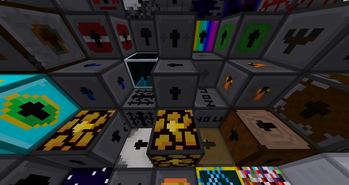
A minecraft mod that adds a ton of fun and unique locks, with a bit of a story to them!
Screenshots
About this Mod
This is an Mcreator mod!
THANK YOU FOR EVERYTHING
My C Disk had to get wiped due to it getting corrupted, so basically most of my Mcreator projects are gone, including Way Too Many Locks. It's been a fun ride with all of you! I'm sad that I wont be able to release the Omega Lock, but sometimes, bad luck happens.
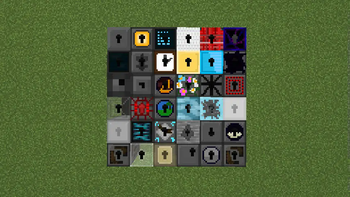
This mod is about a ton of random, fun, and unique locks you can play with, each having its advancement, giving you a goal of getting every lock. I originally made a lock mod for 1.16.5, called Too Many Locks, but i never finished it, until now, where I came back and remade the entire thing, adding tons more locks!
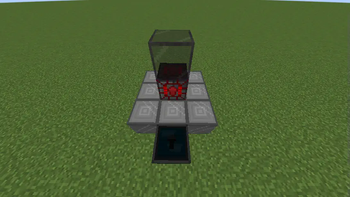
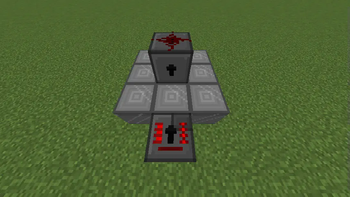
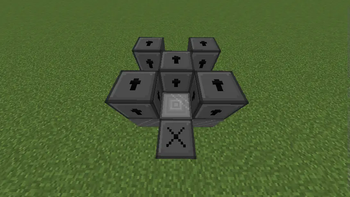
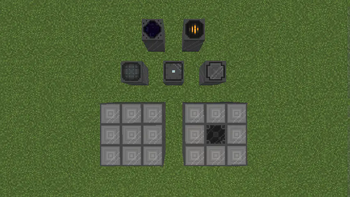
How to use the ancient mechanisms:
Lock Creation Plate:
Spoiler
Make a 3x3 plate out of the 9 blocks, and build the structure needed for the custom lock ontop.Spoiler
Place a Basic Lock on top of the Infuser, then right click the infuser using the item needed for the custom lock.Spoiler
Place any lock ontop, and right click the crafter.Spoiler
Place any lock ontop, and right click the researcher. Sometimes, some unique blocks can quadruple what made them.Spoiler
Replace the middle of a Lock Creation Plate with the Imploder.Spoiler
Right click the Locksmither with a tool.Spoiler
Place any lock ontop, and right click the MLR.Spoiler
Place any lock ontop, and right click the Patterner while holding a PatternSpoiler
Place any lock ontop, and right click the Lock Furnace. You can also do this with items by holding the item in your hand.This mod is still currently in development and I will add a ton more locks eventually!
If you have any suggestions or find any bugs, feel free to comment.
Available Versions
How to Install Way Too Many Locks on Your Server
Order Server
Order a Minecraft Java server with at least 3 GB RAM (4 GB recommended).
Set forge Loader
In the panel under "Egg", select the forge loader and matching Minecraft version (1.20.1).
Install Mod
Open the mod browser in the dashboard and search for "Way Too Many Locks". Click "Install" – done! Alternatively, upload the .jar via SFTP to the /mods folder.
Compatibility
Mod Loaders
Minecraft Versions
1.20.1
Server-side
✓ RequiredRecommended RAM
4 GB(min. 3 GB)Frequently Asked Questions
Way Too Many Locks server crashes on startup – what to do?
Most common cause: wrong forge version or insufficient RAM. Check the server log (latest.log) for "OutOfMemoryError" or "Mixin" errors. With Mado Hosting: ensure at least 3 GB RAM is allocated and the loader matches the mod version (1.20.1). You can switch loaders with one click in the panel.
Is Way Too Many Locks compatible with forge?
Way Too Many Locks officially supports forge for Minecraft 1.20.1. The Mado dashboard automatically detects incompatible loader combinations.
Server lagging with Way Too Many Locks – how to optimize performance?
Recommended RAM: 4 GB (per 8 players). Use /spark profiler to check if Way Too Many Locks consumes the most tick time. Common fixes: reduce server view-distance to 8-10, install "performant" or "starlight" as supplementary mods on Forge. With Mado Hosting, your server runs on NVMe SSDs with dedicated CPU cores for minimal latency.
Similar Mods




Rent Modded Server
Install Way Too Many Locks with just one click on your server.