
Wayfarer
Improves the locator bar and provides waypoint rendering.
Screenshots
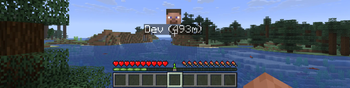
About this Mod





Wayfarer implements a waypoint rendering system and aims to improve the locator bar, all in a way that can be utilized by other developers in their projects!
Client-side, the mod handles waypoint rendering in-world and on the locator bar. There are many customization options to tweak waypoint visuals.
Server-side, the mod handles server-to-client waypoint data and synchronization to tell the client what to render. Not all projects need this, client-side mods can just utilize the waypoint renderer directly!

That's alright; Wayfarer is still useful on its own! Its standalone features include:
Improved Locator Bar
- Wayfarer adds a hold keybind to manually toggle the locator bar.
- In survival, locator bar icons render over the experience bar instead of replacing it with the locator bar, so you can still see your experience!
- Head icons are shown for players on the locator bar.
- Instead of icons getting smaller as they get far away, they become more translucent.
Try These Mods:


You can find an API Reference guide and some examples on how to integrate with Wayfarer on the Wiki.
Join us. Thrive.

Available Versions
How to Install Wayfarer on Your Server
Order Server
Order a Minecraft Java server with at least 3 GB RAM (4 GB recommended).
Set fabric Loader
In the panel under "Egg", select the fabric loader and matching Minecraft version (26.1.2).
Install Mod
Open the mod browser in the dashboard and search for "Wayfarer". Click "Install" – done! Alternatively, upload the .jar via SFTP to the /mods folder.
Compatibility
Mod Loaders
Minecraft Versions
26.1.2, 26.1.1, 26.1 (+11 more)
Server-side
~ OptionalRecommended RAM
4 GB(min. 3 GB)Frequently Asked Questions
Wayfarer server crashes on startup – what to do?
Most common cause: wrong fabric version or insufficient RAM. Check the server log (latest.log) for "OutOfMemoryError" or "Mixin" errors. With Mado Hosting: ensure at least 3 GB RAM is allocated and the loader matches the mod version (26.1.2). You can switch loaders with one click in the panel.
Is Wayfarer compatible with fabric and neoforge and quilt?
Wayfarer officially supports fabric, neoforge, quilt for Minecraft 26.1.2, 26.1.1, 26.1. The Mado dashboard automatically detects incompatible loader combinations.
Server lagging with Wayfarer – how to optimize performance?
Recommended RAM: 4 GB (per 8 players). Use /spark profiler to check if Wayfarer consumes the most tick time. Common fixes: reduce server view-distance to 8-10, install "performant" or "starlight" as supplementary mods on Forge. With Mado Hosting, your server runs on NVMe SSDs with dedicated CPU cores for minimal latency.
Similar Mods




Rent Modded Server
Install Wayfarer with just one click on your server.