
Wearable Quivers
Wearable Quivers adds equippable quivers that store multiple arrow types. Compatible with backpacks — the quiver automatically moves to your hip slot. Shoot directly from your quiver, switch arrow types with and upgrade through six tiers up to netherite.
Screenshots

About this Mod
🏹 Wearable Quivers
Carry your arrows with style. Switch types on the fly. Never fumble with your inventory mid-fight again.
✦ What is this?
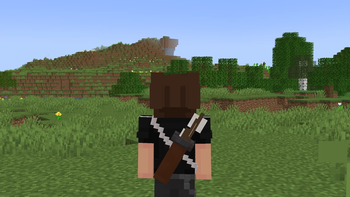
Wearable Quivers adds craftable, equippable quivers that sit on your back (or hip when wearing a backpack). Store multiple arrow types, shoot directly from the quiver, and cycle between them without ever opening your
inventory.


✦ Features
📦 Arrow Storage
Store up to 6 different arrow types in one quiver. Fill it by right-clicking arrows onto it in your inventory.
🎯 Direct Shooting
Bows and crossbows pull from your quiver automatically, prioritizing it over your inventory.
🔄 Quick Switching
Scroll over the quiver slot in your inventory to cycle arrow types, or use Shift + Scroll while holding a bow — no inventory needed.
🖥️Arrow HUD
A clean slot indicator appears next to your hotbar while holding a bow, showing your current arrow, count, and the next/previous types at a glance.
🎨 Dyeable
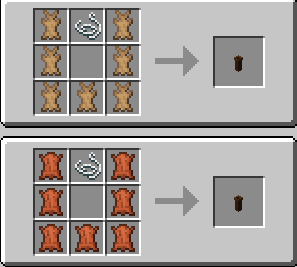
Leather quivers can be dyed any color in a cauldron or a Crafting Table.
✦ Tiers
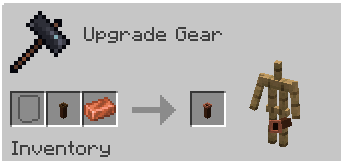
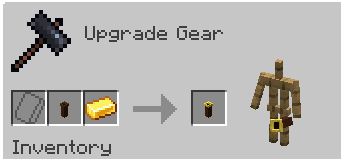
Craft a leather quiver to start, then upgrade it at the smithing table.
| Tier | Capacity |
|---|---|
| 🟤 Leather | 64 |
| 🟠 Copper | 128 |
| ⚪ Iron | 192 |
| 🟡 Gold | 256 |
| 🔵 Diamond | 320 |
| ⚫ Netherite | 384 |
✦ Backpack and Elytra Friendly
The quiver equips in the quiver slot. Equip a backpack or an Elytra and the quiver shifts to your hip automatically. Take the backpack off and it moves back. No fuss.
✦ Conservation Enchantment
Infinity is replaced with Conservation — a more balanced take on arrow preservation.
- Conservation I — 25% chance to save the arrow
- Conservation II — 50% chance to save the arrow
✦ Auto Refill Enchantment
Keep your quiver topped up without lifting a finger.
- Auto Refill — every second, arrows from your inventory are automatically moved into the quiver
- Pause and resume at any time: hover over the quiver and press T
- Status shown in the item tooltip — Active or Inactive
✦ Requirements
✦ Optional Compatibility
- Advanced Cauldron — dye quivers in cauldrons
- Advanced Fletching Table — trail colors displayed in the HUD
- EMI / REI / JEI — smithing recipes shown in recipe viewers
✦ Recipes
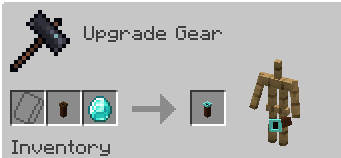
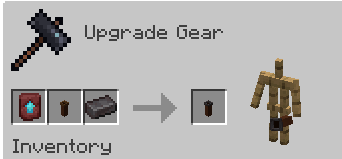
✦ Visuals
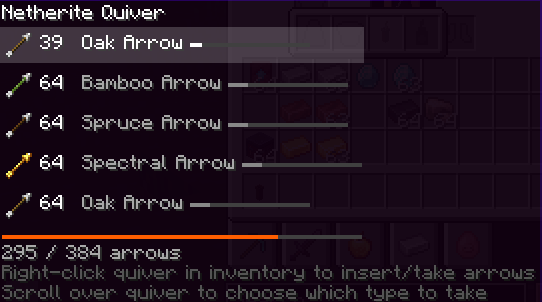

Available Versions
How to Install Wearable Quivers on Your Server
Order Server
Order a Minecraft Java server with at least 3 GB RAM (4 GB recommended).
Set fabric Loader
In the panel under "Egg", select the fabric loader and matching Minecraft version (1.20.1).
Install Mod
Open the mod browser in the dashboard and search for "Wearable Quivers". Click "Install" – done! Alternatively, upload the .jar via SFTP to the /mods folder.
Compatibility
Mod Loaders
Minecraft Versions
1.20.1
Server-side
✓ RequiredRecommended RAM
4 GB(min. 3 GB)Frequently Asked Questions
Wearable Quivers server crashes on startup – what to do?
Most common cause: wrong fabric version or insufficient RAM. Check the server log (latest.log) for "OutOfMemoryError" or "Mixin" errors. With Mado Hosting: ensure at least 3 GB RAM is allocated and the loader matches the mod version (1.20.1). You can switch loaders with one click in the panel.
Is Wearable Quivers compatible with fabric?
Wearable Quivers officially supports fabric for Minecraft 1.20.1. The Mado dashboard automatically detects incompatible loader combinations.
Server lagging with Wearable Quivers – how to optimize performance?
Recommended RAM: 4 GB (per 8 players). Use /spark profiler to check if Wearable Quivers consumes the most tick time. Common fixes: reduce server view-distance to 8-10, install "performant" or "starlight" as supplementary mods on Forge. With Mado Hosting, your server runs on NVMe SSDs with dedicated CPU cores for minimal latency.
Similar Mods




![[TaCZ] Timeless and Classics Zero](https://cdn.modrinth.com/data/SzzJttH8/fd27766d2bb8390d284696b1dbd358f87e081439_96.webp)

Rent Modded Server
Install Wearable Quivers with just one click on your server.