
Web Chat
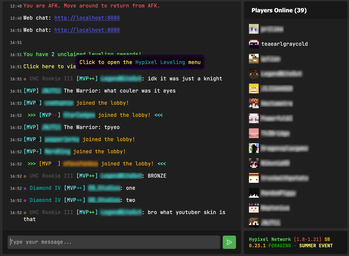
Client side mod that gives you access to minecraft chat through the browser.
Screenshots

About this Mod
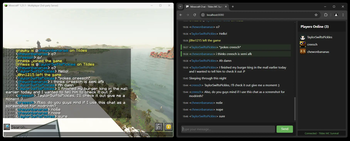
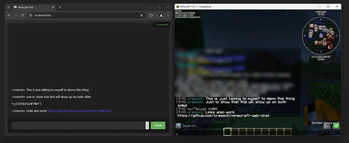
Web chat is a client only mod that gives you access to the Minecraft chat of your running game window. This allows you to chat with other players while having minecraft in the background. Great for things like semi-afk farming and similar things!
Features
- Access chat through any web browser.
- Chat history is stored and available when you are on a server and open chat in a browser.
- Tab completion of usernames.
- Tab icon notification for new messages when the browser isn't focused.
- Fully client side, works on any server.
- Ping support for your username & configurable keywords.
- Support for
/tell,/msg,/wand/mecommands. - Full support for Minecraft's text formatting (colors, bold, italic, translation, etc.)
- Support for official click and hover interactions (opening URLs, achievement details, etc.)

Availability
- Minecraft version:
- 26.1 supported by Web Chat v1.7.0
- 1.21.11 supported by Web Chat v1.5.0-v1.6.0
- 1.21.8 supported by Web Chat v1.4.0
- 1.21.1 - 1.21.4 are supported up to Web Chat v1.3.0 and not further.
- Mod loader: Fabric only
There are no plans to support other mod loaders.
Usage
Requirements
- Fabric API (required)
- YACL (required)
- Mod Menu (optional, needed for configuration)
Installation
- Install the mod from Modrinth or grab the latest release from GitHub.
- Start minecraft.
- Join a server.
- Go to
localhost:8080on the same computer, or use your computer's local IP address (like192.168.1.x:8080) from other devices on your network. - Start chatting.
Settings
Message settings
Ping on Username- This will ping the browser window any time a player's username appears in the chat.Extra Ping keywords- This will ping the browser window any time one of these words appear in the chat.
Network settings
HTTP Port- Port number used to serve the web interface.8080by default.
Security & Privacy
This mod turns minecraft into a small web server on your computer that's only accessible (using localhost or your local IP) on your home network. This means that you can access Web Chat on a different device on your network, but not over the internet.
No data is sent over the internet beyond your normal Minecraft traffic.
Important: This mod is designed for local use only. Do not expose the web chat port to the internet. If you need remote access, setup a VPN (such as Tailscale).
Available Versions
How to Install Web Chat on Your Server
Order Server
Order a Minecraft Java server with at least 3 GB RAM (4 GB recommended).
Set fabric Loader
In the panel under "Egg", select the fabric loader and matching Minecraft version (26.1.2).
Install Mod
Open the mod browser in the dashboard and search for "Web Chat". Click "Install" – done! Alternatively, upload the .jar via SFTP to the /mods folder.
Compatibility
Mod Loaders
Minecraft Versions
26.1.2, 26.1.1, 26.1 (+6 more)
Server-side
✗ UnsupportedRecommended RAM
4 GB(min. 3 GB)Frequently Asked Questions
Web Chat server crashes on startup – what to do?
Most common cause: wrong fabric version or insufficient RAM. Check the server log (latest.log) for "OutOfMemoryError" or "Mixin" errors. With Mado Hosting: ensure at least 3 GB RAM is allocated and the loader matches the mod version (26.1.2). You can switch loaders with one click in the panel.
Is Web Chat compatible with fabric?
Web Chat officially supports fabric for Minecraft 26.1.2, 26.1.1, 26.1. The Mado dashboard automatically detects incompatible loader combinations.
Server lagging with Web Chat – how to optimize performance?
Recommended RAM: 4 GB (per 8 players). Use /spark profiler to check if Web Chat consumes the most tick time. Common fixes: reduce server view-distance to 8-10, install "performant" or "starlight" as supplementary mods on Forge. With Mado Hosting, your server runs on NVMe SSDs with dedicated CPU cores for minimal latency.
Rent Modded Server
Install Web Chat with just one click on your server.