
Weird Wares
Weird wares for your wacky world! This mod adds various unobtainable and forgotten items, blocks, and features plus a few extras.
Screenshots
About this Mod
Weird Wares
Weird wares for your wacky world! This mod adds various unobtainable and forgotten items, blocks, and features plus a few extras.
Glitter
Fair warning: Excessive use of glitter may result in frame drops.
Glitter can be used to add enchantment glint to items and blocks in your world. In the inventory, select a stack of glitter, then apply (left click) the glitter on another item stack. Enchanted blocks that are placed down will appear enchanted in the world.

Crafting
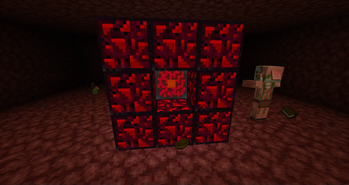
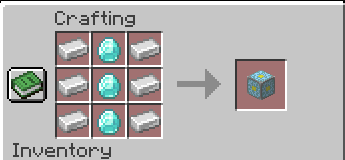
You can craft a Nether Reactor Core with by placing a vertical line of 3 iron ingots on the left, 3 diamonds in the middle, and 3 iron ingots on the right.
Unobtainables
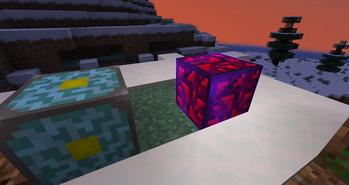
There are a few unobtainable blocks that Weird Wares adds to the Creative menu. For example, there is now an "info update" block and an Unknown block.
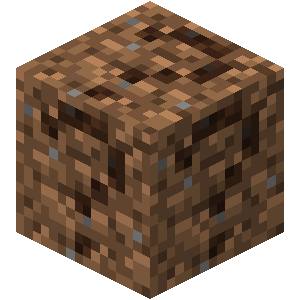
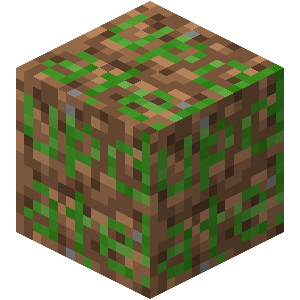
Credit to the Minecraft Wiki for renders of unknown.png and info_update.png.
Sculk Remote
When used, the Sculk Remote can remotely interact with a block. When sneaking and used, the Sculk Remote sets its target position and dimension to the target block. When dispensed in a dispenser block, the Sculk Remote remotely interacts with its target block, effectively enabling remote redstone. Additionally, Sculk Remotes can shift right-click in a dispenser if the player holds shift and left-clicks a block.


More to Come
This mod is in its early stages. New features will be released periodically as they are requested. There is no guarantee that any one idea will make it into the mod, but you may create an issue on the issue tracker.
Usage Permission
You may use this mod in your Modpack provided you give adequate and direct credit, via a link to the mod's page as well as a copy of the source code. You may not redistribute binary builds of the Software if you do not also provide the Source Code.
License
By contributing, you agree to the license terms found in LICENSE. You may create forks for the purpose of contributing code upstream.
Special Thanks To...
- Oliver-makes-code for helping with asset creation.
Available Versions
How to Install Weird Wares on Your Server
Order Server
Order a Minecraft Java server with at least 3 GB RAM (4 GB recommended).
Set fabric Loader
In the panel under "Egg", select the fabric loader and matching Minecraft version (1.21.11).
Install Mod
Open the mod browser in the dashboard and search for "Weird Wares". Click "Install" – done! Alternatively, upload the .jar via SFTP to the /mods folder.
Compatibility
Mod Loaders
Minecraft Versions
1.21.11, 1.21.1, 1.21
Server-side
✓ RequiredRecommended RAM
4 GB(min. 3 GB)Frequently Asked Questions
Weird Wares server crashes on startup – what to do?
Most common cause: wrong fabric version or insufficient RAM. Check the server log (latest.log) for "OutOfMemoryError" or "Mixin" errors. With Mado Hosting: ensure at least 3 GB RAM is allocated and the loader matches the mod version (1.21.11). You can switch loaders with one click in the panel.
Is Weird Wares compatible with fabric?
Weird Wares officially supports fabric for Minecraft 1.21.11, 1.21.1, 1.21. The Mado dashboard automatically detects incompatible loader combinations.
Server lagging with Weird Wares – how to optimize performance?
Recommended RAM: 4 GB (per 8 players). Use /spark profiler to check if Weird Wares consumes the most tick time. Common fixes: reduce server view-distance to 8-10, install "performant" or "starlight" as supplementary mods on Forge. With Mado Hosting, your server runs on NVMe SSDs with dedicated CPU cores for minimal latency.
Similar Mods







Rent Modded Server
Install Weird Wares with just one click on your server.