
What do you have in your hand
utility for Minecraft that allows you to instantly identify any item another player is holding from a distance. By simply aiming your crosshairs, a customizable HUD displays the item's icon, stack count, and full enchantment and more...
Screenshots
About this Mod
✨ Hand Item Features
Long-Distance Inspection – Use a custom high-range raycast to "peek" at players up to 256 blocks away. Perfect for scouting gear in PvP or just satisfyng your curiosity from afar.
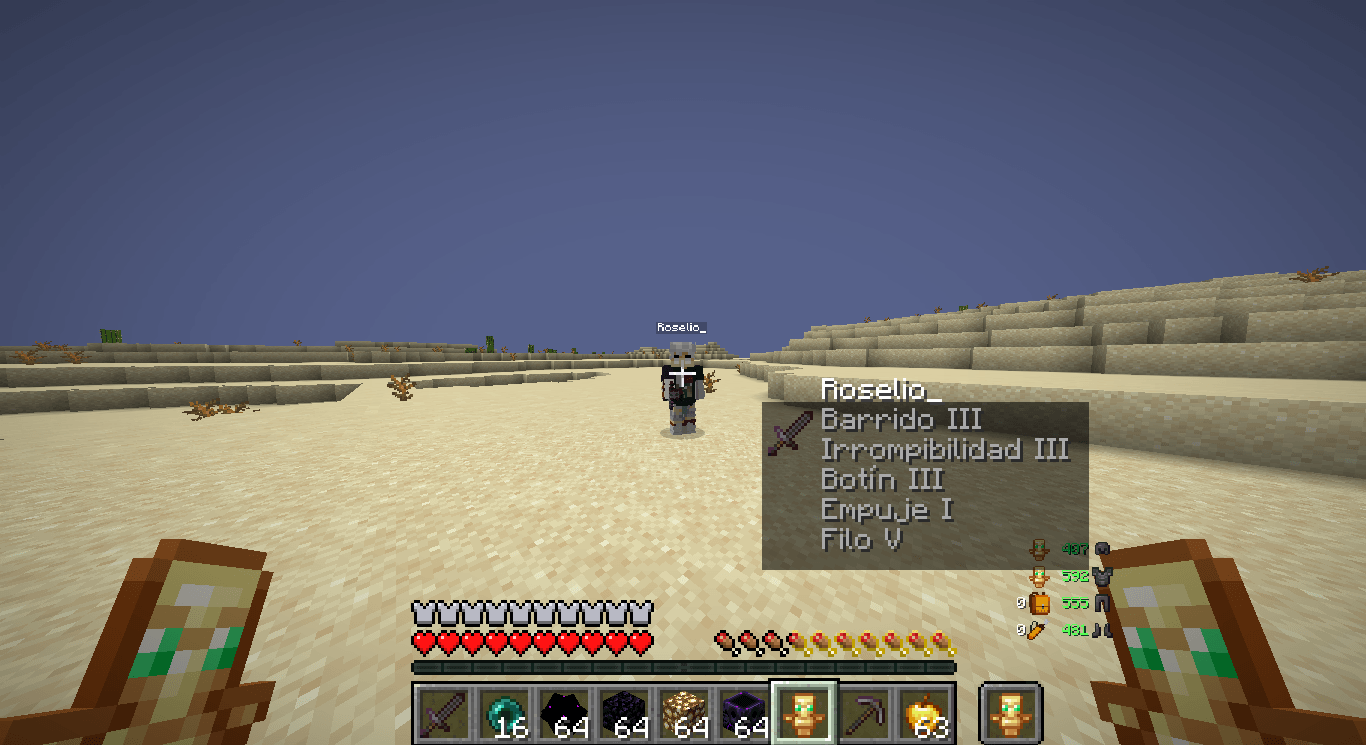
Detailed HUD Overlay – When you look at a player, a compact HUD appears showing exactly what is in their main hand, including the 2D item model and stack count.
Legible Enchantments – No more guessing! The HUD lists up to 5 enchantments with proper localized names and Roman numerals (e.g., Sharpness V, Protection IV) using Minecraft's native formatting.
Target Identification – The HUD automatically displays the name of the player you are currently inspecting, ensuring you always know who you're looking at.
Draggable Interface – Don't like where the HUD is? Enter Edit Mode to click and drag the overlay to any position on your screen. It even saves its position as a percentage, so it stays perfectly placed regardless of your GUI scale.
Toggle with a Click – Quickly enable or disable the entire HUD with a simple keybind to keep your screen clean when you don't need the info.
True Client-Side – This mod is 100% client-side. It doesn't need to be installed on the server and works on any multiplayer world.
📸 Screenshots
In-Action – Inspecting a player from a distance, showing a Netherite Sword with Sharpness and Unbreaking.
🔧 Requirements
> Fabric Loader ≥ 0.15.0
> Fabric API
> Java 21
🎮 How to use
Install the mod and launch Minecraft 1.21.8.
Aim your crosshair at any player—even those very far away.
The HUD will appear automatically showing their held item and its enchantments.
Press H (default) to toggle the HUD visibility on or off.
Press J (default) to open the HUD Configuration.
In the config screen, click and drag the HUD to your preferred location, then press ESC to save.
⚠️ Disclaimer
This mod is client-side only and does not modify game files or network packets. It simply reads publicly available entity data provided by the server. However, some competitive servers may have specific rules regarding "inspect" mods or HUD modifications.
Use this mod at your own risk. Always check the rules of the servers you play on before using any client-side modifications.
🐛 Bug reports & suggestions
Send me a DM on Discord
marcellesa
Available Versions
How to Install What do you have in your hand on Your Server
Order Server
Order a Minecraft Java server with at least 3 GB RAM (4 GB recommended).
Set fabric Loader
In the panel under "Egg", select the fabric loader and matching Minecraft version (1.21.8).
Install Mod
Open the mod browser in the dashboard and search for "What do you have in your hand". Click "Install" – done! Alternatively, upload the .jar via SFTP to the /mods folder.
Compatibility
Mod Loaders
Minecraft Versions
1.21.8, 1.21.6, 1.21.5 (+1 more)
Server-side
✗ UnsupportedRecommended RAM
4 GB(min. 3 GB)Frequently Asked Questions
What do you have in your hand server crashes on startup – what to do?
Most common cause: wrong fabric version or insufficient RAM. Check the server log (latest.log) for "OutOfMemoryError" or "Mixin" errors. With Mado Hosting: ensure at least 3 GB RAM is allocated and the loader matches the mod version (1.21.8). You can switch loaders with one click in the panel.
Is What do you have in your hand compatible with fabric?
What do you have in your hand officially supports fabric for Minecraft 1.21.8, 1.21.6, 1.21.5. The Mado dashboard automatically detects incompatible loader combinations.
Server lagging with What do you have in your hand – how to optimize performance?
Recommended RAM: 4 GB (per 8 players). Use /spark profiler to check if What do you have in your hand consumes the most tick time. Common fixes: reduce server view-distance to 8-10, install "performant" or "starlight" as supplementary mods on Forge. With Mado Hosting, your server runs on NVMe SSDs with dedicated CPU cores for minimal latency.
Similar Mods




![[TaCZ] Timeless and Classics Zero](https://cdn.modrinth.com/data/SzzJttH8/fd27766d2bb8390d284696b1dbd358f87e081439_96.webp)

Rent Modded Server
Install What do you have in your hand with just one click on your server.