
WhatBlock
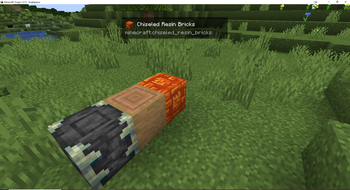
Lightweight client-side HUD that shows the block you’re looking at: icon + localized name + registry ID. Auto-hides when you aren’t looking at a block.
Screenshots
About this Mod
WhatBlock — Know what you’re looking at
Tap into instant block info without the clutter. WhatBlock is a tiny HUD that pops in only when you aim at a block—showing [icon] Localized Name | registry:id—then politely disappears. It’s the “just enough info” tool you’ll actually keep installed.
Why players love it
Instant clarity. Icon + proper name + minecraft:id at a glance.
Stays out of your way. Auto-hides on sky/air and when any GUI is open.
Reads your language. Uses your current locale for names.
Featherweight. One small overlay, negligible overhead, no keybinds or setup.
Modpack friendly. Works with vanilla and most Forge mod blocks.
Perfect for builders, pack makers, content creators, and anyone who goes “wait, which block is that?”
What you see
A clean pill near the top of the screen:
Icon of the block (when available)
Localized block name
registry:id for quick searching or commands

Compatibility
Minecraft: 1.21.8
Loader: Forge 58.x
Side: Client-only (no server install required)
Install (10 seconds)
Install Forge 58.x for 1.21.8
Drop whatblock-1.0.0.jar in mods/
Launch and look at any block—done ✅
FAQ
Will this slow my game? It’s ultra-lightweight and only renders when needed.
Works on servers? Yes—client-only. Join any server without them installing it.
Why no settings? It’s designed to be plug-and-play. (Simple toggles/position options are planned.)
**
Privacy & License**
No telemetry. No network calls. No data collected.
MIT — use, modify, and include in modpacks with attribution.
Grab it now and never guess your blocks again.
Available Versions
How to Install WhatBlock on Your Server
Order Server
Order a Minecraft Java server with at least 3 GB RAM (4 GB recommended).
Set forge Loader
In the panel under "Egg", select the forge loader and matching Minecraft version (1.21.8).
Install Mod
Open the mod browser in the dashboard and search for "WhatBlock". Click "Install" – done! Alternatively, upload the .jar via SFTP to the /mods folder.
Compatibility
Mod Loaders
Minecraft Versions
1.21.8
Server-side
✗ UnsupportedRecommended RAM
4 GB(min. 3 GB)Frequently Asked Questions
WhatBlock server crashes on startup – what to do?
Most common cause: wrong forge version or insufficient RAM. Check the server log (latest.log) for "OutOfMemoryError" or "Mixin" errors. With Mado Hosting: ensure at least 3 GB RAM is allocated and the loader matches the mod version (1.21.8). You can switch loaders with one click in the panel.
Is WhatBlock compatible with forge?
WhatBlock officially supports forge for Minecraft 1.21.8. The Mado dashboard automatically detects incompatible loader combinations.
Server lagging with WhatBlock – how to optimize performance?
Recommended RAM: 4 GB (per 8 players). Use /spark profiler to check if WhatBlock consumes the most tick time. Common fixes: reduce server view-distance to 8-10, install "performant" or "starlight" as supplementary mods on Forge. With Mado Hosting, your server runs on NVMe SSDs with dedicated CPU cores for minimal latency.
Rent Modded Server
Install WhatBlock with just one click on your server.