
Who Is My Friend (WIMF)
Client-side friend management tool designed to help you remember everyone you meet on your Minecraft adventures.
Screenshots
About this Mod
Interface Integration
- Complete removal of chat commands. All management has been moved to the Graphical User Interface (GUI).
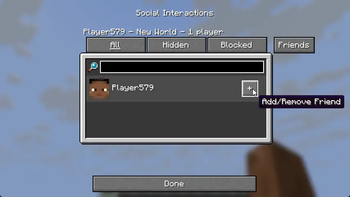
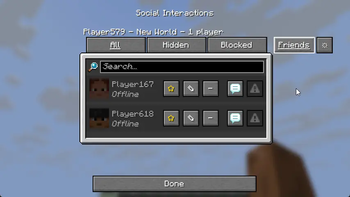
- Added a "Friends" tab to the standard "Social Interactions" menu (Key P).
- Added a "Settings" button (gear icon) inside the Friends tab.
Friend List
- Offline Mode: Players remain in the list after leaving the server.
- Statuses: Visual distinction between online and offline players (customizable nickname colors).
- Activity Tracking: Added "Last Seen" status with a time counter.
- Favorites: Ability to mark a friend with a "Star" to pin them at the top of the list during sorting.
- Control Buttons: Add/Remove, Favorite, and Open Notes buttons added to each player entry.
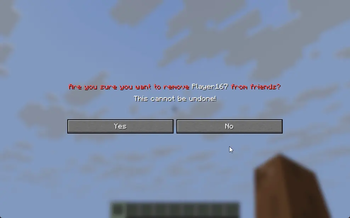
- Action Confirmation: Added a confirmation screen when removing a friend.
Notes System
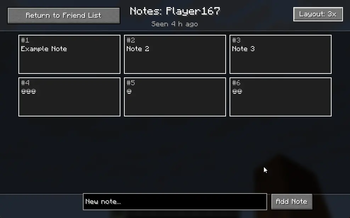
- Completely new GUI for note management.
- Grid View: Ability to switch note display modes (1, 2, or 3 columns).
- Inline Editing: Note text editing happens directly within the list entry, without opening additional windows.
- Bulk Deletion: Added checkboxes for selecting multiple notes and a button to delete selected items.
- Visualization: Added borders for notes, a proper scrollbar, and enlarged input fields.
Settings and Configuration
- Settings menu for changing status colors (Online/Offline) via HEX codes.
- Reworked data saving system: switched to UUID storage for correct offline player handling.
Removed
- All text commands (/friend add, /friend list, etc.).
Available Versions
How to Install Who Is My Friend (WIMF) on Your Server
Order Server
Order a Minecraft Java server with at least 3 GB RAM (4 GB recommended).
Set fabric Loader
In the panel under "Egg", select the fabric loader and matching Minecraft version (1.21.8).
Install Mod
Open the mod browser in the dashboard and search for "Who Is My Friend (WIMF)". Click "Install" – done! Alternatively, upload the .jar via SFTP to the /mods folder.
Compatibility
Mod Loaders
Minecraft Versions
1.21.8, 1.21.7
Server-side
✗ UnsupportedRecommended RAM
4 GB(min. 3 GB)Frequently Asked Questions
Who Is My Friend (WIMF) server crashes on startup – what to do?
Most common cause: wrong fabric version or insufficient RAM. Check the server log (latest.log) for "OutOfMemoryError" or "Mixin" errors. With Mado Hosting: ensure at least 3 GB RAM is allocated and the loader matches the mod version (1.21.8). You can switch loaders with one click in the panel.
Is Who Is My Friend (WIMF) compatible with fabric?
Who Is My Friend (WIMF) officially supports fabric for Minecraft 1.21.8, 1.21.7. The Mado dashboard automatically detects incompatible loader combinations.
Server lagging with Who Is My Friend (WIMF) – how to optimize performance?
Recommended RAM: 4 GB (per 8 players). Use /spark profiler to check if Who Is My Friend (WIMF) consumes the most tick time. Common fixes: reduce server view-distance to 8-10, install "performant" or "starlight" as supplementary mods on Forge. With Mado Hosting, your server runs on NVMe SSDs with dedicated CPU cores for minimal latency.
Similar Mods






Rent Modded Server
Install Who Is My Friend (WIMF) with just one click on your server.