
Wither Ascension
Makes the Wither boss harder with phases and abilities
Screenshots


About this Mod
Wither Ascension
A complete overhaul of the Wither boss fight for Minecraft 1.21+. This datapack transforms the vanilla Wither into a fast-paced, multi-phase raid boss with advanced AI, cinematic visuals, devastating abilities, and tactical combat mechanics.
Built to feel like a true endgame encounter, the fight evolves dynamically as the Wither loses health, forcing players to adapt, react, and survive increasingly dangerous attack patterns.
Core Features
Adaptive Boss AI
At 50% health, the Wither gains a chance to dodge incoming attacks. At critical health, it enters Hyper-Dodge Mode, becoming extremely evasive.
Anti-camping behavior targets players hiding in enclosed spaces by dropping destructive blue skulls overhead.
If trapped underground or summoned beneath bedrock, the Wither slowly ascends through blocks until freed.
Smart Combat Logic
The Wither reacts dynamically to:
- Player distance
- Movement speed
- Group positioning
- Combat pressure
Abilities become more aggressive and unpredictable as the battle progresses.
The Soul-Anchor Mechanic
The Shield
Starting in Phase 2, the Wither gains an impenetrable shield that destroys all incoming arrows and heavily reduces ranged effectiveness.
The Weakness
Players can hunt Wither Skeletons for a rare drop called the Withered Core.
Drop a:
- Withered Core
- Netherite Sword
together on the ground to forge the Wither-Bane Blade.
The Stun
Hitting the Wither with the Wither-Bane Blade activates Soul-Anchor:
- Shatters the shield
- Freezes the Wither completely for 8 seconds
- Disables all abilities temporarily
This creates a short but critical damage window for heavy melee attacks and Mace combos.
At less than 10% HP, the Wither activates Near-Death Rage, dramatically increasing speed and attack frequency.
Rewards
Wither Trophy
Defeating the Wither rewards players with a legendary artifact.
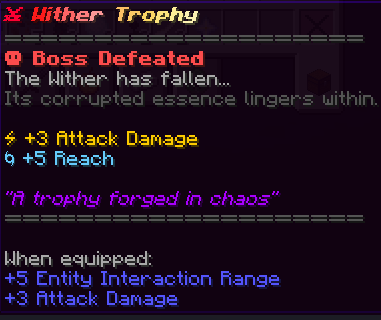
Bonuses
- +3 Attack Damage
- +5 Reach
Installation
- Download the datapack
- Move it into your world's
datapacksfolder - Run
/reload - Summon the Wither
Compatibility
- Minecraft 1.21.x
- Singleplayer and Multiplayer
- Compatible with most datapacks
- Server-friendly
Recommended Resource Pack
For the best experience, use the Remastered Wither resource pack with this datapack.
FAQ
How difficult is this fight?
Much harder than the vanilla Wither. The fight is designed as a true endgame boss encounter requiring movement, timing, and strategy.
Can I change the difficulty?
Currently the difficulty is fixed and balanced around a challenging but fair experience.
Does this work on servers?
Yes. Install it like any standard datapack.
Available Versions
How to Install Wither Ascension on Your Server
Order Server
Order a Minecraft Java server with at least 3 GB RAM (4 GB recommended).
Set datapack Loader
In the panel under "Egg", select the datapack loader and matching Minecraft version (26.1.2).
Install Mod
Open the mod browser in the dashboard and search for "Wither Ascension". Click "Install" – done! Alternatively, upload the .jar via SFTP to the /mods folder.
Compatibility
Mod Loaders
Minecraft Versions
26.1.2, 26.1.1, 26.1 (+7 more)
Server-side
✓ RequiredRecommended RAM
4 GB(min. 3 GB)Frequently Asked Questions
Wither Ascension server crashes on startup – what to do?
Most common cause: wrong datapack version or insufficient RAM. Check the server log (latest.log) for "OutOfMemoryError" or "Mixin" errors. With Mado Hosting: ensure at least 3 GB RAM is allocated and the loader matches the mod version (26.1.2). You can switch loaders with one click in the panel.
Is Wither Ascension compatible with datapack and fabric and forge and neoforge and quilt?
Wither Ascension officially supports datapack, fabric, forge, neoforge, quilt for Minecraft 26.1.2, 26.1.1, 26.1. Note: Forge and Fabric mods are NOT cross-compatible – pick one loader and stick with it. The Mado dashboard automatically detects incompatible loader combinations.
Server lagging with Wither Ascension – how to optimize performance?
Recommended RAM: 4 GB (per 8 players). Use /spark profiler to check if Wither Ascension consumes the most tick time. Common fixes: reduce server view-distance to 8-10, install "performant" or "starlight" as supplementary mods on Forge. With Mado Hosting, your server runs on NVMe SSDs with dedicated CPU cores for minimal latency.
Similar Mods




Rent Modded Server
Install Wither Ascension with just one click on your server.