
Wolf Armor and Storage Enhanced (MuddyPort)
Craftable wolf armor, wolf chest storage, auto-healing, and more.
Screenshots

About this Mod
Summary: Craftable wolf armor in 7 materials, wolf chest storage, auto-healing, and more. Ported to 1.20.1 Forge with some new enhancements! Now compatible with Jade!
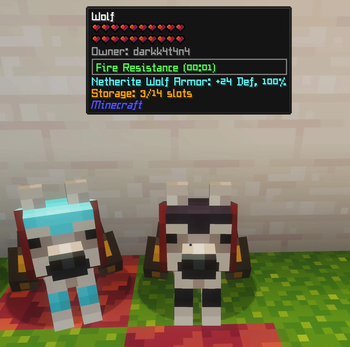
Equip your tamed wolves with craftable armor in 7 different materials, give them a chest for portable storage, and watch them heal themselves from food in their inventory. This port also adds some more material-specific special effects, vanilla enchanting support, and vanilla loot table integration that weren't in the original.
🛡️ Wolf Armor (7 Materials)
- Leather — Light protection, craftable early
- Copper — Mid-tier
- Chainmail — Found in dungeon loot only (not craftable), grants a damage boost to wolf attacks
- Iron — Solid all-round protection
- Gold — Enemies killed by your wolf drop extra loot (Looting II effect)
- Diamond — High defense with knockback resistance
- Netherite — Top-tier defense, grants your wolf permanent Fire Resistance
Right-click a tamed wolf with any wolf armor to equip it. Armor is visible on the wolf with custom render layers.
📦 Wolf Chest Storage
- Right-click a tamed wolf with a Wolf Chest to attach storage
- Shift+right-click to open the 14-slot inventory GUI
- Wolves drop all stored items on death
🩹 Auto-Heal Behavior - Wolves with a chest will automatically eat food from their inventory to heal
- Configurable via config file
🌙 Howl at Moon - Wolves occasionally howl at night with custom sound effects
- Configurable via config file
✨ Enchantment Support - All wolf armor can be enchanted on an anvil with:
- Protection, Fire Protection, Blast Protection, Projectile Protection Unbreaking
🗺️ Loot Table Integration
Wolf armor spawns naturally in vanilla structure chests:
- Dungeons, Nether Fortresses, Desert Temples, Jungle Temples
- Strongholds, End Cities, Mineshafts, Ancient Cities
- Bastions, Ruined Portals, Buried Treasure, Village Armorers
- Loot rates match equivalent horse armor / chainmail armor weights. Configurable — can be disabled in the config.
🔍 Jade Compatibility (Optional)
If Jade is installed, the built-in HUD overlay auto-disables and Jade displays:
- Armor name, defense value, and durability percentage
- Chest storage usage (used/total slots)
⚙️ Configurable
All major features can be toggled in the config:
- Enable/disable crafting recipes
- Enable/disable wolf inventory system
- Enable/disable loot table injection
- Enable/disable auto-heal and howl behaviors
- Toggle armor/inventory rendering
- Toggle stat overlay (auto-disabled when Jade is present)
Compatibility
- LetSleepingDogsLie — Fully compatible. Armor renders correctly in lying/sleeping poses.
- Jade — Built-in optional integration. No extra files needed.
This is a Forge port (and enhancement) of the NeoForge Port 1.21.10 by Smallinger
Original mod by Satyrnidae (1.12.2)
Available Versions
How to Install Wolf Armor and Storage Enhanced (MuddyPort) on Your Server
Order Server
Order a Minecraft Java server with at least 3 GB RAM (4 GB recommended).
Set forge Loader
In the panel under "Egg", select the forge loader and matching Minecraft version (1.20.1).
Install Mod
Open the mod browser in the dashboard and search for "Wolf Armor and Storage Enhanced (MuddyPort)". Click "Install" – done! Alternatively, upload the .jar via SFTP to the /mods folder.
Compatibility
Mod Loaders
Minecraft Versions
1.20.1
Server-side
✓ RequiredRecommended RAM
4 GB(min. 3 GB)Frequently Asked Questions
Wolf Armor and Storage Enhanced (MuddyPort) server crashes on startup – what to do?
Most common cause: wrong forge version or insufficient RAM. Check the server log (latest.log) for "OutOfMemoryError" or "Mixin" errors. With Mado Hosting: ensure at least 3 GB RAM is allocated and the loader matches the mod version (1.20.1). You can switch loaders with one click in the panel.
Is Wolf Armor and Storage Enhanced (MuddyPort) compatible with forge?
Wolf Armor and Storage Enhanced (MuddyPort) officially supports forge for Minecraft 1.20.1. The Mado dashboard automatically detects incompatible loader combinations.
Server lagging with Wolf Armor and Storage Enhanced (MuddyPort) – how to optimize performance?
Recommended RAM: 4 GB (per 8 players). Use /spark profiler to check if Wolf Armor and Storage Enhanced (MuddyPort) consumes the most tick time. Common fixes: reduce server view-distance to 8-10, install "performant" or "starlight" as supplementary mods on Forge. With Mado Hosting, your server runs on NVMe SSDs with dedicated CPU cores for minimal latency.
Similar Mods




Rent Modded Server
Install Wolf Armor and Storage Enhanced (MuddyPort) with just one click on your server.