
Woodcutter
The "Woodcutter" Data Pack adds the ability to cut all wood types with the Stonecutter.
Screenshots



About this Mod
Woodcutter
This datapack adds the ability to cut all wood types into further processed forms like planks, stairs and slabs using the stonecutter.
Extensions
- Sticks n' stones (Adds sticks to the woodcutter's repertoire)
Recipes

I used oak wood as an example, but this works with all wood types.
The numbers varie a bit with Bamboo Blocks, because you only get 2 Bamboo planks from a Bamboo Block
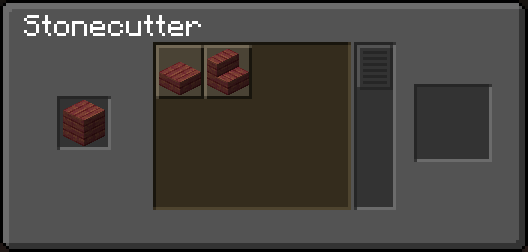
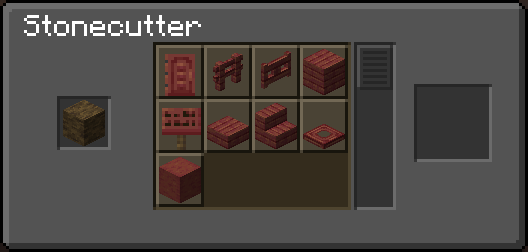
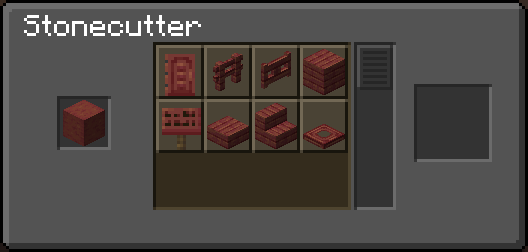
I used mangrove wood as an example, but this works with all wood types.
Why I decided to do stuff the way I did
You might have wondered why you can't craft fences, fence gates, doors and trapdoors using planks in the stonecutter, but can with logs. The reason is that I decided that you should at max get 0.5 extra planks for using the stonecutter instead of the crafting table, as that's the max you get in vanilla, when crafting a stone stair that would cost 1.5 stones in a crafting table. Here's a table about the plank cost of every wooden block that further illustrates the point I'm trying to make here.
| item | planks needed for the recipe (including sticks [1 stick = 0.5 plank]) | recipe output | cost per block (in planks) |
|---|---|---|---|
| stair | 6 | 4 | 1.5 |
| slab | 3 | 6 | 0.5 |
| fence | 5 | 3 | ~1.7 |
| fence gate | 4 | 1 | 4 |
| door | 6 | 3 | 2 |
| trapdoor | 6 | 2 | 3 |
| pressure plate | 2 | 1 | 2 |
| button | 1 | 1 | 1 |
| sign | 6.5 | 3 | ~2.2 |
Hanging signs aren't on this table, because their crafting recipe includes chains.
You can now further craft shelves from logs and stripped logs 1:1, since their crafting recipe is 6:6. You cannot, however, craft them from wood blocks (bark on all sides), as there is no vanilla crafting recipe to convert a wood block back to a log.
If you dislike my decisions, I recommend you check out Taya's Woodcutter datapack which made some things different to this one.
Available Versions
How to Install Woodcutter on Your Server
Order Server
Order a Minecraft Java server with at least 3 GB RAM (4 GB recommended).
Set datapack Loader
In the panel under "Egg", select the datapack loader and matching Minecraft version (1.21.11).
Install Mod
Open the mod browser in the dashboard and search for "Woodcutter". Click "Install" – done! Alternatively, upload the .jar via SFTP to the /mods folder.
Compatibility
Mod Loaders
Minecraft Versions
1.21.11, 1.21.10, 1.21.9 (+40 more)
Server-side
✓ RequiredRecommended RAM
4 GB(min. 3 GB)Frequently Asked Questions
Woodcutter server crashes on startup – what to do?
Most common cause: wrong datapack version or insufficient RAM. Check the server log (latest.log) for "OutOfMemoryError" or "Mixin" errors. With Mado Hosting: ensure at least 3 GB RAM is allocated and the loader matches the mod version (1.21.11). You can switch loaders with one click in the panel.
Is Woodcutter compatible with datapack and fabric and forge and neoforge and quilt?
Woodcutter officially supports datapack, fabric, forge, neoforge, quilt for Minecraft 1.21.11, 1.21.10, 1.21.9. Note: Forge and Fabric mods are NOT cross-compatible – pick one loader and stick with it. The Mado dashboard automatically detects incompatible loader combinations.
Server lagging with Woodcutter – how to optimize performance?
Recommended RAM: 4 GB (per 8 players). Use /spark profiler to check if Woodcutter consumes the most tick time. Common fixes: reduce server view-distance to 8-10, install "performant" or "starlight" as supplementary mods on Forge. With Mado Hosting, your server runs on NVMe SSDs with dedicated CPU cores for minimal latency.
Rent Modded Server
Install Woodcutter with just one click on your server.