
World First Join Message
World First Join Message is a customizable mod that displays a unique welcome message when a player joins for the first time.
Screenshots

About this Mod



World_First_Join_Message is a lightweight yet powerful Minecraft mod that adds a unique and personalized twist to your server and modpack. With this mod, you can display a custom message whenever a new player joins your world for the very first time. Perfect for creating a welcoming environment on multiplayer servers ,modpack or adding a touch of flair to single-player adventures.
Features:
- Customizable Messages: Set unique first-time join messages with full color and style formatting.
- Player Recognition: Displays the first-join message only once per player.
- Server-Wide Appeal: Great for community servers to welcome new members with a personalized touch.
- Lightweight & Compatible: Designed to work seamlessly with other mods and plugins.
Make every player's first join an unforgettable experience with World_First_Join_Message!
Let your imagination run wild with creative welcomes and make your server stand out from the rest. Download now and give your players the warm greeting they deserve!
Installation and Configuration Instructions for World_First_Join_Message
Install the Mod:
-
Download the mod from CurseForge and place it into the
modsfolder of your Minecraft directory.
Launch Minecraft:
-
Start Minecraft with the mod installed.
-
The mod will be loaded, and its settings can be adjusted in-game.
Accessing In-Game Configuration:
-
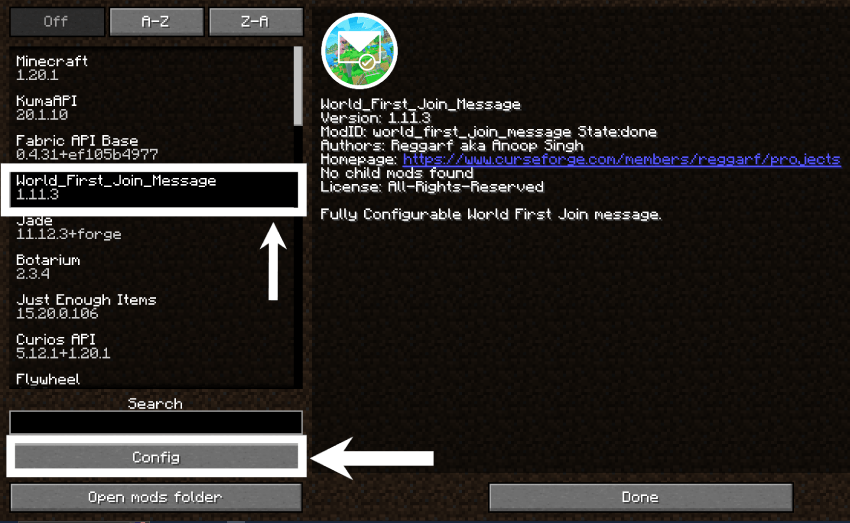
Open Minecraft and go to the Mods menu.
-
Locate World First Join Message and click on Configure (if using ModMenu or Forge's built-in config GUI).
-
Customize the following settings:
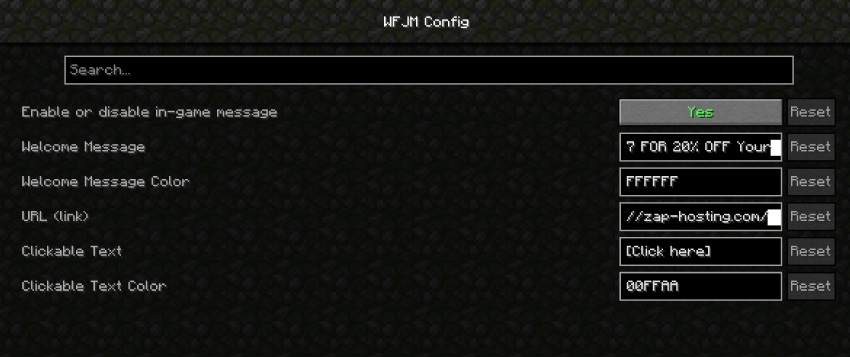
Now, all configurations can be managed directly from the game without manually editing any files! 🚀
[welcome_message] #Enable or disable the welcome message enabled = true #The message to be displayed when a player joins the game for the first time text = "THANKS TO OUR SPONSORS, ZAP-HOSTING! Support Reggarf And Save BIG -#The RGB color code for the welcome message. #Examples: 'FF0000' for red, '00FF00' for green, '0000FF' for blue #'FFFF00' for yellow, 'FF00FF' for magenta, '00FFFF' for cyan color = "FFFFFF" #The URL to be opened when the player clicks the link url = "https://zap-hosting.com/reggarf" #The RGB color code for the clickable text '[Click here]', #Examples: 'FF0000' for red, '00FF00' for green, '0000FF' for blue #'FFFF00' for yellow, 'FF00FF' for magenta, '00FFFF' for cyan, 'FFFFFF' for white clickableColor = "00FFAA"
Your server or modpack is now ready to welcome new players with a custom, vibrant message!
Available Versions
How to Install World First Join Message on Your Server
Order Server
Order a Minecraft Java server with at least 3 GB RAM (4 GB recommended).
Set fabric Loader
In the panel under "Egg", select the fabric loader and matching Minecraft version (26.1.1).
Install Mod
Open the mod browser in the dashboard and search for "World First Join Message". Click "Install" – done! Alternatively, upload the .jar via SFTP to the /mods folder.
Compatibility
Mod Loaders
Minecraft Versions
26.1.1, 26.1, 1.21.11 (+13 more)
Server-side
✓ RequiredRecommended RAM
4 GB(min. 3 GB)Frequently Asked Questions
World First Join Message server crashes on startup – what to do?
Most common cause: wrong fabric version or insufficient RAM. Check the server log (latest.log) for "OutOfMemoryError" or "Mixin" errors. With Mado Hosting: ensure at least 3 GB RAM is allocated and the loader matches the mod version (26.1.1). You can switch loaders with one click in the panel.
Is World First Join Message compatible with fabric and forge and neoforge?
World First Join Message officially supports fabric, forge, neoforge for Minecraft 26.1.1, 26.1, 1.21.11. Note: Forge and Fabric mods are NOT cross-compatible – pick one loader and stick with it. The Mado dashboard automatically detects incompatible loader combinations.
Server lagging with World First Join Message – how to optimize performance?
Recommended RAM: 4 GB (per 8 players). Use /spark profiler to check if World First Join Message consumes the most tick time. Common fixes: reduce server view-distance to 8-10, install "performant" or "starlight" as supplementary mods on Forge. With Mado Hosting, your server runs on NVMe SSDs with dedicated CPU cores for minimal latency.
Similar Mods



Rent Modded Server
Install World First Join Message with just one click on your server.