
World of Chaotic Blocks
The project aims to add a new world type for a new survival effect.
Screenshots
About this Mod
World of Chaotic Blocks
World of Chaotic Blocks is a Minecraft Forge 1.20.1 mod that adds a new custom world type with chaotic random block generation.
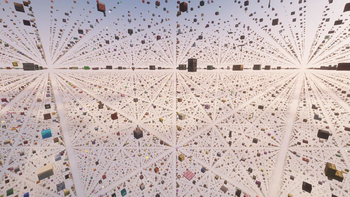
When you create a world with this type, the Overworld no longer generates as normal terrain. Instead, it becomes a huge empty space filled with blocks placed in a three-dimensional grid. Blocks appear every 10 blocks on the X, Y, and Z axes, creating a strange floating world where every direction can lead to something unexpected.
The mod uses the loaded block registry, which means it can generate blocks from vanilla Minecraft and from other installed mods. Because of this, every modpack changes the experience. A small Forge setup will create one kind of chaos, while a large tech or adventure modpack can turn the world into something much more unpredictable.
World of Chaotic Blocks is made for unusual survival and challenge runs. Useful resources may appear nearby, but reaching them can be dangerous. Rare blocks may float above or beside you, but empty space stands between you and them. The world pushes you to explore, improvise, bridge across gaps, plan your route, and rely on a bit of luck.
The Nether and End remain mostly normal, so progression is still possible, but the Overworld becomes a completely different experience.
Some unsafe technical blocks are excluded from generation, such as air, portals, command blocks, structure blocks, and similar vanilla blocks. Selected Immersive Engineering multiblock parts are also excluded so they do not appear as broken structure pieces in the random grid.
How to Use
Install Minecraft Forge 1.20.1, place the mod file in your mods folder, and create a new world.
Before creating the world, open the world settings and select the World of Chaotic Blocks world type.
Important: The world type must be selected before the world is created.
Existing worlds cannot be switched to World of Chaotic Blocks through the normal in-game world settings.
Because the mod uses blocks from installed mods, the final generation depends on your modpack.~~~~
Available Versions
How to Install World of Chaotic Blocks on Your Server
Order Server
Order a Minecraft Java server with at least 3 GB RAM (4 GB recommended).
Set forge Loader
In the panel under "Egg", select the forge loader and matching Minecraft version (1.20.1).
Install Mod
Open the mod browser in the dashboard and search for "World of Chaotic Blocks". Click "Install" – done! Alternatively, upload the .jar via SFTP to the /mods folder.
Compatibility
Mod Loaders
Minecraft Versions
1.20.1
Server-side
✓ RequiredRecommended RAM
4 GB(min. 3 GB)Frequently Asked Questions
World of Chaotic Blocks server crashes on startup – what to do?
Most common cause: wrong forge version or insufficient RAM. Check the server log (latest.log) for "OutOfMemoryError" or "Mixin" errors. With Mado Hosting: ensure at least 3 GB RAM is allocated and the loader matches the mod version (1.20.1). You can switch loaders with one click in the panel.
Is World of Chaotic Blocks compatible with forge?
World of Chaotic Blocks officially supports forge for Minecraft 1.20.1. The Mado dashboard automatically detects incompatible loader combinations.
Server lagging with World of Chaotic Blocks – how to optimize performance?
Recommended RAM: 4 GB (per 8 players). Use /spark profiler to check if World of Chaotic Blocks consumes the most tick time. Common fixes: reduce server view-distance to 8-10, install "performant" or "starlight" as supplementary mods on Forge. With Mado Hosting, your server runs on NVMe SSDs with dedicated CPU cores for minimal latency.
Similar Mods




Rent Modded Server
Install World of Chaotic Blocks with just one click on your server.