
World Panel
The all-in-one in-game control panel for Minecraft.
Screenshots
About this Mod
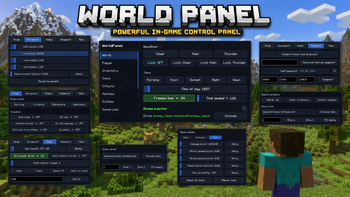
The all-in-one in-game control panel for Minecraft. Open a single GUI with the M key and run your world — weather, time, mobs, items, abilities, buildings, schematics, players, permissions, photo mode and dozens more tools — without ever typing a command.
Quick start
Drop the jar into your mods/ folder
Launch Minecraft with NeoForge 21.11.42
Press M in-game to open WorldPanel
(Optional) Bind extra hotkeys via Esc → Options → Controls → WorldPanel
(Optional) Drop .litematic / .nbt files into worldpanel-schematics/ or worldpanel-houses/
Full feature list
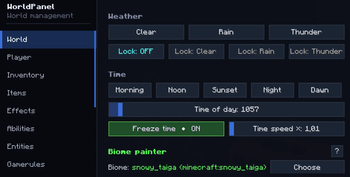
🌍 World tab
Weather: Clear / Rain / Thunder + Weather lock (server keeps the chosen weather)
Time presets: Morning / Noon / Sunset / Night / Dawn
Time slider (0–24000) + Freeze time + Time speed multiplier (0–100×)
Difficulty: Peaceful / Easy / Normal / Hard
Biome painter: replace biome in a sphere around you (any vanilla biome)
World backup: one-click snapshot to worldpanel-backups/
Keep inventory toggle
Anti-AFK auto-kick (configurable minutes)
🧑 Player tab
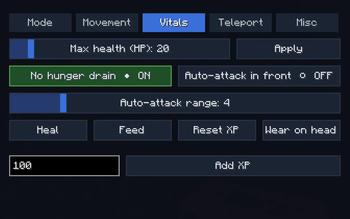
Sub-tabs: Mode / Movement / Vitals / Teleport / Misc
Game mode switch (Survival / Creative / Adventure / Spectator)
Walk / Fly / Jump / Swim speed sliders (with No fall damage + Reset)
Heal / Feed / Max health (HP) up to 200 / No hunger drain
God mode / Infinite breath / Invisible / Auto-eat from hotbar / Reach extender
Teleport to coordinates / Teleport home / Waypoints (save & jump)
XP add/reset / Wear held item as helmet
Free-cam (spectator-detach, body stays in place)
Run server command sender
🎒 Inventory tab
Give item (count input) / Fill empty slots with picked item
Clear inventory / Repair all / Unlock all recipes
🗡 Items tab
Sub-tabs: Basic / Enchants / Stats
Custom name (with formatting) / Repair held / Unbreakable / Hide enchant glint / Apply all curses
Add any enchantment at any level (1–255) / Max all valid enchants in one click / Clear all
Damage / Attack speed / Mining speed / Reach / Max durability boosts (attribute modifiers)
✨ Effects tab
Apply any vanilla potion effect at any duration/amplifier (timed or infinite)
Clear all
Potion crafting: assemble a custom potion with multiple effects, give as Drink / Splash / Lingering
💥 Abilities tab
Sub-tabs: Bombardment / Waves / Powers / Midas
Bombardment: Lightning at crosshair, Smite, Lightning storm, Fireball, Fireball volley, Explosion, TNT rain, Nuke (any radius), TNT power multiplier (up to 2000×)
Waves: Wind burst, Knockback wave, Vacuum, Levitate, Freeze nearby, Heal & buff wave
Powers: Player scale (×0.1..×10), Velocity boost (rocket-self), Ender chain dash, Withering touch, Break wave, Berserker mode (Strength X + Speed X + Regen X + Resistance IV + Haste V + Fire Resistance), Annihilate (instakill in look line), Apocalypse combo, Meteor shower
Midas Touch: walk-mode (turn ground under your feet into the chosen block) or attack-mode (every block you break converts instead of dropping)
🧟 Entities tab
Spawn any vanilla mob (count + HP / Damage / Scale sliders)
Mob variants: Armored / Diamond / Baby Zombie, Husk with sword, Drowned with trident, Skeleton with iron sword, Armored Wither Skeleton, Spider Jockey, Chicken Jockey, Giant / Tiny Slime, Giant Magma Cube, Pink / Rainbow Sheep, Angry Wolf, Piglin Brute, Huge / Tiny Zombie / Creeper / Skeleton, Huge Spider, Huge Enderman, Tank Zombie (500 HP + armored), Glass Zombie (1 HP)
Kill hostile mobs in radius (filter: hostile only / + neutral / + passive / everything)
Freeze mobs / Disable mob spawning
Live nearby-entity counter
⚙ Gamerules tab
Every gamerule in the world — sliders for ints, toggles for bools, instant apply.
🛠 Tools tab
Tree feller (only with axe, configurable: damage axe? max logs?)
Vein miner / Instant mine / Fullbright (client-side)
Auto-grow: Trees / Crops / Grass / Other (in 10-block radius)
🏗 Build tab
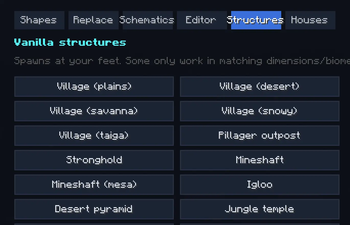
Sub-tabs: Shapes / Replace / Schematics / Editor / Structures / Houses
Shapes: Sphere / Cube / Pyramid / Cylinder / Dome / Ring / Floor / Wall (any block, size up to 128×128×128, optional hollow)
Replace: swap block A → B in a radius
Schematics: load .litematic and vanilla .nbt from disk, library persists in worldpanel-schematics/; ghost preview (look-aimed, 90° rotate, build/cancel)
Editor (click-based world editor):
Start selection → LMB block = corner A → RMB block = corner B (wireframe ghost between them)
Wall / Roof / Floor templates (separate picker each):
11 wall templates (Cottage, Tudor, Brick facade, Castle stone, Castle slits, Modern glass tower, Japanese shoji, Gothic cathedral, Nether fortress, Dungeon, Plain)
7 roof templates (Flat, Flat + cornice, Pitched oak/dark/brick, Hipped, Dome)
7 floor templates (Plain, 3 checker variants, Carpet over oak, Stone path, Polished pattern)
Fill solid / Hollow / Walls / Floor / Roof / Replace / Clear within selection
Clipboard: Copy selection, Paste at A, Save / Load named templates (worldpanel-clips/)
Structures: 26 vanilla structures one-click (villages, fortresses, monuments, ancient cities, end city…)
Houses: pre-built houses library from worldpanel-houses/ (drop your .litematic files there)
🎨 Photo / FX tab
Photo mode (FOV slider 20°–170°, optional Hide HUD)
Free-cam
Cosmetic particles on self: Halo / Fire / Sparkle / Hearts / Notes
Movement trails: Fire / Ice / Flowers / Lava / Portal
Live HUD overlay toggle — corner display of every active toggle
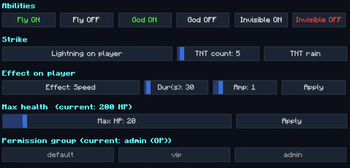
👥 Players tab (server admin)
Full per-player admin screen:
View / edit target's inventory (6×9) and ender chest (3×9)
Game mode quick-switch (current highlighted)
Fly / God / Invisible ON/OFF (live status)
Lightning / TNT rain on player
Apply any effect with duration/amplifier
Heal / Feed / Kill / Op / Deop / Kick / TP to / Pull to me
Max health slider per target
Permission group (default / vip / admin) + per-feature ✓/✗ overrides
Export permission groups + README to Desktop
💾 Profiles tab
Save full panel state (every slider, toggle, picked item/effect/mob) as a named preset
Load / delete profiles, stored as .properties in worldpanel-profiles/
⏱ Cooldowns tab
Per-ability cooldown slider (0–120s) for every ability
Server enforces and shows on-cooldown message
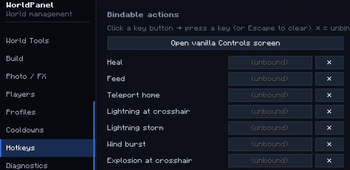
⌨ Hotkeys tab
Every action has a bindable keybind, visible in this tab
Quick link to vanilla Controls screen
Default hotkeys unbound — set in Controls → WorldPanel
🩺 Diagnostics tab
Live server / player / system info
Chat command sender
🔎 Spotlight
Cmd-K style global search: type "fly speed" → jump straight to the setting
~110 indexed features
Permission system
Every action belongs to one of 36 fine-grained Features (e.g. WORLD_BIOME, ABILITY_POWERS, BUILD_SCHEMATICS, PLAYER_ADMIN…).
Groups (default / vip / admin) in
Per-player overrides through the GUI (✓/✗ buttons)
OP players always bypass the check (you can never lock yourself out)
Cooldowns per ability stored in
File / folder reference
World Panel creates and uses several folders and configuration files:
config/worldpanel-client.properties — client-side panel state
worldpanel-schematics/ — auto-loaded schematic library
worldpanel-houses/ — pre-built houses library
worldpanel-profiles/ — saved settings presets
worldpanel-clips/ (world dir) — saved building templates
worldpanel-backups/ (world dir) — one-click world backups
Available Versions
How to Install World Panel on Your Server
Order Server
Order a Minecraft Java server with at least 3 GB RAM (4 GB recommended).
Set neoforge Loader
In the panel under "Egg", select the neoforge loader and matching Minecraft version (1.21.11).
Install Mod
Open the mod browser in the dashboard and search for "World Panel". Click "Install" – done! Alternatively, upload the .jar via SFTP to the /mods folder.
Compatibility
Mod Loaders
Minecraft Versions
1.21.11
Server-side
~ OptionalRecommended RAM
4 GB(min. 3 GB)Frequently Asked Questions
World Panel server crashes on startup – what to do?
Most common cause: wrong neoforge version or insufficient RAM. Check the server log (latest.log) for "OutOfMemoryError" or "Mixin" errors. With Mado Hosting: ensure at least 3 GB RAM is allocated and the loader matches the mod version (1.21.11). You can switch loaders with one click in the panel.
Is World Panel compatible with neoforge?
World Panel officially supports neoforge for Minecraft 1.21.11. The Mado dashboard automatically detects incompatible loader combinations.
Server lagging with World Panel – how to optimize performance?
Recommended RAM: 4 GB (per 8 players). Use /spark profiler to check if World Panel consumes the most tick time. Common fixes: reduce server view-distance to 8-10, install "performant" or "starlight" as supplementary mods on Forge. With Mado Hosting, your server runs on NVMe SSDs with dedicated CPU cores for minimal latency.
Rent Modded Server
Install World Panel with just one click on your server.