
World Pre Generator
Provides a pre-generator for Minecraft worlds.
About this Mod
Version 5.X.X
For older versions of the mod, check the wiki.
This Mod can pre generate the Minecraft dimensions per command.
The Mod is only needed on the server side, but can also be used on the client side.
You need a server to play with friends? You don't know how to set up one? Just rent an already configured server!
Click on the picture above, select a plan (with recommended at least 6 GB),
use my code **** to get 25% off your first month and enjoy playing with your friends!
Support
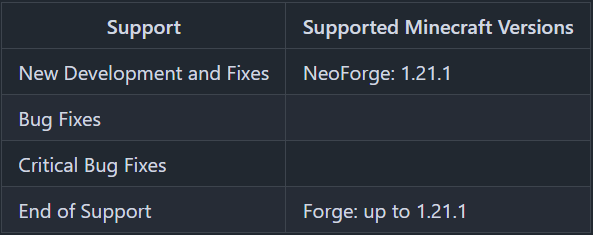
Minecraft versions, for which the mod is not released, are not supported.
You can find a text version here.
Hints
The pre generation tasks are executed one after the other.
The pre generations are continued after restarts.
Chunks already generated are skipped on pre-generation, if the forced flag is not true.
In semi-parallel pre generation mode, multiple tasks for pre generation are started in parallel, but the execution is done the Minecraft way. As of 1.20.1, this means, that only one chunk can be generated at a time.
Server Config
- send_feedback
Shall a pre generation feedback send to all online players? - generation
Parameters for generation- type
Type of generation
SERIAL: Every chunk one after another is generated.
SEMI_PARALLEL: Multiple chunk generation tasks are created, but the generation is still serial (speed up the chunk generation). - semi_parallel_task_count
How many chunk generation tasks shall be start in parallel?
If the value is "0", the number of processor cores is used.
- type
- delays
Delays of the print and save tasks- print
Time between 2 status prints - save
Time between 2 saving events
- print
Commands
/pregen list- Lists all running pre generation tasks./pregen gen <dimension> start <block|chunk> <center> <radius> [<force>]- Creates a pre generation task with the specified centre, radius and dimension. Optional, the force flag (true, false) can be set. If it is set to true, all chunks are loaded. If it is set to false, already generated chunks are skipped. If the force flag is absent, it is set to false.- block: The center coordinates and the radius are in blocks.
If you want to generate a 4000x4000 (2000 in the positive and negative direction) from the center of the world, the command would be:/pregen gen minecraft:overworld start block 0 0 2000
If you want to generate a 4002x4002 (2001 in the positive and negative direction) from x = 100, z = 150 of the world, the command would be:/pregen gen minecraft:overworld start block 100 150 2001
Hint: In the pregeneration list it will show up, with the following center and radius data, because the block data are calculated to chunk data and back:
x = "round down"(100 / 16) * 16 = 96
z = "round down"(150 / 16) * 16 = 144
radius = "round up"(2001 / 16) * 16 = 2016 - chunk: The center coordinates and the radius are in chunks.
If you want to generate a 4000x4000 (2000 in the positive and negative direction) from the center of the world, the command would be:/pregen gen minecraft:overworld start chunk 0 0 125
If you want to generate a 4002x4002 (2001 in the positive and negative direction) from x = 100, z = 150 of the world.
"chunk x" = "round down"(100 / 16) = 6
"chunk z" = "round down"(150 / 16) = 9
"chunk radius" = "round up"(2001 / 16) = 126
The command would be:/pregen gen minecraft:overworld start chunk 6 9 126
- block: The center coordinates and the radius are in blocks.
/pregen gen <dimension> resume- Resumes the pre generation task of the dimension./pregen gen <dimension> pause- Pauses the pre generation task of the dimension./pregen gen <dimension> cancel- Cancels the pre generation task of the dimension./pregen clear- Cancels all pre generation tasks./pregen sendFeedback- Shows, if the progression feedback is enabled or disabled./pregen sendFeedback <isFeedbackEnabled>- Enables or disables progression feedback depending on isFeedbackEnabled. Generation start and finish feedback are not affected of that.
Progression State
The progress state computed is in chunks.
You get the following information in the generation messages: "A B/C (D%) E chunks/s"
- Dimension (A)
- Chunk generated (B)
- Total chunks to generate (C)
- Percentage of chunks for which generation is finished (D)
- Rate of Chunks per second generated between this and the last message (E)
Thanks for the logo to Muse31.
You can use this mod in non-commercial modpacks without asking.
You can find more mods from me on CurseForge and Modrinth.

Available Versions
How to Install World Pre Generator on Your Server
Order Server
Order a Minecraft Java server with at least 4 GB RAM (6 GB recommended).
Set forge Loader
In the panel under "Egg", select the forge loader and matching Minecraft version (1.21.10).
Install Mod
Open the mod browser in the dashboard and search for "World Pre Generator". Click "Install" – done! Alternatively, upload the .jar via SFTP to the /mods folder.
Compatibility
Mod Loaders
Minecraft Versions
1.21.10, 1.21.9, 1.21.8 (+16 more)
Server-side
✓ RequiredRecommended RAM
6 GB(min. 4 GB)Frequently Asked Questions
World Pre Generator server crashes on startup – what to do?
Most common cause: wrong forge version or insufficient RAM. Check the server log (latest.log) for "OutOfMemoryError" or "Mixin" errors. With Mado Hosting: ensure at least 4 GB RAM is allocated and the loader matches the mod version (1.21.10). You can switch loaders with one click in the panel.
Is World Pre Generator compatible with forge and neoforge?
World Pre Generator officially supports forge, neoforge for Minecraft 1.21.10, 1.21.9, 1.21.8. The Mado dashboard automatically detects incompatible loader combinations.
Server lagging with World Pre Generator – how to optimize performance?
Recommended RAM: 6 GB (per 5 players). Use /spark profiler to check if World Pre Generator consumes the most tick time. Common fixes: reduce server view-distance to 8-10, install "performant" or "starlight" as supplementary mods on Forge. With Mado Hosting, your server runs on NVMe SSDs with dedicated CPU cores for minimal latency.
Rent Modded Server
Install World Pre Generator with just one click on your server.