
World Repos
This mod lets you browse and download worlds from repos
Screenshots
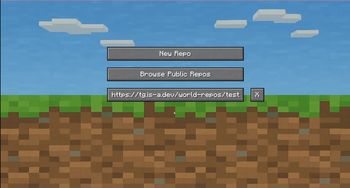
About this Mod
World Repos lets Minecraft players and map creators share and discover custom worlds effortlessly through simple online repositories.
How it works
Map creators upload a small JSON file plus zipped world files to their own website or hosting service. Players add the repository URL inside the mod, then browse, preview, and download the worlds directly from that repo — all without leaving Minecraft.
Features
Simple setup for creators: just upload a JSON manifest and zipped worlds to a web folder.
In-game interface for browsing and downloading worlds from any added or public repo.
A curated public repo list where creators can submit their repositories for easy discovery by everyone.
Perfect for map makers wanting to share, and players wanting fresh new worlds to explore.
FAQ
📁 How to make my own repository?
Create aMinecraftWorldRepo.json file with the following format:
{
  "info": {
    "name": "My Test World Repo",
    "description": "Testing The mod",
    "author": "TGGamesYT"
  },
  "worlds": [
    {
      "name": "My test world",
      "description": "Testing!",
      "location": "test_world.zip"
    }
  ]
}https://my.site/repo/MinecraftWorldRepo.json) and place your world zips in the same directory, relative to the JSON.🌐 How to add my repo to the public list?
Just create an issue at the GitHub issues page and tell us about your repo. If it fits, it’ll likely be added🎮 How to use a repository?
Launch Minecraft with the mod installed, open the mod's menu, click “Add New Repo”, paste the link to the repo (the location where the json is located, but without the json), and you’re good to go! You can now browse and download worlds directly from that repository.Available Versions
How to Install World Repos on Your Server
Order Server
Order a Minecraft Java server with at least 3 GB RAM (4 GB recommended).
Set fabric Loader
In the panel under "Egg", select the fabric loader and matching Minecraft version (1.21.5).
Install Mod
Open the mod browser in the dashboard and search for "World Repos". Click "Install" – done! Alternatively, upload the .jar via SFTP to the /mods folder.
Compatibility
Mod Loaders
Minecraft Versions
1.21.5, 1.21.4, 1.21.1 (+3 more)
Server-side
✗ UnsupportedRecommended RAM
4 GB(min. 3 GB)Frequently Asked Questions
World Repos server crashes on startup – what to do?
Most common cause: wrong fabric version or insufficient RAM. Check the server log (latest.log) for "OutOfMemoryError" or "Mixin" errors. With Mado Hosting: ensure at least 3 GB RAM is allocated and the loader matches the mod version (1.21.5). You can switch loaders with one click in the panel.
Is World Repos compatible with fabric?
World Repos officially supports fabric for Minecraft 1.21.5, 1.21.4, 1.21.1. The Mado dashboard automatically detects incompatible loader combinations.
Server lagging with World Repos – how to optimize performance?
Recommended RAM: 4 GB (per 8 players). Use /spark profiler to check if World Repos consumes the most tick time. Common fixes: reduce server view-distance to 8-10, install "performant" or "starlight" as supplementary mods on Forge. With Mado Hosting, your server runs on NVMe SSDs with dedicated CPU cores for minimal latency.
Similar Mods






Rent Modded Server
Install World Repos with just one click on your server.