
World Size
World Size is a lightweight, client-side utility mod for Minecraft Fabric that brings more transparency to your world management.
Screenshots
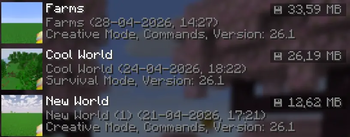
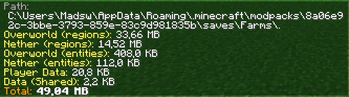

About this Mod
World Size is a lightweight, client-side utility mod for Minecraft Fabric that brings more transparency to your world management.
Ever wondered how much disk space your massive survival world is actually taking up? With this mod, you no longer need to dive into your file explorer to find out.
Features:
- Real-time Size Tracking: View the total disk size of every world directly on the World Selection screen. Or you can use the /worldsize command to show it in game.
- Automatic Formatting: Sizes are automatically converted to a readable format (Bytes, KB, MB, or GB) for at-a-glance information.
- Seamless Integration: Designed to blend perfectly with the modern Minecraft UI, featuring a clean, non-intrusive display.
- Performance Optimized: The size calculation happens efficiently in the background, ensuring your menu navigation remains smooth and lag-free.
Why use World Size Display?
Whether you are a modpack creator, a dedicated survivalist, or just someone looking to clean up old worlds, this mod provides the essential data you need to manage your storage effectively without ever leaving the game.
Available Versions
How to Install World Size on Your Server
Order Server
Order a Minecraft Java server with at least 3 GB RAM (4 GB recommended).
Set fabric Loader
In the panel under "Egg", select the fabric loader and matching Minecraft version (26.1.2).
Install Mod
Open the mod browser in the dashboard and search for "World Size". Click "Install" – done! Alternatively, upload the .jar via SFTP to the /mods folder.
Compatibility
Mod Loaders
Minecraft Versions
26.1.2, 26.1.1, 26.1
Server-side
✓ RequiredRecommended RAM
4 GB(min. 3 GB)Frequently Asked Questions
World Size server crashes on startup – what to do?
Most common cause: wrong fabric version or insufficient RAM. Check the server log (latest.log) for "OutOfMemoryError" or "Mixin" errors. With Mado Hosting: ensure at least 3 GB RAM is allocated and the loader matches the mod version (26.1.2). You can switch loaders with one click in the panel.
Is World Size compatible with fabric?
World Size officially supports fabric for Minecraft 26.1.2, 26.1.1, 26.1. The Mado dashboard automatically detects incompatible loader combinations.
Server lagging with World Size – how to optimize performance?
Recommended RAM: 4 GB (per 8 players). Use /spark profiler to check if World Size consumes the most tick time. Common fixes: reduce server view-distance to 8-10, install "performant" or "starlight" as supplementary mods on Forge. With Mado Hosting, your server runs on NVMe SSDs with dedicated CPU cores for minimal latency.
Similar Mods






Rent Modded Server
Install World Size with just one click on your server.