
World Syncer
World Syncer is a mod that keeps your game world data synchronized across devices for smoother cross-device experience or as a backup system.
Screenshots
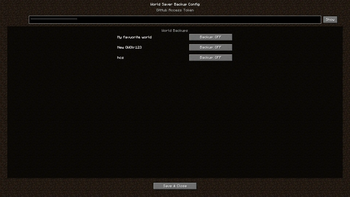
About this Mod
World Syncer
World Syncer is a Minecraft mod designed to seamlessly synchronize your world data across multiple devices. Whether you're switching between computers or running multiple sessions, World Syncer ensures your world is always up-to-date and accessible wherever and whenever you play.
Features
- Automatic Synchronization: Keeps your Minecraft world data in sync across devices with minimal setup.
- Cross-Platform Support: Compatible with all major platforms that support Minecraft Java Edition.
- Lightweight & Efficient: Minimal performance impact, focusing only on world and essential data—no unnecessary overhead.
Usage
- Install the Mod: Download and add World Syncer to your mods folder.
- **Get your Github access token via GitHub Settings > Developer settings > Personal access tokens (classic) - more help in the projects github repo
- **Leave and Relaunch Minecraft
- Multi-Device Play: Install World Syncer on all devices you use. Log in with the same access token to keep worlds aligned.
Dependencies
- Minecraft Java Edition: Version 1.20.1 or any 1.21.x
- **Fabric API
- **Cloth Config API
- **Mod Menu (optional)
- Java 17 or higher
- **Github access token (via Usage)
Compatibility
- If some parts of the config screen are blured turn off menu blur in video settings
- Works with most other mods.
- Designed for singleplayer enviroment.
- No known conflicts, but always back up your world before first use.
Additional Information
- Open Source: Contributions are welcome! Check out the GitHub repo for details.
- Support: For help or to report bugs, use the issues tab on GitHub.
- Regular Updates: Stay tuned for new features like scheduled syncs, more cloud providers, and advanced conflict management.
Available Versions
How to Install World Syncer on Your Server
Order Server
Order a Minecraft Java server with at least 3 GB RAM (4 GB recommended).
Set fabric Loader
In the panel under "Egg", select the fabric loader and matching Minecraft version (1.21.5).
Install Mod
Open the mod browser in the dashboard and search for "World Syncer". Click "Install" – done! Alternatively, upload the .jar via SFTP to the /mods folder.
Compatibility
Mod Loaders
Minecraft Versions
1.21.5, 1.21.4, 1.21.3 (+3 more)
Server-side
✓ RequiredRecommended RAM
4 GB(min. 3 GB)Frequently Asked Questions
World Syncer server crashes on startup – what to do?
Most common cause: wrong fabric version or insufficient RAM. Check the server log (latest.log) for "OutOfMemoryError" or "Mixin" errors. With Mado Hosting: ensure at least 3 GB RAM is allocated and the loader matches the mod version (1.21.5). You can switch loaders with one click in the panel.
Is World Syncer compatible with fabric?
World Syncer officially supports fabric for Minecraft 1.21.5, 1.21.4, 1.21.3. The Mado dashboard automatically detects incompatible loader combinations.
Server lagging with World Syncer – how to optimize performance?
Recommended RAM: 4 GB (per 8 players). Use /spark profiler to check if World Syncer consumes the most tick time. Common fixes: reduce server view-distance to 8-10, install "performant" or "starlight" as supplementary mods on Forge. With Mado Hosting, your server runs on NVMe SSDs with dedicated CPU cores for minimal latency.
Similar Mods






Rent Modded Server
Install World Syncer with just one click on your server.