WorldFarView
Mod that increases render distance by utilizing height map planes.
About this Mod
Inspired by FarPlane2, this mod enhances render distance using Level of Detail (LOD) planes.
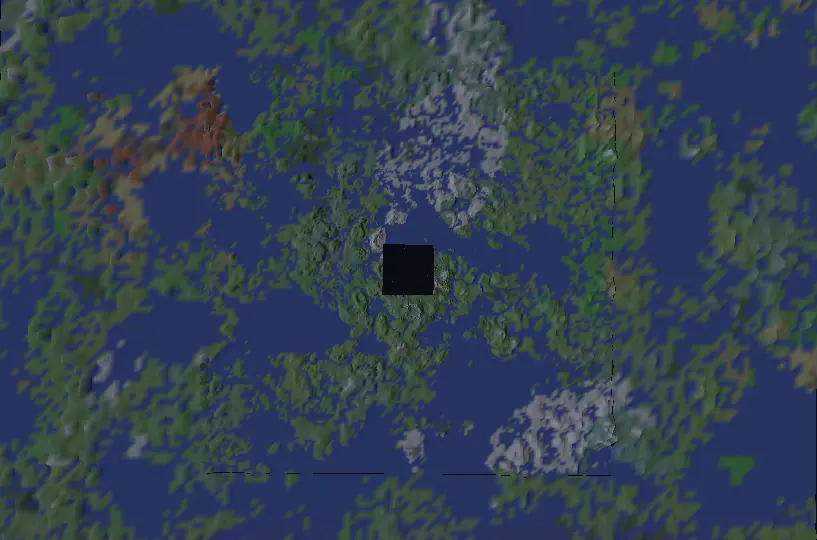
Image of LOD's from y=3500 with resolution = 70 and start size = 1024
🚀 Features
- Dynamic LOD-based rendering
- Configurable render distance and quality settings
- Server-side compatibility controls
- Extensible API for custom chunk generators
🔧 Installation & Usage
- Install the mod on both client and server.
- Join a world - the mod activates automatically.
- Note: High resolutions may require longer loading times.
- Currently supports only noise-based chunk generators (vanilla-compatible).
- The mod will notify you if any compatibility issues arise.
⚠️ Development Notice: This mod is still in active development and may have stability issues.
⚙️ Configuration
Client Settings (Editable in-game via Mods menu)
| Setting | Description | Recommended Value |
|---|---|---|
| LOD0 Start Size | Base plane size (rendering starts at half this distance) | Render distance * 32 |
| Number of LODs | Total LOD planes (each 2× larger than the previous) | - |
| Resolution Quality | Vertices per plane (higher = sharper but heavier) | 70 |
Render Distance Formula:Total Distance = LOD0 Start Size × (2 ^ Number of LODs)
Example: If LOD0 Start Size = 1000 and Number of LODs = 3, the max distance is 1000 × 8 = 8000 blocks.
⚠️ If the server rejects client settings (e.g., unsupported resolution), the mod will auto-disable.
Server Settings (Can be found in world/server files)
| Setting | Description |
|---|---|
| clientSide | If true, sends seed/generator data to clients (unsupported in current version). If false, forces server-side generation. |
| maxResolution | Rejects clients requesting resolutions beyond this limit (if clientSide = false). |
| maxLevel | Rejects clients requesting higher LOD levels than allowed (if clientSide = false). |
🛠️ For Developers: Adding Compatibility
To integrate your custom world generator:
- Implement
FarChunkGeneratorand register it inFarChunkGenerators. - For client-side support, create:
ClientFarChunkGeneratorSerializableFarChunkGenerator<YourClientFarChunkGenerator>
📌 Performance Note: Ensure your chunk generator is optimized for speed!
Available Versions
How to Install WorldFarView on Your Server
Order Server
Order a Minecraft Java server with at least 3 GB RAM (4 GB recommended).
Set forge Loader
In the panel under "Egg", select the forge loader and matching Minecraft version (1.20.1).
Install Mod
Open the mod browser in the dashboard and search for "WorldFarView". Click "Install" – done! Alternatively, upload the .jar via SFTP to the /mods folder.
Compatibility
Mod Loaders
Minecraft Versions
1.20.1
Server-side
✓ RequiredRecommended RAM
4 GB(min. 3 GB)Frequently Asked Questions
WorldFarView server crashes on startup – what to do?
Most common cause: wrong forge version or insufficient RAM. Check the server log (latest.log) for "OutOfMemoryError" or "Mixin" errors. With Mado Hosting: ensure at least 3 GB RAM is allocated and the loader matches the mod version (1.20.1). You can switch loaders with one click in the panel.
Is WorldFarView compatible with forge?
WorldFarView officially supports forge for Minecraft 1.20.1. The Mado dashboard automatically detects incompatible loader combinations.
Server lagging with WorldFarView – how to optimize performance?
Recommended RAM: 4 GB (per 8 players). Use /spark profiler to check if WorldFarView consumes the most tick time. Common fixes: reduce server view-distance to 8-10, install "performant" or "starlight" as supplementary mods on Forge. With Mado Hosting, your server runs on NVMe SSDs with dedicated CPU cores for minimal latency.
Rent Modded Server
Install WorldFarView with just one click on your server.