
WorldHomeCommand
mod that set up home and teleport
Screenshots



About this Mod
World Home Command 🏠✨
World Home Command is a lightweight Fabric mod that allows players to save multiple base locations (homes) and teleport to them at any time.
It's incredibly useful for survival adventures and managing bases on multiplayer servers!
🌟 Features
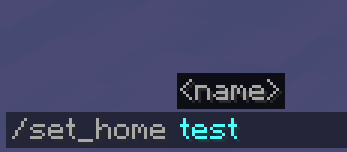
Multiple Homes: Save as many locations as you want by giving them custom names.
Cross-Dimension Support: Works perfectly across the Overworld, Nether, and End. Teleports you to the exact dimension where the home was set.
Server-Side Only: This mod only needs to be installed on the server! Your friends or server members do not need to download this mod. They can join with a vanilla client and use the commands right away.
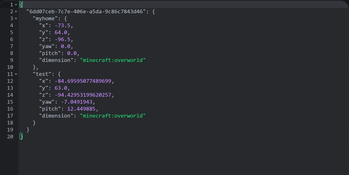
Safe Data Storage: Home data is safely saved as a dedicated JSON file within the world's saves folder. Your data won't be lost even if the server restarts or crashes.
Action Bar Notifications & Auto-completion: Success messages are displayed neatly on the action bar (above the hotbar) to prevent chat spam. Fully supports command auto-completion (suggestions) while typing!
⌨️ Commands
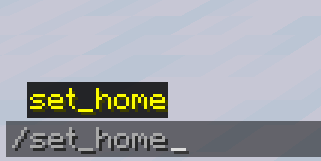
/set_home
Registers your current location as a home with the specified name.
(e.g., /set_home base)
/home
Teleports you to the registered home.
(e.g., /home base)
/delete_home
Deletes the registered home.
⚙️ Requirements
Mod Loader: Fabric
Dependencies: Fabric API (Recommended)
📥 Installation
[Singleplayer]
Drop the .jar file into your mods folder.
[Multiplayer (Server)]
Drop the .jar file into your server's mods folder. Players joining the server do NOT need to install it on their clients.
Available Versions
How to Install WorldHomeCommand on Your Server
Order Server
Order a Minecraft Java server with at least 3 GB RAM (4 GB recommended).
Set fabric Loader
In the panel under "Egg", select the fabric loader and matching Minecraft version (1.20.1).
Install Mod
Open the mod browser in the dashboard and search for "WorldHomeCommand". Click "Install" – done! Alternatively, upload the .jar via SFTP to the /mods folder.
Compatibility
Mod Loaders
Minecraft Versions
1.20.1
Server-side
✓ RequiredRecommended RAM
4 GB(min. 3 GB)Frequently Asked Questions
WorldHomeCommand server crashes on startup – what to do?
Most common cause: wrong fabric version or insufficient RAM. Check the server log (latest.log) for "OutOfMemoryError" or "Mixin" errors. With Mado Hosting: ensure at least 3 GB RAM is allocated and the loader matches the mod version (1.20.1). You can switch loaders with one click in the panel.
Is WorldHomeCommand compatible with fabric?
WorldHomeCommand officially supports fabric for Minecraft 1.20.1. The Mado dashboard automatically detects incompatible loader combinations.
Server lagging with WorldHomeCommand – how to optimize performance?
Recommended RAM: 4 GB (per 8 players). Use /spark profiler to check if WorldHomeCommand consumes the most tick time. Common fixes: reduce server view-distance to 8-10, install "performant" or "starlight" as supplementary mods on Forge. With Mado Hosting, your server runs on NVMe SSDs with dedicated CPU cores for minimal latency.
Similar Mods


Rent Modded Server
Install WorldHomeCommand with just one click on your server.