
ws2tcp
Allow players to connect to the server via WebSocket.
Screenshots
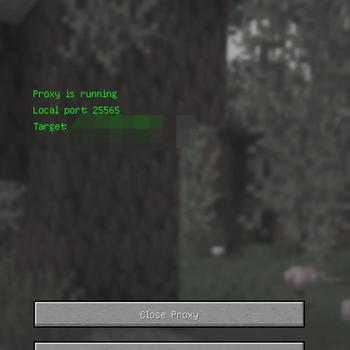
About this Mod
ws2tcp
ws2tcp is a Fabric-based Minecraft client mod that allows players to connect to Minecraft servers via the WebSocket protocol. This mod is useful for scenarios where you need to access servers through a WebSocket proxy, such as cloud gaming, CDN, or NAT traversal.
Features
- Proxy local port 25565 to a specified WebSocket address
- Automatically read and save proxy configuration
- Automatically add the local proxy server to the server list
- Simple graphical interface with multi-language support (English and Simplified Chinese)
Installation
Requirements
- Minecraft 1.21.4
- Fabric Loader 0.16.12 or above
Install the Mod
- Download the built
ws2tcpjar file - Place it into your
.minecraft/mods/directory
- Download the built
Start the Game
- Launch the Minecraft client as usual
Usage
- Go to the Multiplayer screen and click the "Enable WebSocket Proxy" button
- Enter the WebSocket server address (e.g.,
example.com:8080) and click "Done" - After the proxy starts, a local server (127.0.0.1:25565) will be automatically added to your server list
- You can stop the proxy at any time via the interface
Configuration
- Config file path:
config/ws2tcp-client.properties - You can edit it manually or generate it via the GUI
Language Support
- Supports Simplified Chinese (
zh_cn) and English (en_us) - Automatically switches based on the game language
FAQ
- Error when loading on server
This mod is client-side only. It will automatically exit if loaded on a server.
Development & Building
- Clone this repository
- Open with IDEA or VSCode, ensure you have JDK 21
- Build with:
./gradlew build - The built jar will be in
build/libs/
License
This project is licensed under the Apache-2.0 License.
Feel free to submit issues or pull requests if you have questions
Available Versions
How to Install ws2tcp on Your Server
Order Server
Order a Minecraft Java server with at least 3 GB RAM (4 GB recommended).
Set fabric Loader
In the panel under "Egg", select the fabric loader and matching Minecraft version (1.21.4).
Install Mod
Open the mod browser in the dashboard and search for "ws2tcp". Click "Install" – done! Alternatively, upload the .jar via SFTP to the /mods folder.
Compatibility
Mod Loaders
Minecraft Versions
1.21.4
Server-side
✗ UnsupportedRecommended RAM
4 GB(min. 3 GB)Frequently Asked Questions
ws2tcp server crashes on startup – what to do?
Most common cause: wrong fabric version or insufficient RAM. Check the server log (latest.log) for "OutOfMemoryError" or "Mixin" errors. With Mado Hosting: ensure at least 3 GB RAM is allocated and the loader matches the mod version (1.21.4). You can switch loaders with one click in the panel.
Is ws2tcp compatible with fabric?
ws2tcp officially supports fabric for Minecraft 1.21.4. The Mado dashboard automatically detects incompatible loader combinations.
Server lagging with ws2tcp – how to optimize performance?
Recommended RAM: 4 GB (per 8 players). Use /spark profiler to check if ws2tcp consumes the most tick time. Common fixes: reduce server view-distance to 8-10, install "performant" or "starlight" as supplementary mods on Forge. With Mado Hosting, your server runs on NVMe SSDs with dedicated CPU cores for minimal latency.
Similar Mods



Rent Modded Server
Install ws2tcp with just one click on your server.