
Xaero Map Regions
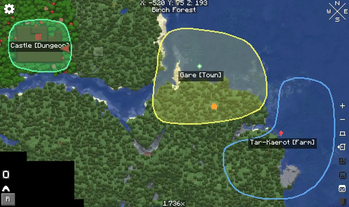
If you've been missing the ability to create regions - complete with names, boundaries, and icons - in your builds or servers, this mod is just what you need
Screenshots
About this Mod
✦ Usage
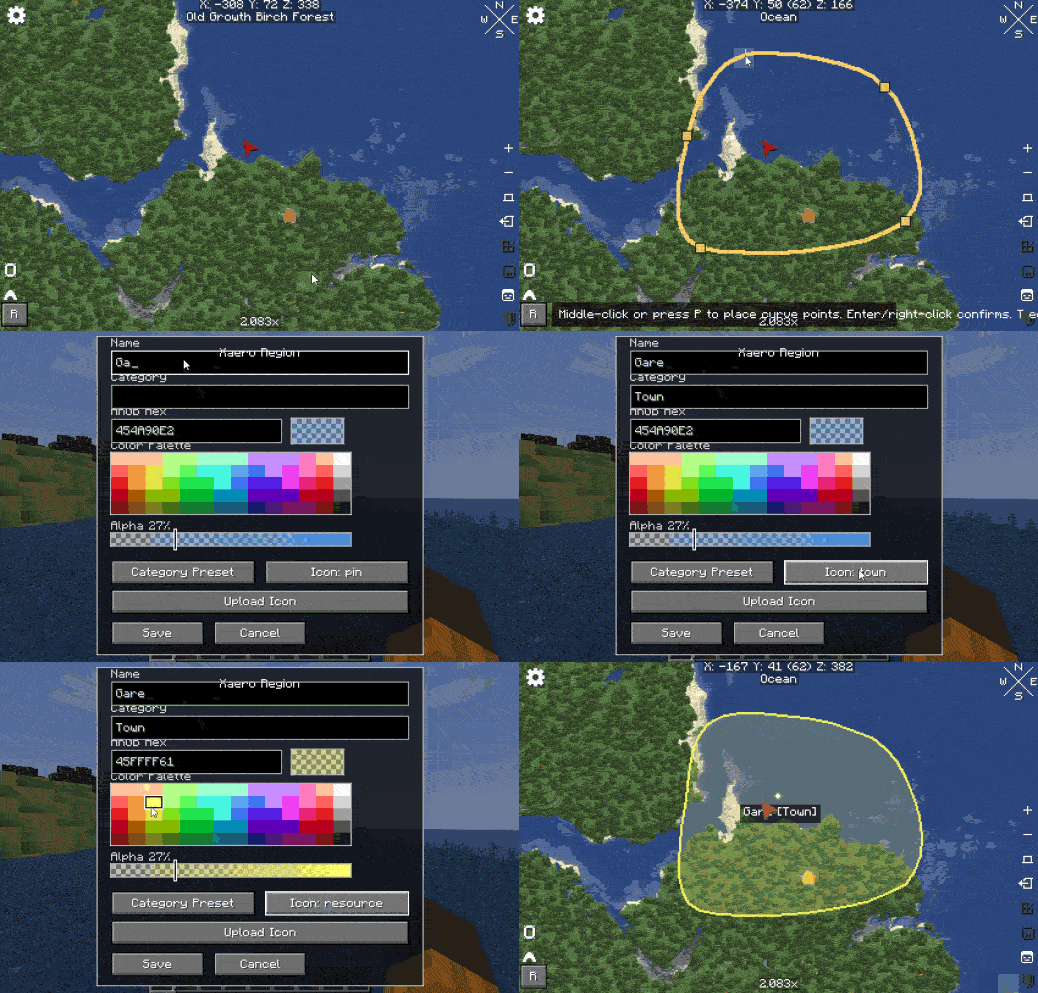
Open Xaero's World Map and use the region controls:
- R opens the region drawing workflow on Xaero's map screen when the player is an operator in creative mode.
- Middle mouse click places polygon points while drawing.
- T opens the region manager while in normal camera/game view.
Commands are available only to players who are currently in Creative mode.
Hide a region for one player
/region hide <player> <region>
Show a hidden region again
/region visible <player> <region>
Create a point marker
/region createpoint <player> <mode> <iconname> <label> <x> <y> <z>
Arguments:
<player>: target player who will see the marker.<mode>: marker lifetime mode.<iconname>: predefined pixel icon. The command suggests available icon names while typing.<label>: text shown under the marker. Use quotes for labels with spaces.<x> <y> <z>: block coordinates for the marker.
Modes:
waitenter: the marker disappears for the target player when they enter the marker's chunk.waitcommand: the marker stays until it is removed with/region delpoint.
Delete a point marker
/region delpoint <player> <x> <y> <z>
✦ What It Does
- Lets operators in creative mode draw freeform polygon regions on Xaero's World Map.
- Supports named regions, ARGB colors, alpha/opacity, optional categories, predefined icons, and custom PNG icons.
- Stores all region data on the server and syncs it to every connected client.
- Restricts create, edit, delete, and icon upload packets on the server to players who are both operators and in creative mode.
- Respects Xaero's explored-map data so regions only render where the player has already explored the map.
- Fades newly revealed region portions in over about 1.5 seconds.
- Shows region entry titles when a player crosses into a region, with optional Traveler's Titles reflection support and an internal fallback overlay.
- Persists regions and custom icon metadata through world
SavedData.
✦ Dependencies
**Use these dependencies when publishing and when building a server pack.
**
Kotlin for Forge | Tested ver: 5.6.0 required because this mod is written in Kotlin.
Xaero's World Map | Tested ver: 1.40.16
XaeroLib | Tested ver: 1.1.15
Traveler's Titles | Optional -> Tested by reflection only | If absent, Xaero Regions uses its built-in title overlay.
Important: do not redistribute xaeroworldmap-neoforge-1.21.1-1.40.16.jar
inside this mod jar or inside this repository release artifact. Xaero's World
Map is an external dependency with its own license.
Available Versions
How to Install Xaero Map Regions on Your Server
Order Server
Order a Minecraft Java server with at least 3 GB RAM (4 GB recommended).
Set neoforge Loader
In the panel under "Egg", select the neoforge loader and matching Minecraft version (1.21.1).
Install Mod
Open the mod browser in the dashboard and search for "Xaero Map Regions". Click "Install" – done! Alternatively, upload the .jar via SFTP to the /mods folder.
Compatibility
Mod Loaders
Minecraft Versions
1.21.1, 1.21
Server-side
✓ RequiredRecommended RAM
4 GB(min. 3 GB)Frequently Asked Questions
Xaero Map Regions server crashes on startup – what to do?
Most common cause: wrong neoforge version or insufficient RAM. Check the server log (latest.log) for "OutOfMemoryError" or "Mixin" errors. With Mado Hosting: ensure at least 3 GB RAM is allocated and the loader matches the mod version (1.21.1). You can switch loaders with one click in the panel.
Is Xaero Map Regions compatible with neoforge?
Xaero Map Regions officially supports neoforge for Minecraft 1.21.1, 1.21. The Mado dashboard automatically detects incompatible loader combinations.
Server lagging with Xaero Map Regions – how to optimize performance?
Recommended RAM: 4 GB (per 8 players). Use /spark profiler to check if Xaero Map Regions consumes the most tick time. Common fixes: reduce server view-distance to 8-10, install "performant" or "starlight" as supplementary mods on Forge. With Mado Hosting, your server runs on NVMe SSDs with dedicated CPU cores for minimal latency.
Rent Modded Server
Install Xaero Map Regions with just one click on your server.