
Xp Bottles
Safely store and share your XP! Protect your experience from loss and easily transfer it to friends using simple, reusable XP containers.
Screenshots
About this Mod
Unlock the ability to safely store and share your hard-earned XP with the XP Bottles Datapack. Never lose your experience points upon death, and easily share XP with your friends by storing it in customizable XP containers!
Store Your XP
With this datapack, you can store your XP in special containers like capsules, vials, and canisters. No more worrying about losing all your progress when things go wrong—store your XP and keep it safe for later use or share it with your friends.
How It Works: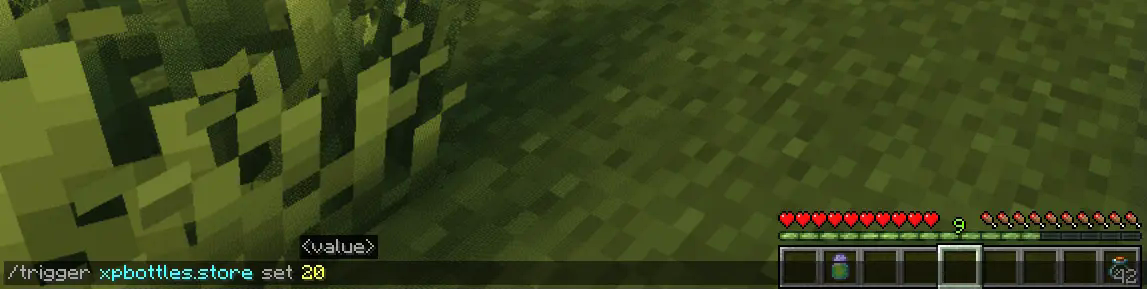
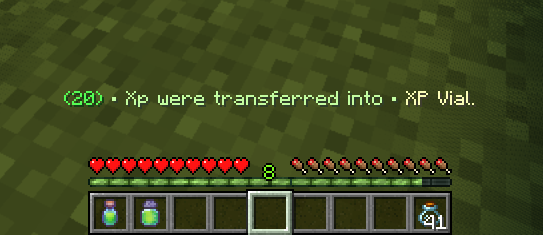
- To store your XP, simply use the command:
/trigger xpbottles.store set <amount of XP> - Make sure you have empty Glass Bottles in your inventory.
Depending on how much XP you're storing, the number of glass bottles needed will vary:- 1 Glass Bottle for less than 40 XP
- 2 Glass Bottles for XP between 40 and 100 XP
- 3 Glass Bottles for more than 100 XP
The XP will automatically be stored in the appropriate item (XP Capsule, XP Vial, or XP Canister) based on the amount.
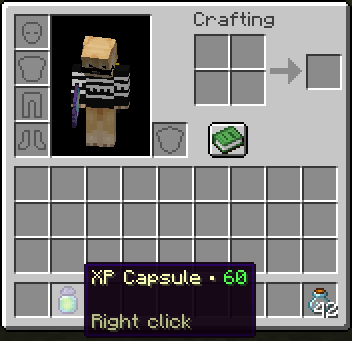
Retrieve Your XP
Getting your XP back is as easy as right-clicking with the XP item in your hand. Instantly reclaim the XP stored in the container and get back the glass bottles you used. No complicated commands—just a simple action to retrieve what you saved.
Key Features:
- XP Storage & Safety: Protect your XP from being lost when you die by storing it in reusable containers.
- Flexible Storage Options: Store different amounts of XP in different-sized containers based on your needs.
- Easy Sharing: Share XP with other players by giving them the XP items you’ve stored.
- Simple Commands & Actions: No complicated setup—just easy-to-use commands and in-game mechanics.
Whether you're stocking up for later use or looking for a way to share XP with your friends, the XP Bottles Datapack is a must-have addition to your Minecraft experience! Download now and take control of your XP like never before.
Uninstalling
Ready to say goodbye to the Datapack? No problem! Simply follow these simple steps:
- Access the Chat Window.
- Enter the Uninstall Command and press Enter:
/function xpbottles:uninstall
- You can now remove it safely from the Datapacks folder, every trace of the datapack has been removed.
Additional Notes
- Compatible with all other datapacks, following the standard conventions.
- This datapack was coded using JMC
Available Versions
How to Install Xp Bottles on Your Server
Order Server
Order a Minecraft Java server with at least 3 GB RAM (4 GB recommended).
Set datapack Loader
In the panel under "Egg", select the datapack loader and matching Minecraft version (1.21.1).
Install Mod
Open the mod browser in the dashboard and search for "Xp Bottles". Click "Install" – done! Alternatively, upload the .jar via SFTP to the /mods folder.
Compatibility
Mod Loaders
Minecraft Versions
1.21.1, 1.21
Server-side
✓ RequiredRecommended RAM
4 GB(min. 3 GB)Frequently Asked Questions
Xp Bottles server crashes on startup – what to do?
Most common cause: wrong datapack version or insufficient RAM. Check the server log (latest.log) for "OutOfMemoryError" or "Mixin" errors. With Mado Hosting: ensure at least 3 GB RAM is allocated and the loader matches the mod version (1.21.1). You can switch loaders with one click in the panel.
Is Xp Bottles compatible with datapack and fabric and forge and neoforge and quilt?
Xp Bottles officially supports datapack, fabric, forge, neoforge, quilt for Minecraft 1.21.1, 1.21. Note: Forge and Fabric mods are NOT cross-compatible – pick one loader and stick with it. The Mado dashboard automatically detects incompatible loader combinations.
Server lagging with Xp Bottles – how to optimize performance?
Recommended RAM: 4 GB (per 8 players). Use /spark profiler to check if Xp Bottles consumes the most tick time. Common fixes: reduce server view-distance to 8-10, install "performant" or "starlight" as supplementary mods on Forge. With Mado Hosting, your server runs on NVMe SSDs with dedicated CPU cores for minimal latency.
Similar Mods




Rent Modded Server
Install Xp Bottles with just one click on your server.