
XP Shop
Tired of hoarding piles of resources you'll never use? XP Shop lets you sell them for experience points directly in-game through a clean GUI menu.
Screenshots
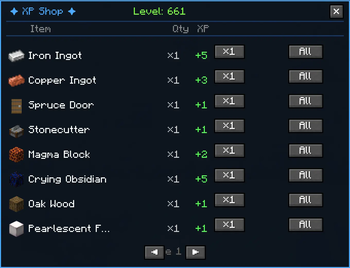
About this Mod
✦ XP Shop
RU: Продавай ресурсы — получай опыт. Просто, быстро, сбалансировано.
EN: Sell your resources for XP. Simple, fast, balanced.
🇷🇺 Описание
Надоело копить горы ресурсов, которые тебе никогда не понадобятся? XP Shop позволяет продавать их за очки опыта прямо в игре — через удобное GUI-меню.
Нажми [V] — и перед тобой откроется магазин, где каждый предмет в твоём инвентаре имеет свою цену в XP.
✅ Возможности
- 🖥 Мини GUI-меню — открывается клавишей V (можно изменить в настройках управления).
- 💰 Быстрая продажа — продавай 1, 16 или весь стак предметов в один клик.
- 📋 150+ предметов с индивидуальной ценой XP.
- 📄 Пагинация — удобное листание страниц, если предметов в инвентаре много.
- ⚖️ Продуманный баланс — экономика настроена так, что быстро нафармить уровни не получится.
- 🔒 Защита от абузов — бутылочки с опытом, элитры и Nether Star продавать нельзя.
⚖️ Балансировка цен
| Категория | XP за штуку |
|---|---|
| Земля, песок, гравий | 0 |
| Камень, дерево, уголь | 1–2 |
| Железо, медь | 3–4 |
| Золото | 5–6 |
| Алмаз | 12 |
| Изумруд | 20 |
| Незерит | 80 |
| Моб-дропы | 2–20 |
| Еда | 1–10 |
📦 Установка
- Установи Fabric Loader 0.18.1+ для Minecraft 1.21.1.
- Скачай Fabric API.
- Положи скачанный
.jarфайл мода в папку.minecraft/mods/. - Запускай игру и нажимай V!
🇬🇧 Description
Tired of hoarding piles of resources you'll never use? XP Shop lets you sell them for experience points directly in-game through a clean GUI menu.
Press [V] and a shop opens showing every sellable item in your inventory with its XP price.
✅ Features
- 🖥 Mini GUI menu — open with V (rebindable in controls).
- 💰 Flexible Selling — sell 1, 16, or the full stack with one click.
- 📋 150+ items with individual XP prices.
- 📄 Pagination — browse through all your sellable items easily.
- ⚖️ Carefully tuned balance — no instant level grinding.
- 🔒 Exploit protection — XP bottles, Elytra and Nether Stars cannot be sold.
⚖️ Price Balancing
| Category | XP each |
|---|---|
| Dirt, Sand, Gravel | 0 |
| Stone, Wood, Coal | 1–2 |
| Iron, Copper | 3–4 |
| Gold | 5–6 |
| Diamond | 12 |
| Emerald | 20 |
| Netherite Ingot | 80 |
| Mob drops | 2–20 |
| Food | 1–10 |
📦 Installation
- Install Fabric Loader 0.18.1+ for Minecraft 1.21.1.
- Download Fabric API.
- Drop the
.jarfile into your.minecraft/mods/folder. - Launch the game and press V!
📜 License / Лицензия
© 2026 Cheburashka. All Rights Reserved.
- ✅ Personal use allowed / Личное использование разрешено
- ✅ Download from Modrinth only / Скачивание только с Modrinth
- ❌ No redistribution / Запрет на распространение
📬 Контакты / Contact
- 💬 Discord:
cheburashka_uwu - ✈️ Telegram:
t.me/chebraschka
Available Versions
How to Install XP Shop on Your Server
Order Server
Order a Minecraft Java server with at least 3 GB RAM (4 GB recommended).
Set fabric Loader
In the panel under "Egg", select the fabric loader and matching Minecraft version (1.21.11).
Install Mod
Open the mod browser in the dashboard and search for "XP Shop". Click "Install" – done! Alternatively, upload the .jar via SFTP to the /mods folder.
Compatibility
Mod Loaders
Minecraft Versions
1.21.11
Server-side
✓ RequiredRecommended RAM
4 GB(min. 3 GB)Frequently Asked Questions
XP Shop server crashes on startup – what to do?
Most common cause: wrong fabric version or insufficient RAM. Check the server log (latest.log) for "OutOfMemoryError" or "Mixin" errors. With Mado Hosting: ensure at least 3 GB RAM is allocated and the loader matches the mod version (1.21.11). You can switch loaders with one click in the panel.
Is XP Shop compatible with fabric?
XP Shop officially supports fabric for Minecraft 1.21.11. The Mado dashboard automatically detects incompatible loader combinations.
Server lagging with XP Shop – how to optimize performance?
Recommended RAM: 4 GB (per 8 players). Use /spark profiler to check if XP Shop consumes the most tick time. Common fixes: reduce server view-distance to 8-10, install "performant" or "starlight" as supplementary mods on Forge. With Mado Hosting, your server runs on NVMe SSDs with dedicated CPU cores for minimal latency.
Similar Mods




![CobbleDollars [Cobblemon Addon]](https://cdn.modrinth.com/data/s7N7AsqL/684040a264fc1d7f9b856ec5d2da39767398c7ad.png)
Rent Modded Server
Install XP Shop with just one click on your server.