
XpOrbs HUD
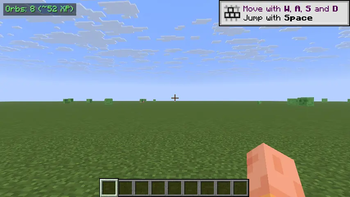
Tiny top-left HUD that counts experience orbs within 16 blocks and their total XP value, so you never miss orbs that scattered out of view after a fight. Toggle with X.
Screenshots
About this Mod
XpOrbs HUD is a one-line indicator that tells you whether there are still experience orbs in the area worth picking up. Vanilla Minecraft only shows orbs visually — and they often fly off behind blocks, drop down a cliff, or scatter into tall grass after a mob fight. By the time the XP-bar flash settles down you have no idea whether there's still anything left to grab. XpOrbs answers that at a glance.
What it shows
A small badge in the top-left corner:
Orbs: 8 (~52 XP)
- Orbs — how many
ExperienceOrbEntityentities are alive within 16 blocks of you. - ~XP — the sum of their values (what you would gain if you collected them all).
When there are no orbs nearby, the badge dims to a muted Orbs: 0 so you can tell the mod is still active without it shouting.
How it works
Every 5 client ticks (≈4 times per second) the mod queries the client world for nearby ExperienceOrbEntity instances inside a 16-block cube around the player, then filters by squared-distance so the radius is a true sphere. Each orb's value is read from getValue() and summed. The count and total are cached between scans so the HUD render itself is essentially free.
Controls
- X — toggle the HUD on / off. A chat message confirms the new state.
The key uses raw GLFW polling so it behaves identically on every supported Minecraft version, no rebind UI required.
Compatibility
Works on Minecraft 1.21.8, 1.21.9, 1.21.10, and 1.21.11 (Fabric Loader 0.16+). One JAR covers all four versions — install via Fabric and drop into your mods/ folder.
- Pure client-side: install on the client only, works on any server, no game-state changes.
- Hides automatically when you press F1 to hide the rest of the HUD, and while any GUI screen is open.
- Counts only orbs you can already reach in the loaded world chunks; orbs in unloaded chunks aren't included.
Why
XP orbs are easy to miss. After clearing a mob spawner room, killing a few zombies near a ravine, or breaking a vein of ore, orbs scatter and float around for a couple of minutes. XpOrbs HUD lets you know whether there's still a meaningful XP haul waiting nearby — without doing a slow lap of the room or hunting through tall grass.
Available Versions
How to Install XpOrbs HUD on Your Server
Order Server
Order a Minecraft Java server with at least 3 GB RAM (4 GB recommended).
Set fabric Loader
In the panel under "Egg", select the fabric loader and matching Minecraft version (1.21.11).
Install Mod
Open the mod browser in the dashboard and search for "XpOrbs HUD". Click "Install" – done! Alternatively, upload the .jar via SFTP to the /mods folder.
Compatibility
Mod Loaders
Minecraft Versions
1.21.11, 1.21.10, 1.21.9 (+1 more)
Server-side
✗ UnsupportedRecommended RAM
4 GB(min. 3 GB)Frequently Asked Questions
XpOrbs HUD server crashes on startup – what to do?
Most common cause: wrong fabric version or insufficient RAM. Check the server log (latest.log) for "OutOfMemoryError" or "Mixin" errors. With Mado Hosting: ensure at least 3 GB RAM is allocated and the loader matches the mod version (1.21.11). You can switch loaders with one click in the panel.
Is XpOrbs HUD compatible with fabric?
XpOrbs HUD officially supports fabric for Minecraft 1.21.11, 1.21.10, 1.21.9. The Mado dashboard automatically detects incompatible loader combinations.
Server lagging with XpOrbs HUD – how to optimize performance?
Recommended RAM: 4 GB (per 8 players). Use /spark profiler to check if XpOrbs HUD consumes the most tick time. Common fixes: reduce server view-distance to 8-10, install "performant" or "starlight" as supplementary mods on Forge. With Mado Hosting, your server runs on NVMe SSDs with dedicated CPU cores for minimal latency.
Rent Modded Server
Install XpOrbs HUD with just one click on your server.