
Your PC Mine
A toolkit for ARG creators and immersive multiplayer experiences — enabling scripted effects like fake errors, window shaking, visual overlays, browser actions, and more. All triggered through simple commands for use in private, trusted
Screenshots
About this Mod
YPM — Your PC Mine
A Fabric mod that lets you mess with your friends directly from a Minecraft server. Built for ARGs, horror maps, or just chaotic fun — you type a command, and something happens on their screen. Or their game. Or their PC.
⚠️ Must be installed on both server and client. Players without the mod will be kicked on join.
✨ What you can do
/ypm error <player> "Title" "Text" [freeze]
Pops a fake Windows error dialog on their screen. Add a freeze time to lock up their game first, then show it. Use | for line breaks.
/ypm errorspam <player> <count> "Title" "Text" [--random] [--minimize]
Floods their screen with fake error dialogs — up to 100 at once. Flags:
--random— randomizes dialog positions across the screen--minimize— minimizes Minecraft before spawning the dialogs
/ypm toast <player> "Title" "Text" [icon] [durationMs]
Shows a real Windows system notification (toast) in the bottom-right corner. Icon options: Info (default), Warning, Error, None. Duration in milliseconds (1000–30000, default 5000).
/ypm msgbox <player> "Title" "Text" [buttons] [icon]
Opens a real Windows message box dialog. Button sets: OK (default), OKCancel, YesNo, YesNoCancel, RetryCancel, AbortRetryIgnore. Icons: Info (default), Warning, Error, Question, None.
/ypm freeze <player> <time>
Freezes their game completely for a set time (e.g. 10s, 2m). Nothing works — no clicking, no moving, nothing.
/ypm windowshake <player> <time> <strength 1-10> [--noise] [--fullwindowed] [--restore]
Shakes their Minecraft window. Strength from 1 to 10. Optional flags:
--noise— random jerky movement instead of smooth waves--fullwindowed— stretches to fullscreen before shaking--restore— puts the window back where it was after
/ypm colorbars <player> <time> [type] [--tone] [--label <corner> "text"]
Covers their screen with broadcast-style color bars. Types: smpte (default), hd, ebu, pluge, mono, rgb. Flags:
--tone— plays a 1kHz test tone for the duration--label <corner> "text"— shows text in a corner (tl,tr,bl,br); supports&color codes
/ypm invert <player> <time>
Inverts all colors on their screen for the given time (e.g. 5s, 1m).
/ypm syssound <player> <sound>
Plays a Windows system sound on their PC with no visual. Options: Hand, Asterisk, Beep, Exclamation, Question.
/ypm overlaytext <player> <time> <size 1-5|rdm> <scaleX|rdm> <scaleY|rdm> <color> "text" [--random] [--sound] [--mctext]
Renders text directly on their screen, over the game. Size from 1 (tiny) to 5 (huge), or rdm for random. Scale X/Y control stretch — rdm randomly squeezes one axis and stretches the other. Flags:
--random— places the text at a random position on screen--sound— plays a low tone when the text appears--mctext— uses the vanilla Minecraft font instead of the mod's font
Supports&color codes (&4,&c, etc.) and formatting codes (&lbold,&oitalic,&nunderline,&mstrikethrough,&kobfuscated,&rreset) anywhere in the text. Use|for line breaks.
/ypm overlayspam <player> <count> <time> <size> <scaleX> <scaleY> <color> "text" [--random] [--sound]
Sends the overlay text repeatedly — <count> times with 100ms between each flash.
/ypm console <player> <time> <color> "text" [--screamer [<vol> [<seconds>]]] [--mctext]
Blacks out their entire screen and types the text line-by-line like a terminal. Lines appear one at a time, looping until time runs out. Use | to separate lines. Flags:
--screamer— plays a scream sound when it appears. Optional:<vol>(0.0–1.0) and<seconds>for how long the sound lasts--mctext— uses vanilla Minecraft font
Supports&color and formatting codes.
/ypm screamer <player> [<volume>] [<duration>]
Plays a raw scream sound directly on their client with no visual. Volume 0.0–1.0, duration in s/m format.
/ypm web <player> <url>
Opens a URL in their browser. While they're playing.
/ypm txt <player> "filename" "text"
Creates and opens a .txt file in Notepad with whatever you want it to say. Use | for line breaks.
/ypm minimize <player>
Minimizes their Minecraft window. Poof.
/ypm shutdown <player>
Shuts down their PC.
/ypm reboot <player>
Reboots their PC.
/ypm chat <player> "text" [--send] [--perspective]
Opens their chat and types text as if it's them. Flags:
--send— sends the message automatically--perspective— switches their camera view while typing
/ypm perspective <player>
Switches their camera between first and third person.
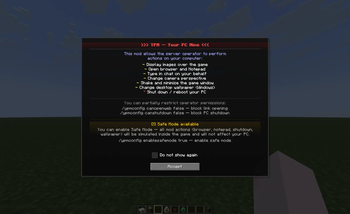
/ypm disclaimer <player>
Shows the YPM disclaimer screen to the player.
🔁 Interactive overlay — /ypmutil
/ypmutil overlaytext <overlay_to> <time> <size> <scaleX> <scaleY> <color> [chat_from] [--random] [--sound] [--mctext]
Starts an interactive overlay session. Whatever the designated player (chat_from, or the command executor by default) types in chat gets sent live as overlay text to overlay_to — instead of being posted in chat. Supports player names, comma-separated lists, or r<N> for radius (e.g. r20 = all players within 20 blocks).
Useful for ARGs where a "system" character types messages that appear directly on someone's screen in real time.
/ypmutil stop [<player>]
Ends the active overlay session. Without an argument, stops your own session.
🛡️ Player protection — /ypmconfig
Players can restrict what the operator is allowed to do on their machine:
/ypmconfig canopenweb <true|false>
Block the operator from opening URLs in the browser. When blocked, a fake browser window appears inside the game instead.
/ypmconfig canshutdown <true|false>
Block shutdown and reboot commands. When blocked, a fake shutdown/reboot screen appears inside the game — the PC is not touched.
/ypmconfig enablesafemode <true|false>
Enable Safe Mode — the most complete protection. All out-of-game actions (browser, Notepad, shutdown) are fully simulated inside Minecraft. Nothing reaches the real OS.
Running /ypmconfig with no arguments shows your current settings.
📡 Operator feedback
When you run any /ypm command, the server tells you the mode each player is in:
[YPM] Error sent to 3 player(s) | Normal: 2, SafeMode: 1
So if you're running an ARG with a group, you always know who gets the real effect and who is in safe mode.
🎭 Made for ARGs, horror maps, and pranks between friends on private servers. Please don't be evil.
Available Versions
How to Install Your PC Mine on Your Server
Order Server
Order a Minecraft Java server with at least 3 GB RAM (4 GB recommended).
Set fabric Loader
In the panel under "Egg", select the fabric loader and matching Minecraft version (1.21.11).
Install Mod
Open the mod browser in the dashboard and search for "Your PC Mine". Click "Install" – done! Alternatively, upload the .jar via SFTP to the /mods folder.
Compatibility
Mod Loaders
Minecraft Versions
1.21.11
Server-side
✓ RequiredRecommended RAM
4 GB(min. 3 GB)Frequently Asked Questions
Your PC Mine server crashes on startup – what to do?
Most common cause: wrong fabric version or insufficient RAM. Check the server log (latest.log) for "OutOfMemoryError" or "Mixin" errors. With Mado Hosting: ensure at least 3 GB RAM is allocated and the loader matches the mod version (1.21.11). You can switch loaders with one click in the panel.
Is Your PC Mine compatible with fabric?
Your PC Mine officially supports fabric for Minecraft 1.21.11. The Mado dashboard automatically detects incompatible loader combinations.
Server lagging with Your PC Mine – how to optimize performance?
Recommended RAM: 4 GB (per 8 players). Use /spark profiler to check if Your PC Mine consumes the most tick time. Common fixes: reduce server view-distance to 8-10, install "performant" or "starlight" as supplementary mods on Forge. With Mado Hosting, your server runs on NVMe SSDs with dedicated CPU cores for minimal latency.
Similar Mods





Rent Modded Server
Install Your PC Mine with just one click on your server.