
YTChatToMinecraft
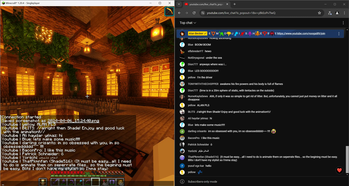
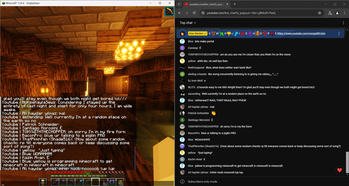
A *mostly* simple to use mod that allows you to put any YouTube chat into your in-game Minecraft chat.
Screenshots
About this Mod
YT Chat to Minecraft
A mostly simple to use mod that allows you to put any YouTube chat into your in-game Minecraft chat.
How to use
This is a Fabric mod, so you'll need Fabric installed first. Once you have it installed you'll need to place the mod in your mod folder.
This is where it gets kinda hard
A video tutorial on this will be released soon
IMPORTANT: THIS ONLY WORKS ON CHROMIUM BASED BROWSERS (idk why). I also suggest you to have Minecraft open for these steps to make sure that everything is working.
Firstly, open your live stream chat, and pop it out. To do this, open your live stream and click the 3 vertical dots on the chat frame and click the box with the arrow on it. Once it's popped out, you then need to open Dev Tools. You can do this by pressing Ctrl + Shift + I. When Dev Tools open, look for the "Console" tab on there and click it. For this next part you'll need to copy and paste code into the Dev Tools console, so you'll need to allow pasting by typing 'allow pasting' into the console.
Now all you gotta do to copy and paste this code into your console, and check Minecraft to see if you got the "Connection Started" message. If you do, you are ready! Just make sure to keep the browser open.
If you think you messed up any of the steps above, you can just reload the browser window to try again.
Why?
The normal and intended method of getting a live YouTube Chat isn't the best, and you'll hit a limit in the amount of messages you can fetch from your chat. The intended way to fix this is to pay for more API requests. But that isn't ideal for small streamers that do this for fun, so this is a workaround the intended method to help smaller creators that want this.
Available Versions
How to Install YTChatToMinecraft on Your Server
Order Server
Order a Minecraft Java server with at least 3 GB RAM (4 GB recommended).
Set fabric Loader
In the panel under "Egg", select the fabric loader and matching Minecraft version (1.20.4).
Install Mod
Open the mod browser in the dashboard and search for "YTChatToMinecraft". Click "Install" – done! Alternatively, upload the .jar via SFTP to the /mods folder.
Compatibility
Mod Loaders
Minecraft Versions
1.20.4
Server-side
✗ UnsupportedRecommended RAM
4 GB(min. 3 GB)Frequently Asked Questions
YTChatToMinecraft server crashes on startup – what to do?
Most common cause: wrong fabric version or insufficient RAM. Check the server log (latest.log) for "OutOfMemoryError" or "Mixin" errors. With Mado Hosting: ensure at least 3 GB RAM is allocated and the loader matches the mod version (1.20.4). You can switch loaders with one click in the panel.
Is YTChatToMinecraft compatible with fabric?
YTChatToMinecraft officially supports fabric for Minecraft 1.20.4. The Mado dashboard automatically detects incompatible loader combinations.
Server lagging with YTChatToMinecraft – how to optimize performance?
Recommended RAM: 4 GB (per 8 players). Use /spark profiler to check if YTChatToMinecraft consumes the most tick time. Common fixes: reduce server view-distance to 8-10, install "performant" or "starlight" as supplementary mods on Forge. With Mado Hosting, your server runs on NVMe SSDs with dedicated CPU cores for minimal latency.
Similar Mods






Rent Modded Server
Install YTChatToMinecraft with just one click on your server.