
yyz's backpack compat
Makes yyz's backpack support more mods' menus
Screenshots
About this Mod
yyz's backpack compat
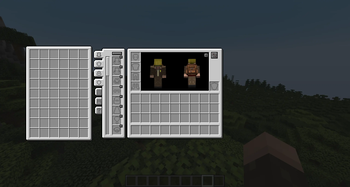
A compatibility mod for yyz's backpack that extends its backpack side-panel display into menus added by other mods.
yyz's backpack by default only shows the backpack panel in vanilla menus (chest, crafting table, furnace, etc.) and a few select mods (like Applied Energistics 2). This mod adds support for a wide range of popular modded menus so you can access your backpack from anywhere.
How it works
The base mod's backpack panel has to be initialized for each menu. This mod does exactly that via mixins. Each mixin only activates if the related mod is installed.
For screens with variable width (like the Accessories mod's experimental equipment screen), the mod queries the host mod's own API to calculate the correct offset dynamically, so the backpack panel never overlaps with the main UI.
Supported mods
Each integration only activates if the matching mod is present, so any combination works out of the box.
| Mod | Supported menus |
|---|---|
| The Aether | Altar, Freezer, Incubator, Book of Lore |
| Deep Aether | Combiner |
| Accessories | Original + Experimental screens (with dynamic sizing) |
| Armor Statues | Equipment screen (only screen with player inventory) |
| Better Archeology | Fossil Inventory, Identifying |
| CERBON's Better Beacons | New Beacon Menu |
| Chisel Reborn | Chisel |
| Corpse | Corpse Inventory, Additional Items |
| Create | Toolbox, Crafting Blueprint, Schematic Table, Schematicannon |
| Exposure | Lightroom |
| Farmer's Delight | Cooking Pot |
| Universal Sawmill | Sawmill |
| SecurityCraft | Inventory Scanner, Briefcase |
| Spectrum | Pedestal, Crafting Tablet, Fabrication Chest, Compacting Chest, Black Hole Chest, Potion Workshop, Color Picker, Cinderhearth, Filtering, Particle Spawner, 3x3 Containers |
| Storage Drawers | All drawer containers |
Menus from mods that extend vanilla menus (Easy Anvils, Easy Magic, Visual Workbench, Trading Post, SecurityCraft keypad furnaces) are already supported by yyz's backpack itself via class inheritance, no extra compat needed.
Requirements
- Minecraft 1.21.1
- NeoForge 21.1.226+
- yyz's backpack 21.1.2+
Credits
Based on yyz's backpack by yyz729.
Available Versions
How to Install yyz's backpack compat on Your Server
Order Server
Order a Minecraft Java server with at least 3 GB RAM (4 GB recommended).
Set neoforge Loader
In the panel under "Egg", select the neoforge loader and matching Minecraft version (1.21.1).
Install Mod
Open the mod browser in the dashboard and search for "yyz's backpack compat". Click "Install" – done! Alternatively, upload the .jar via SFTP to the /mods folder.
Compatibility
Mod Loaders
Minecraft Versions
1.21.1
Server-side
✓ RequiredRecommended RAM
4 GB(min. 3 GB)Frequently Asked Questions
yyz's backpack compat server crashes on startup – what to do?
Most common cause: wrong neoforge version or insufficient RAM. Check the server log (latest.log) for "OutOfMemoryError" or "Mixin" errors. With Mado Hosting: ensure at least 3 GB RAM is allocated and the loader matches the mod version (1.21.1). You can switch loaders with one click in the panel.
Is yyz's backpack compat compatible with neoforge?
yyz's backpack compat officially supports neoforge for Minecraft 1.21.1. The Mado dashboard automatically detects incompatible loader combinations.
Server lagging with yyz's backpack compat – how to optimize performance?
Recommended RAM: 4 GB (per 8 players). Use /spark profiler to check if yyz's backpack compat consumes the most tick time. Common fixes: reduce server view-distance to 8-10, install "performant" or "starlight" as supplementary mods on Forge. With Mado Hosting, your server runs on NVMe SSDs with dedicated CPU cores for minimal latency.
Similar Mods



![[TaCZ] Timeless and Classics Zero](https://cdn.modrinth.com/data/SzzJttH8/fd27766d2bb8390d284696b1dbd358f87e081439_96.webp)


Rent Modded Server
Install yyz's backpack compat with just one click on your server.