
Zavarushka Mod
✨Мод для игры в Заварушку! Тут вы получите актуальную информацию о персонажах, картах, механиках игры и многое другое! ✨A mod for playing Zavarushka! Here you will get up-to-date information about the characters, maps, game mechanics and much more!
Screenshots
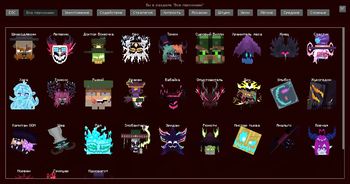
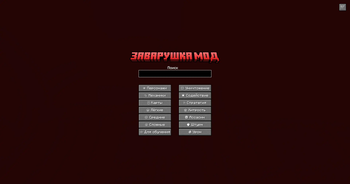
About this Mod
⚡ Мод для игры в Заварушку!
На данный момент мод даёт возможность просмотреть актуальную информацию о персонажах, аренах и механиках игры Заварушка. В дальнейшем мод будет развиваться ещё сильней, чтобы с его помощью вы могли играть в игру записывая все данные не на табличку в игре, а в сам мод!
Чтобы открыть меню мода вы можете нажать кнопку "Z" в игре. Изменить кнопку можно в Настройки -> Управление -> Zavarushka Mod .
Следите за обновлениями, в них рассказано, что появилось в моде.
⚡ A mod for playing Zavarushka!
At the moment, the mod gives you the opportunity to view up-to-date information about the characters, arenas and mechanics of the game Zavarushka. In the future, the mod will develop even more strongly, so that with its help you can play the game by writing all the data not on the tablet in the game, but in the mod itself!
To open the mod menu, you can press the "Z" button in the game. You can change the button in Settings -> Management -> Zavarushka Mod .
Stay tuned for updates, they tell you what's in fashion.
Available Versions
How to Install Zavarushka Mod on Your Server
Order Server
Order a Minecraft Java server with at least 3 GB RAM (4 GB recommended).
Set fabric Loader
In the panel under "Egg", select the fabric loader and matching Minecraft version (1.21.5).
Install Mod
Open the mod browser in the dashboard and search for "Zavarushka Mod". Click "Install" – done! Alternatively, upload the .jar via SFTP to the /mods folder.
Compatibility
Mod Loaders
Minecraft Versions
1.21.5, 1.21.4, 1.21.3 (+2 more)
Server-side
✗ UnsupportedRecommended RAM
4 GB(min. 3 GB)Frequently Asked Questions
Zavarushka Mod server crashes on startup – what to do?
Most common cause: wrong fabric version or insufficient RAM. Check the server log (latest.log) for "OutOfMemoryError" or "Mixin" errors. With Mado Hosting: ensure at least 3 GB RAM is allocated and the loader matches the mod version (1.21.5). You can switch loaders with one click in the panel.
Is Zavarushka Mod compatible with fabric?
Zavarushka Mod officially supports fabric for Minecraft 1.21.5, 1.21.4, 1.21.3. The Mado dashboard automatically detects incompatible loader combinations.
Server lagging with Zavarushka Mod – how to optimize performance?
Recommended RAM: 4 GB (per 8 players). Use /spark profiler to check if Zavarushka Mod consumes the most tick time. Common fixes: reduce server view-distance to 8-10, install "performant" or "starlight" as supplementary mods on Forge. With Mado Hosting, your server runs on NVMe SSDs with dedicated CPU cores for minimal latency.
Similar Mods


Rent Modded Server
Install Zavarushka Mod with just one click on your server.