
Zefir's Optimizations
Mod that adds async entity movement using Akka actors
Screenshots
About this Mod
Zefir's Optimizations
Zefir's Optimizations is a Fabric mod that adds parallel entity movement using Akka actors. It focuses primarily on separating the movement ticking of mobs and armor stands from the main thread. This can gradually improve the performance on the multi-core server.
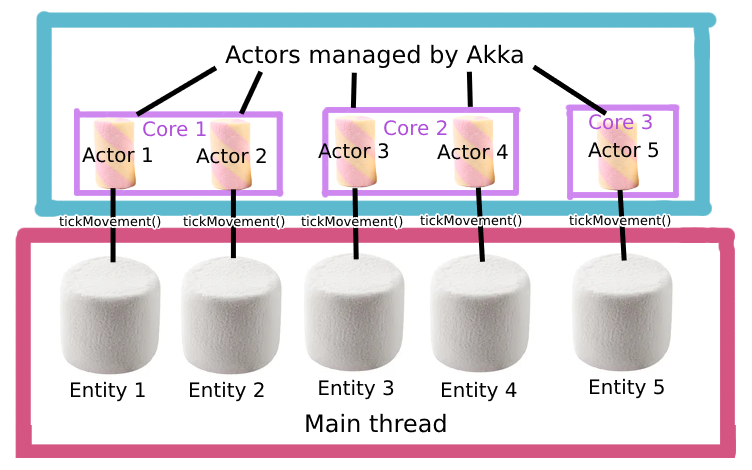
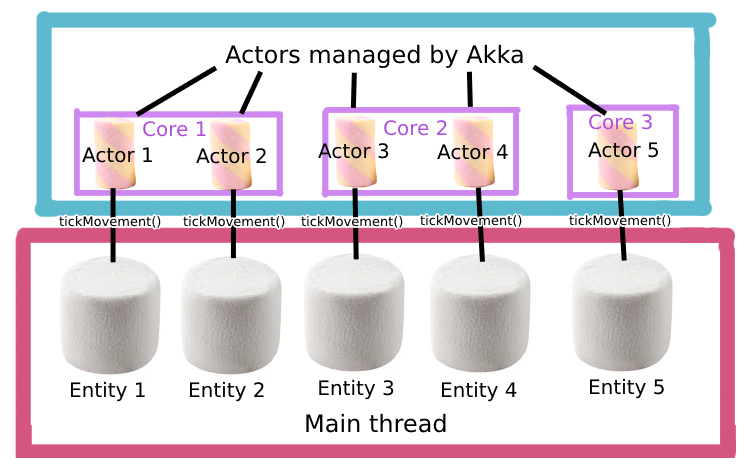
It works by attaching an actor to each MobEntity and ArmorStand and redirecting movement calls and executing them on diffirent thread. For now, only the basic movement logic from Entity and LivingEntity is implemented.
You must to have atleast 2 cores to see the diffirence! The more cores, the better.
How it works
Each mob and armor stand gets its own actor. When it's time for the entity to tick its movement logic, the Async Tick Manager tells the corresponding Entity Actor to do the work. The Entity Actor receives messages to its mailbox and processes them one by one.Some actions, like dealing damage or picking up items, must be done on the main thread for safety reasons. When an Entity Actor needs to do one of these actions, it sends a message to the Main Thread Actor that do the work on main thread.
For now, Entity Actor implements tickMovement() and travel() from LivingEntity and MobEntity (armor stand inherits it form LivingEntity).

It may and will be VERY broken. It can broke your etities, your world and your dog. You have been warned.
Rport any issues in our Discord!
Available Versions
How to Install Zefir's Optimizations on Your Server
Order Server
Order a Minecraft Java server with at least 3 GB RAM (4 GB recommended).
Set fabric Loader
In the panel under "Egg", select the fabric loader and matching Minecraft version (1.21.1).
Install Mod
Open the mod browser in the dashboard and search for "Zefir's Optimizations". Click "Install" – done! Alternatively, upload the .jar via SFTP to the /mods folder.
Compatibility
Mod Loaders
Minecraft Versions
1.21.1, 1.21
Server-side
✓ RequiredRecommended RAM
4 GB(min. 3 GB)Frequently Asked Questions
Zefir's Optimizations server crashes on startup – what to do?
Most common cause: wrong fabric version or insufficient RAM. Check the server log (latest.log) for "OutOfMemoryError" or "Mixin" errors. With Mado Hosting: ensure at least 3 GB RAM is allocated and the loader matches the mod version (1.21.1). You can switch loaders with one click in the panel.
Is Zefir's Optimizations compatible with fabric?
Zefir's Optimizations officially supports fabric for Minecraft 1.21.1, 1.21. The Mado dashboard automatically detects incompatible loader combinations.
Server lagging with Zefir's Optimizations – how to optimize performance?
Recommended RAM: 4 GB (per 8 players). Use /spark profiler to check if Zefir's Optimizations consumes the most tick time. Common fixes: reduce server view-distance to 8-10, install "performant" or "starlight" as supplementary mods on Forge. With Mado Hosting, your server runs on NVMe SSDs with dedicated CPU cores for minimal latency.
Similar Mods





Rent Modded Server
Install Zefir's Optimizations with just one click on your server.
Details
- License
- Creative Commons Attribution Share Alike 4.0 International
- Server-side
- Required