
ZenithX Mod
Host your Minecraft world, invite friends, and play together without setting up a server. Supports Discord Rich Presence and Simple Voice Chat.
Screenshots
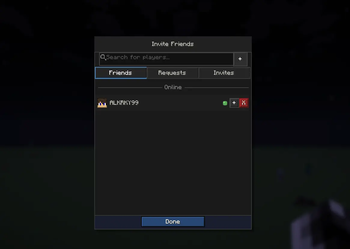
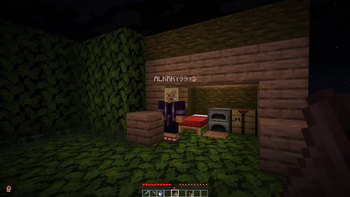
About this Mod
ZenithX Mod
ZenithX is a multiplayer utility mod that allows you to host your Minecraft world and play with friends without creating a dedicated server or configuring port forwarding.
It is designed for players who cannot easily host servers due to NAT or CGNAT network restrictions.
Features
- Host your singleplayer world for online multiplayer
- No port forwarding required
- Invite friends with a simple sharing system
- Fast setup with minimal configuration
- Discord Rich Presence integration
- Compatible with Simple Voice Chat
- Fabric support
- Lightweight and easy to use
How It Works
When you open your world to multiplayer, ZenithX connects your game session to a relay service. This is required because many networks use NAT or CGNAT, which prevents direct connections between players.
Friends join your world through an invite system that routes their connection through the relay.
Important Information
- ZenithX requires a user account to manage sessions and invites
- The mod depends on a relay service for connectivity
- The mod is completely free to use, with no payments or subscriptions
- No configuration or setup is required from the user
- There is no fixed player limit, but performance depends on relay stability and network conditions
- All connections are handled through secure relay infrastructure
Why Use ZenithX?
Setting up multiplayer can be difficult for many players. Dedicated servers require setup, and port forwarding is often unavailable or confusing.
ZenithX simplifies multiplayer by allowing you to:
- Open your world
- Create an invite
- Share it with friends
- Start playing instantly
No server management. No networking setup. Just multiplayer.
Compatibility
- Minecraft Fabric
- Discord Rich Presence
- Simple Voice Chat
Support
If you encounter issues or have suggestions, please report them through the issue tracker.
Available Versions
How to Install ZenithX Mod on Your Server
Order Server
Order a Minecraft Java server with at least 3 GB RAM (4 GB recommended).
Set fabric Loader
In the panel under "Egg", select the fabric loader and matching Minecraft version (26.1.2).
Install Mod
Open the mod browser in the dashboard and search for "ZenithX Mod". Click "Install" – done! Alternatively, upload the .jar via SFTP to the /mods folder.
Compatibility
Mod Loaders
Minecraft Versions
26.1.2, 26.1.1, 26.1
Server-side
✗ UnsupportedRecommended RAM
4 GB(min. 3 GB)Frequently Asked Questions
ZenithX Mod server crashes on startup – what to do?
Most common cause: wrong fabric version or insufficient RAM. Check the server log (latest.log) for "OutOfMemoryError" or "Mixin" errors. With Mado Hosting: ensure at least 3 GB RAM is allocated and the loader matches the mod version (26.1.2). You can switch loaders with one click in the panel.
Is ZenithX Mod compatible with fabric?
ZenithX Mod officially supports fabric for Minecraft 26.1.2, 26.1.1, 26.1. The Mado dashboard automatically detects incompatible loader combinations.
Server lagging with ZenithX Mod – how to optimize performance?
Recommended RAM: 4 GB (per 8 players). Use /spark profiler to check if ZenithX Mod consumes the most tick time. Common fixes: reduce server view-distance to 8-10, install "performant" or "starlight" as supplementary mods on Forge. With Mado Hosting, your server runs on NVMe SSDs with dedicated CPU cores for minimal latency.
Similar Mods






Rent Modded Server
Install ZenithX Mod with just one click on your server.