
Armor HUD
Armor HUD adds a clean, modern overlay that displays your armor durability, protection level, and equipped gear status directly on screen. Designed for PvP and survival players, it helps you track armor wear in real time without opening your inventory.
Screenshots
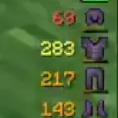

About this Mod
Armor HUD is a clean, modern on‑screen display that shows your armor durability, protection level, and equipped gear status at all times. Instead of opening your inventory mid‑fight, the HUD gives you a real‑time breakdown of how close each armor piece is to breaking, helping you avoid losing gear during PvP, boss fights, or hardcore survival runs.
The mod reads your current armor values and displays them in a compact, unobtrusive overlay that fits naturally into any HUD layout. Durability values update every tick, and color‑coding makes it easy to see which pieces are healthy, damaged, or about to break. This makes Armor HUD especially useful for PvP players who need instant information, speedrunners who can’t afford to stop moving, and survival players who want better awareness without clutter.
Armor HUD is lightweight, fully client‑side, and compatible with virtually any modpack or server. Whether you’re fighting players, exploring dangerous structures, or grinding mobs, this mod ensures you always know the exact state of your armor at a glance.
Available Versions
How to Install Armor HUD on Your Server
Order Server
Order a Minecraft Java server with at least 3 GB RAM (4 GB recommended).
Set fabric Loader
In the panel under "Egg", select the fabric loader and matching Minecraft version (1.21.11).
Install Mod
Open the mod browser in the dashboard and search for "Armor HUD". Click "Install" – done! Alternatively, upload the .jar via SFTP to the /mods folder.
Compatibility
Mod Loaders
Minecraft Versions
1.21.11
Server-side
✗ UnsupportedRecommended RAM
4 GB(min. 3 GB)Frequently Asked Questions
Armor HUD server crashes on startup – what to do?
Most common cause: wrong fabric version or insufficient RAM. Check the server log (latest.log) for "OutOfMemoryError" or "Mixin" errors. With Mado Hosting: ensure at least 3 GB RAM is allocated and the loader matches the mod version (1.21.11). You can switch loaders with one click in the panel.
Is Armor HUD compatible with fabric?
Armor HUD officially supports fabric for Minecraft 1.21.11. The Mado dashboard automatically detects incompatible loader combinations.
Server lagging with Armor HUD – how to optimize performance?
Recommended RAM: 4 GB (per 8 players). Use /spark profiler to check if Armor HUD consumes the most tick time. Common fixes: reduce server view-distance to 8-10, install "performant" or "starlight" as supplementary mods on Forge. With Mado Hosting, your server runs on NVMe SSDs with dedicated CPU cores for minimal latency.
Similar Mods



![[TaCZ] Timeless and Classics Zero](https://cdn.modrinth.com/data/SzzJttH8/fd27766d2bb8390d284696b1dbd358f87e081439_96.webp)


Rent Modded Server
Install Armor HUD with just one click on your server.