
Zqil's Discord Status
An over-engineered Minecraft-Discord status bot. Updates in real-time.
Screenshots
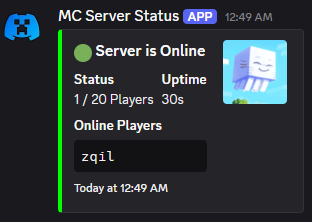
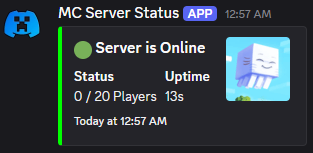


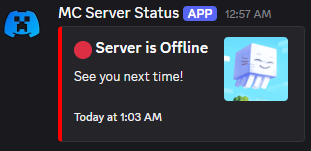
About this Mod
An over-engineered Discord status bot for your Minecraft server.
Note: It's server-side only.
Features:
Obsessively Configurable: Almost every piece of text and styling in the Discord embed can be changed in the config file.
Real-Time Updates: The status message updates automatically when players join or leave.
Dynamic Bot Activity: The bot's "Playing" status can show the current player count, with custom messages for when the server is empty or full.
Data-Rich Fields: Optionally display TPS, server uptime, IP address, and a clean, formatted list of online players.
Smart & Reliable:
If the status message is accidentally deleted, the bot will automatically create a new one.
Includes connection retries in case Discord has a momentary hiccup during server startup.
Survives a Ctrl+C, making sure to send a status update as its last breath. WILL NOT SURVIVE A TERMINAL CLOSE!
Easy Management: A simple in-game command (/discordstatus update) lets you reload the config on the fly without restarting the server.
Server Icon Support: Automatically use your server-icon.png as the thumbnail for the embed.
Setup Guide:
Create a Discord Bot: Go to the Discord Developer Portal, create a new Application, and add a Bot to it. You'll need its Token.
Invite Your Bot: In the "OAuth2" -> "URL Generator" section, select the
botscope, then grant itSend Messages,Manage Messages, andRead Message Historypermissions. Copy the generated URL and use it to invite the bot to your server.Get Your Channel ID: Right-click the channel where you want the status message to live and click "Copy Channel ID". (You may need to enable Developer Mode in your Discord settings).
Install & Configure:
- Drop the mod's
.jarfile into your server'smodsfolder. - Start the server once to generate the default config file. It will print an error and stop, which is normal.
- Open
config/discord_status/discord_status.json. - Paste your Bot Token and Channel ID into the
botTokenandchannelIdfields. - Restart the server. The bot will connect and post its first message!
- Drop the mod's
Available Versions
How to Install Zqil's Discord Status on Your Server
Order Server
Order a Minecraft Java server with at least 3 GB RAM (4 GB recommended).
Set fabric Loader
In the panel under "Egg", select the fabric loader and matching Minecraft version (1.21.6).
Install Mod
Open the mod browser in the dashboard and search for "Zqil's Discord Status". Click "Install" – done! Alternatively, upload the .jar via SFTP to the /mods folder.
Compatibility
Mod Loaders
Minecraft Versions
1.21.6
Server-side
✓ RequiredRecommended RAM
4 GB(min. 3 GB)Frequently Asked Questions
Zqil's Discord Status server crashes on startup – what to do?
Most common cause: wrong fabric version or insufficient RAM. Check the server log (latest.log) for "OutOfMemoryError" or "Mixin" errors. With Mado Hosting: ensure at least 3 GB RAM is allocated and the loader matches the mod version (1.21.6). You can switch loaders with one click in the panel.
Is Zqil's Discord Status compatible with fabric?
Zqil's Discord Status officially supports fabric for Minecraft 1.21.6. The Mado dashboard automatically detects incompatible loader combinations.
Server lagging with Zqil's Discord Status – how to optimize performance?
Recommended RAM: 4 GB (per 8 players). Use /spark profiler to check if Zqil's Discord Status consumes the most tick time. Common fixes: reduce server view-distance to 8-10, install "performant" or "starlight" as supplementary mods on Forge. With Mado Hosting, your server runs on NVMe SSDs with dedicated CPU cores for minimal latency.
Similar Mods






Rent Modded Server
Install Zqil's Discord Status with just one click on your server.