ZSpeed
A Speedster Type Mod Made by Yours Truly -Zacronium!
About this Mod
What you need to know!
YOU NEED THESE MODS:
tickrate api
player animator
There are currently 3 suits:
^ Flash
^ Reverse Flash
^ Zoom
Key Bindings:
Y = Increase Speed
H = Decrease Speed
R = Enable/Disable Speed
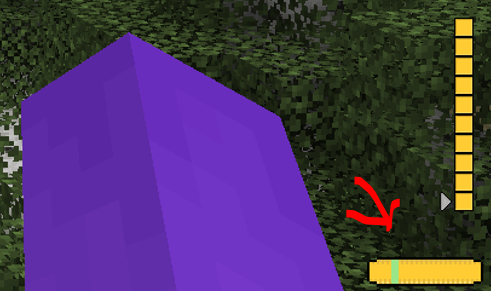
There Is a small meter at the bottom of your screen.
Use Jei or go to https://legacy.curseforge.com/minecraft/mc-mods/zspeed to see the recipies!
Suit Textures:
I had some preset suits I didn't make, I took them out but now only the flash suit has a texture, they still work. They just don't have textures. I will work on them!
Bugs:
There are a few Bugs that I am aware of and trying to fix!
^ Crash - Index (number prob 20-30) Invalid in length 0, This is a bug with the trail, its not you, and its rare. But It can happen, I will try to eliminate it in future versions.
^ Trail is off!!! - At a 45 degree and -135 degree angle the trail is not directly behind the player. I'm not entirely sure why this is. But I will continue to crack at it in the future.
^ Other Players can't see my trail! - This is because of how I render the trail. I render it directly to the client and not the game itself. I will work on multiplayer compatibility, But Its not here yet!
MULTIPLAYER IS RESTRICTED:
The way I coded some of the features makes it single player only. This mod WILL work in multiplayer, It just wont look as cool :( , I am working on making it compatible, but for now, Only you can see your trail.
I will update this mod over time (especially if yall like it)
Available Versions
How to Install ZSpeed on Your Server
Order Server
Order a Minecraft Java server with at least 3 GB RAM (4 GB recommended).
Set forge Loader
In the panel under "Egg", select the forge loader and matching Minecraft version (1.20.1).
Install Mod
Open the mod browser in the dashboard and search for "ZSpeed". Click "Install" – done! Alternatively, upload the .jar via SFTP to the /mods folder.
Compatibility
Mod Loaders
Minecraft Versions
1.20.1
Server-side
✓ RequiredRecommended RAM
4 GB(min. 3 GB)Frequently Asked Questions
ZSpeed server crashes on startup – what to do?
Most common cause: wrong forge version or insufficient RAM. Check the server log (latest.log) for "OutOfMemoryError" or "Mixin" errors. With Mado Hosting: ensure at least 3 GB RAM is allocated and the loader matches the mod version (1.20.1). You can switch loaders with one click in the panel.
Is ZSpeed compatible with forge?
ZSpeed officially supports forge for Minecraft 1.20.1. The Mado dashboard automatically detects incompatible loader combinations.
Server lagging with ZSpeed – how to optimize performance?
Recommended RAM: 4 GB (per 8 players). Use /spark profiler to check if ZSpeed consumes the most tick time. Common fixes: reduce server view-distance to 8-10, install "performant" or "starlight" as supplementary mods on Forge. With Mado Hosting, your server runs on NVMe SSDs with dedicated CPU cores for minimal latency.
Similar Mods



![[TaCZ] Timeless and Classics Zero](https://cdn.modrinth.com/data/SzzJttH8/fd27766d2bb8390d284696b1dbd358f87e081439_96.webp)


Rent Modded Server
Install ZSpeed with just one click on your server.