
Zusz's CoffeeCraft
A simple mod, that adds coffee to minecraft!
Screenshots
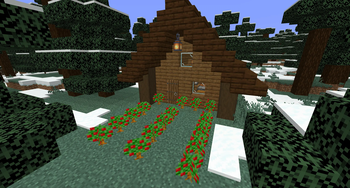
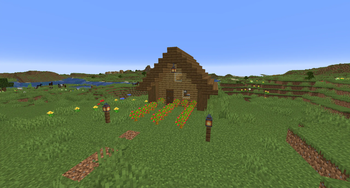
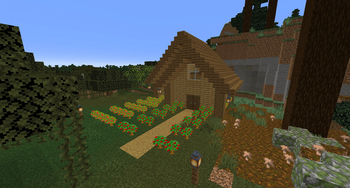

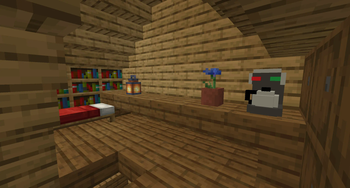
About this Mod
☕ Zusz’s Coffee Craft
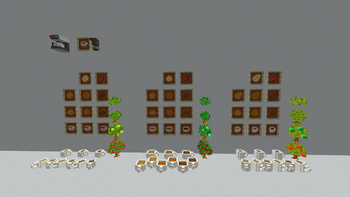
Brew flavor into your Minecraft world! Zusz’s Coffee Craft is a charming little mod that transforms your adventures with coffee plants, tools, drinks, and quirky structures—perfect for players who enjoy immersive, homely touches in Minecraft.
✨ Mod Features
- Three Coffee Types: Arabica, Robusta, Liberica
- Roasting Levels: Raw, Light, Medium, Dark
- Brewing System: Nine distinct coffee variants (combining roast and bean type)
- Interactive Items: Coffee machine, coffee cups
- Special Structure: Coffee Hut—a little world-gen building with coffee bushes and brewing essentials (variants: Basic, Dark, Big)
- Villager Integration: Trade coffee items with villagers
- JEI Integration: Recipe viewing support (occasional glitches)
🌍 Versions
1.20.6 (NeoForge)
1.20.4 (NeoForge)
1.20.1 (Forge)
1.19.4 (Forge, up to 1.1.0)
📜 Version Highlights (Changelog)
| Version | What's New |
|---|---|
| 1.4.1 | • Introduced two new Achievements • Revamped villager trades |
| 1.4.0 | • Stackable, placeable coffee cups (Place with Sneak + Right-click; Pick up with Right-click) • Coffee bushes now grow when bonemealed (one stage at a time) • Added coffee grinder block (non-functional and creative-only; future use hinted) |
| 1.3.1 (Hotfix) | • Added JEI recipes for Liberica coffee • Fixed Coffee Huts generating with open doors (fixed loot table mishap) |
| 1.3.0 (Liberica Update) | • New Liberica bean line (bush, cherry, beans, ground forms, cup) • Adjusted Coffee Hut loot tables • Expanded Liberica-related villager trades (farmer, wandering trader) • Beans now smelt in half the time • Grinded coffee recipe changed from 9 to 6 beans • Liberica coffee grants a Strength effect |
| 1.2.0 (Coffee Cherry Update) | • Added Arabica and Robusta coffee cherries • Coffee bushes now drop cherries instead of raw beans • Cherries craft into raw beans • Grinded coffee recipe adjusted from 9 to 6 beans |
| 1.1.0 (Robusta Update) | • Introduced Robusta coffee items (bush, beans, ground coffee, cups) • Cold-biome “Dark” Coffee Hut featuring Robusta bushes • Large Coffee Hut variant with both coffee types and extra loot • Added additional villager trades and JEI integration |
| 1.0.1 (Hotfix) | • Fixed Coffee Hut generation bug |
| 1.0.0 (First Release) | • Introduced coffee machine, cup, Arabica line, Coffee Hut, villager trades, JEI compatibility |
⚠️ Important Note
As of May 30, 2025, Zusz’s Coffee Craft has been officially discontinued in favor of a brand-new project.
Thank you all for 1,000+ downloads and the amazing support—you made this mod a success! I hope you enjoyed the experience as much as I enjoyed creating it. ❤️
🌟 Looking Ahead: Zusz’s CoffeeCraft2: ReBrewed
Introducing the next chapter: Zusz’s CoffeeCraft2: ReBrewed—a reimagined successor bringing fresh mechanics and deeper coffee gameplay.
☕ New Features:
- 264 unique coffee combinations
- A brand-new caffeine system with perks and side-effects
- Dynamic brewing, where ingredients truly matter
- Full JEI integration for recipes and results
- And more exciting content on the way!
Available for neoforge 1.21.0 and 1.21.1
👉 Check it out here: Zusz’s CoffeeCraft2: ReBrewed on CurseForge
🔗 Links
Zusz's CoffeeCraft2: ReBrewed
Original Zusz's CoffeeCraft
Zusz's Lil Donuts
Available Versions
How to Install Zusz's CoffeeCraft on Your Server
Order Server
Order a Minecraft Java server with at least 3 GB RAM (4 GB recommended).
Set forge Loader
In the panel under "Egg", select the forge loader and matching Minecraft version (1.21.1).
Install Mod
Open the mod browser in the dashboard and search for "Zusz's CoffeeCraft". Click "Install" – done! Alternatively, upload the .jar via SFTP to the /mods folder.
Compatibility
Mod Loaders
Minecraft Versions
1.21.1, 1.20.6, 1.20.4 (+2 more)
Server-side
✓ RequiredRecommended RAM
4 GB(min. 3 GB)Frequently Asked Questions
Zusz's CoffeeCraft server crashes on startup – what to do?
Most common cause: wrong forge version or insufficient RAM. Check the server log (latest.log) for "OutOfMemoryError" or "Mixin" errors. With Mado Hosting: ensure at least 3 GB RAM is allocated and the loader matches the mod version (1.21.1). You can switch loaders with one click in the panel.
Is Zusz's CoffeeCraft compatible with forge and neoforge?
Zusz's CoffeeCraft officially supports forge, neoforge for Minecraft 1.21.1, 1.20.6, 1.20.4. The Mado dashboard automatically detects incompatible loader combinations.
Server lagging with Zusz's CoffeeCraft – how to optimize performance?
Recommended RAM: 4 GB (per 8 players). Use /spark profiler to check if Zusz's CoffeeCraft consumes the most tick time. Common fixes: reduce server view-distance to 8-10, install "performant" or "starlight" as supplementary mods on Forge. With Mado Hosting, your server runs on NVMe SSDs with dedicated CPU cores for minimal latency.
Similar Mods



Rent Modded Server
Install Zusz's CoffeeCraft with just one click on your server.