
ZynAutoEat
Auto Eat that actually helps: off-hand first, smooth until full, respects your inputs, safe around fishing rods, and fully configurable via a clean, searchable blacklist UI (toggle-all/reset). Client-side only.
Screenshots

About this Mod

ZynAutoEat — Hands Free Auto Eat for Fabric & Forge
ZynAutoEat keeps your hunger full without stealing control from you. It automatically eats from your off-hand first, then main hand, then hotbar, and smoothly chains bites until full. It pauses the moment you right-click or open any GUI and resumes automatically afterward. Built as a lightweight client-side QoL mod, it works on servers that don’t have the mod installed.
Loaders: Fabric and Forge
This page hosts both builds. If a Forge build isn’t listed yet for your version, it’s in the pipeline.
Features
- Off-hand priority with hotbar fallback
- Smooth chain-eating until full (keeps the vanilla eating animation)
- Respects your inputs pauses on right-click and while any GUI is open; resumes when you’re done
- Fishing-rod safe avoids accidental cast/reel between bites
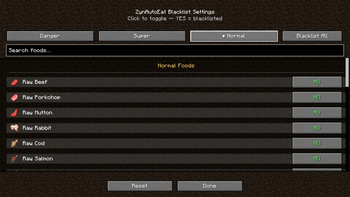
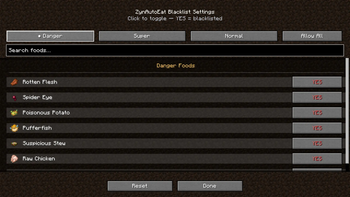
- In-game blacklist with Search, Toggle-All, and Reset
- Action-bar toggle message:
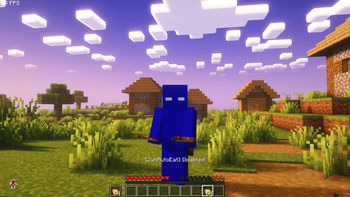
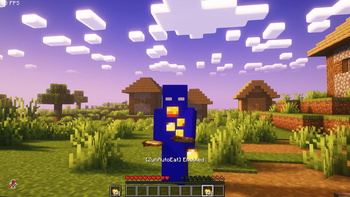
[ZynAutoEat] Enabled/Disabled - Client-side only; server-friendly
How it works
- Triggers eating only in Survival mode
- Chooses food in this order: Off-hand → Main hand → Hotbar
- Skips any item you’ve blacklisted in Settings
- Chains bites until your hunger is full, then stops
- Pauses instantly when you right-click or open a screen (chat/inventory/etc.), then resumes automatically
Settings (in-game)
Open ZynAutoEat Settings to configure per-item blacklist:
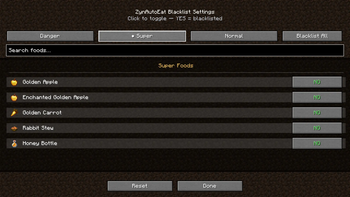
- Categories: Danger Foods, Super Foods, Normal Foods
- Search bar, Toggle-All, and Reset to defaults
- Settings are stored locally
Controls (default)
- H — Toggle ZynAutoEat
- J — Open ZynAutoEat Settings
Compatibility
- Client-side only (QoL): works on any server; no server component required
- Designed for Fabric & Forge (this project lists both)
Requirements
- Fabric: Fabric Loader + Fabric API
- Forge: Forge (no Fabric API required)
Installation
Fabric
- Install Fabric Loader and Fabric API for your Minecraft version
- Put the ZynAutoEat
.jarinto yourmods/folder - Launch the game, press H to enable, J to configure
Forge
- Install the Forge Loader for your Minecraft version
- Put the ZynAutoEat Forge
.jarinto yourmods/folder - Launch the game, press H to enable, J to configure
FAQ
- Will it eat “bad” foods (e.g., Rotten Flesh)?
Not if you blacklist them. The Settings screen ships with sensible defaults you can tweak anytime. - Does it work with custom modded foods?
Yes — if an item has a standardFoodComponent, it can be used (unless blacklisted). - Will it fight my right-click (RMB)?
No. The mod pauses immediately while you’re holding right-click and resumes after you release.
Credits
Author: Zynwro • Contact: https://www.linktr.ee/zynwro
Available Versions
How to Install ZynAutoEat on Your Server
Order Server
Order a Minecraft Java server with at least 3 GB RAM (4 GB recommended).
Set fabric Loader
In the panel under "Egg", select the fabric loader and matching Minecraft version (1.20.1).
Install Mod
Open the mod browser in the dashboard and search for "ZynAutoEat". Click "Install" – done! Alternatively, upload the .jar via SFTP to the /mods folder.
Compatibility
Mod Loaders
Minecraft Versions
1.20.1
Server-side
✗ UnsupportedRecommended RAM
4 GB(min. 3 GB)Frequently Asked Questions
ZynAutoEat server crashes on startup – what to do?
Most common cause: wrong fabric version or insufficient RAM. Check the server log (latest.log) for "OutOfMemoryError" or "Mixin" errors. With Mado Hosting: ensure at least 3 GB RAM is allocated and the loader matches the mod version (1.20.1). You can switch loaders with one click in the panel.
Is ZynAutoEat compatible with fabric and forge?
ZynAutoEat officially supports fabric, forge for Minecraft 1.20.1. Note: Forge and Fabric mods are NOT cross-compatible – pick one loader and stick with it. The Mado dashboard automatically detects incompatible loader combinations.
Server lagging with ZynAutoEat – how to optimize performance?
Recommended RAM: 4 GB (per 8 players). Use /spark profiler to check if ZynAutoEat consumes the most tick time. Common fixes: reduce server view-distance to 8-10, install "performant" or "starlight" as supplementary mods on Forge. With Mado Hosting, your server runs on NVMe SSDs with dedicated CPU cores for minimal latency.
Similar Mods



Rent Modded Server
Install ZynAutoEat with just one click on your server.