
Archipelago Randomizer
Randomize your game progression, potentially with completely separate video games!
Description
Archipelago Multi-World Randomizer
Experience Satisfactory in a whole new way by randomizing your game progression, potentially bringing completely separate video games into the mix too!
This mod is a [randomizer](https://tvtropes.org/pmwiki/pmwiki.php/Main/VideoGameRandomizer),
meaning it modifies your path of progression through the game,
requiring you to employ different approaches to reach your goals.
The randomizer's logic system ensures that the game can still be finished, but the path to get there is different every time.
You can also change when the game ends, such as finishing after only 2 space elevator shipments.
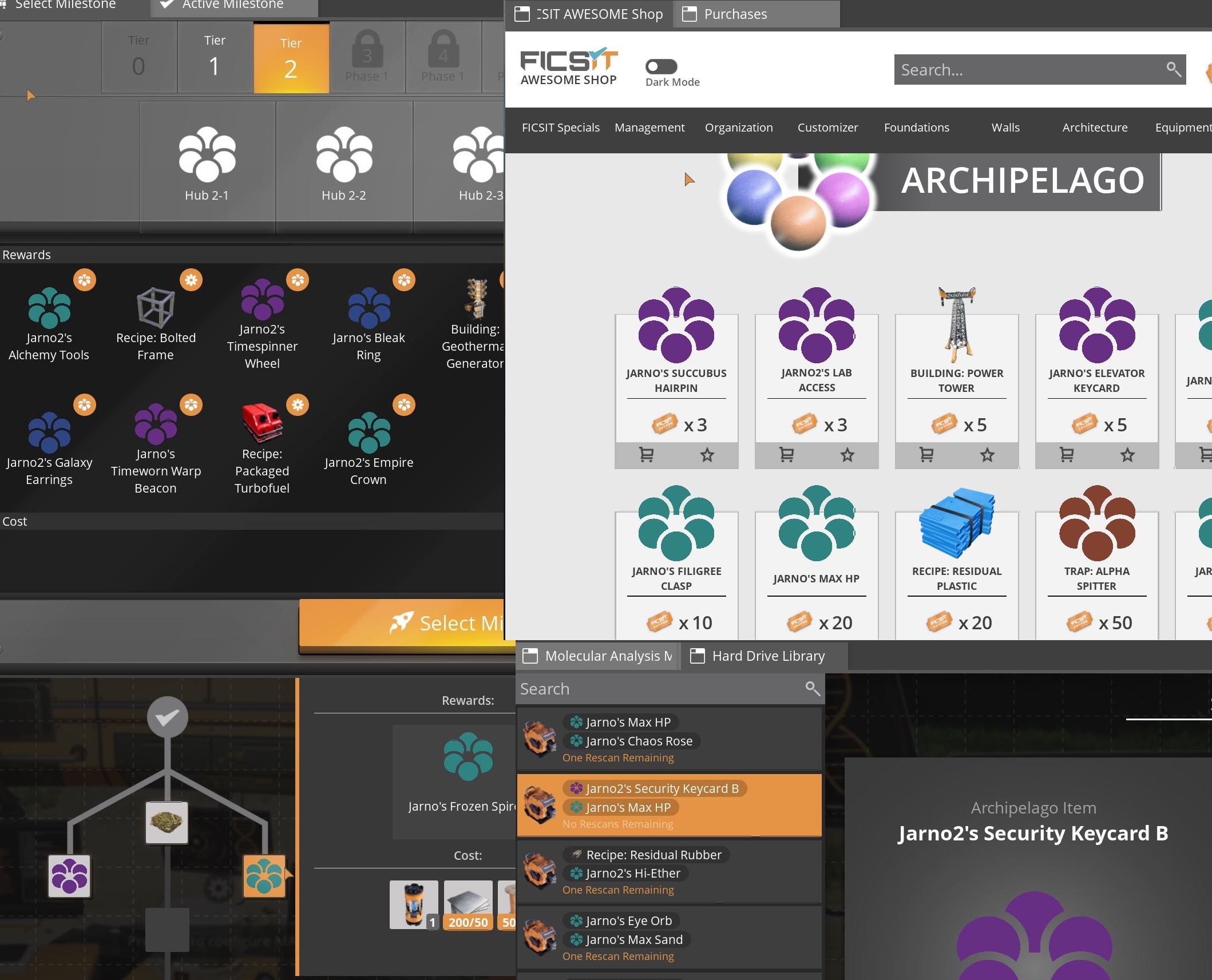
The mod will shuffle around all things you unlock in the HUB, MAM, and even add a few new unlocks to the AWESOME Shop.
You will have to assess all options available to you to find what to unlock next.
For example, if you need an Assembler to craft something but can't find where to get access to it,
you could try to unlock some more nodes in the MAM, as it might be hiding there.
The Archipelago randomizer allows progression from over 60 different games to be mixed,
this is called a multi-world randomizer.
[](https://raw.githubusercontent.com/Jarno458/SatisfactoryArchipelagoMod/main/Docs/random.jpg)
Notable Features
Archipelago Portal
Use Archipelago Portals to send and receive items from other compatible Archipelago games.
Send your friends your Nuclear Waste, send coffee mugs to Stardew Valley players, and more!
EnergyLink
Send and receive power from any compatible Archipelago game, such as other Satisfactory worlds, Factorio, or even Stardew Valley.
Simply build a Power Storage building and hook it up to your power grid.
Remember that Biomass Burners can't charge Power Storage buildings, the same as base game.
Multiple Goals
Choose between one or more of the following goals to complete your game:
- Space Elevator Shipments
- AWESOME Sink Points Total
- AWESOME Sink Points Per Minute
- Exploration
- Erect a FICSMAS Tree (requires using an [in-development version](https://github.com/Jarno458/SatisfactoryArchipelagoMod/blob/main/UseDevelopmentVersions.md))
How to Setup
For simplicity's sake, this guide focuses on setting up a single player experience.
For more complex games with more players feel free to visit [archipelago.gg](https://archipelago.gg/) and/or the [Archipelago Discord](https://discord.gg/archipelago).
Before you can start using the mod you will need to generate a randomized game using Archipelago.
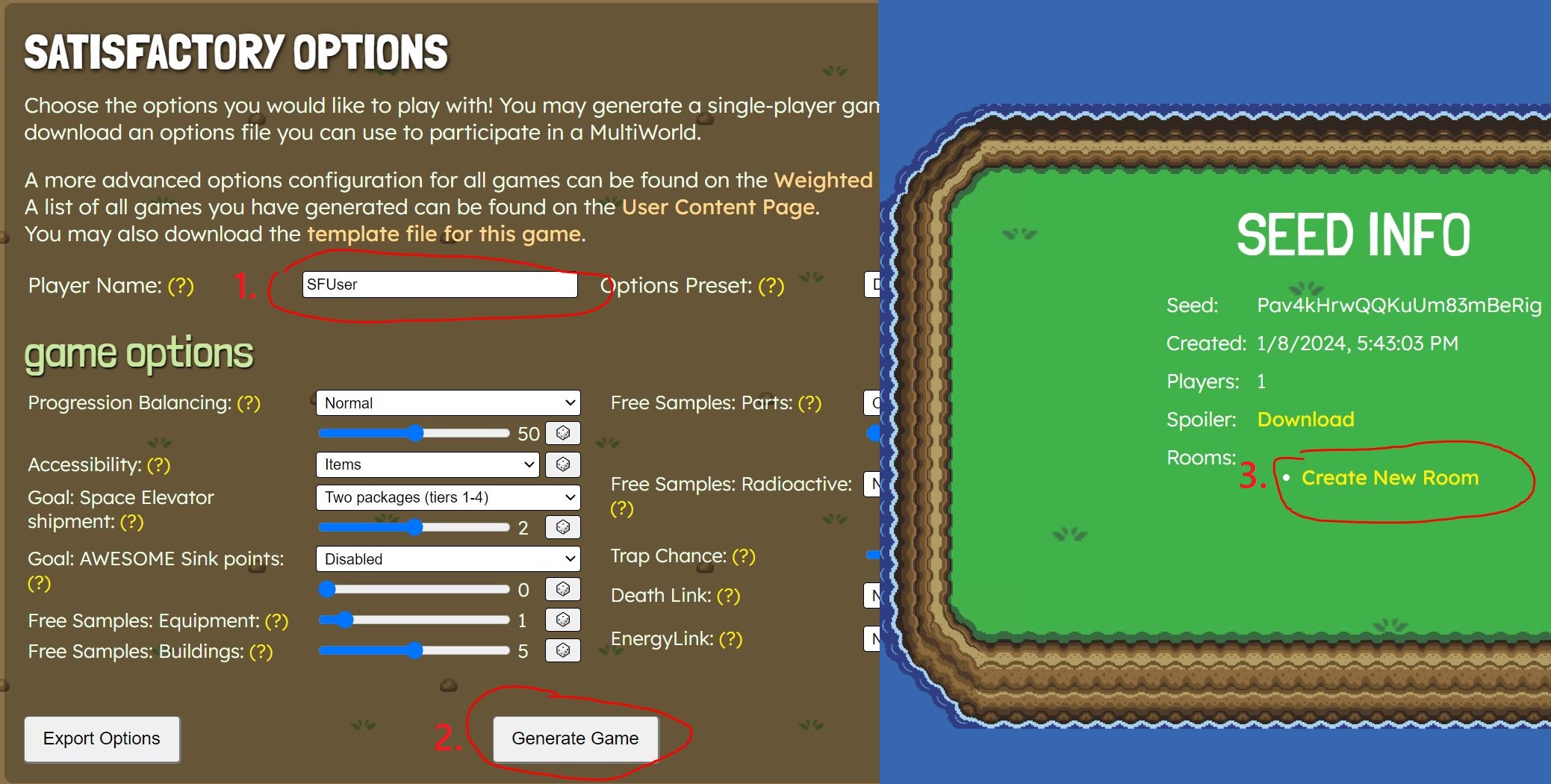
This is done on the [player options](https://archipelago.gg/games/Satisfactory/player-options) page.
On the options page you select the settings for your game, or leave them as default.
You need to change the `Player Name` to whatever you'd like to be called in Archipelago system messages.
Once you are done configuring your game, click on the `Generate Game` button.
Generation might take a few seconds,
after that you'll be redirected to a page showing your `Seed Info`,
on this page click on `Create New Room`.
[](https://raw.githubusercontent.com/Jarno458/SatisfactoryArchipelagoMod/main/Docs/Setup1.JPG)
This will redirect you to a page where you can create a room from your upload; do so.
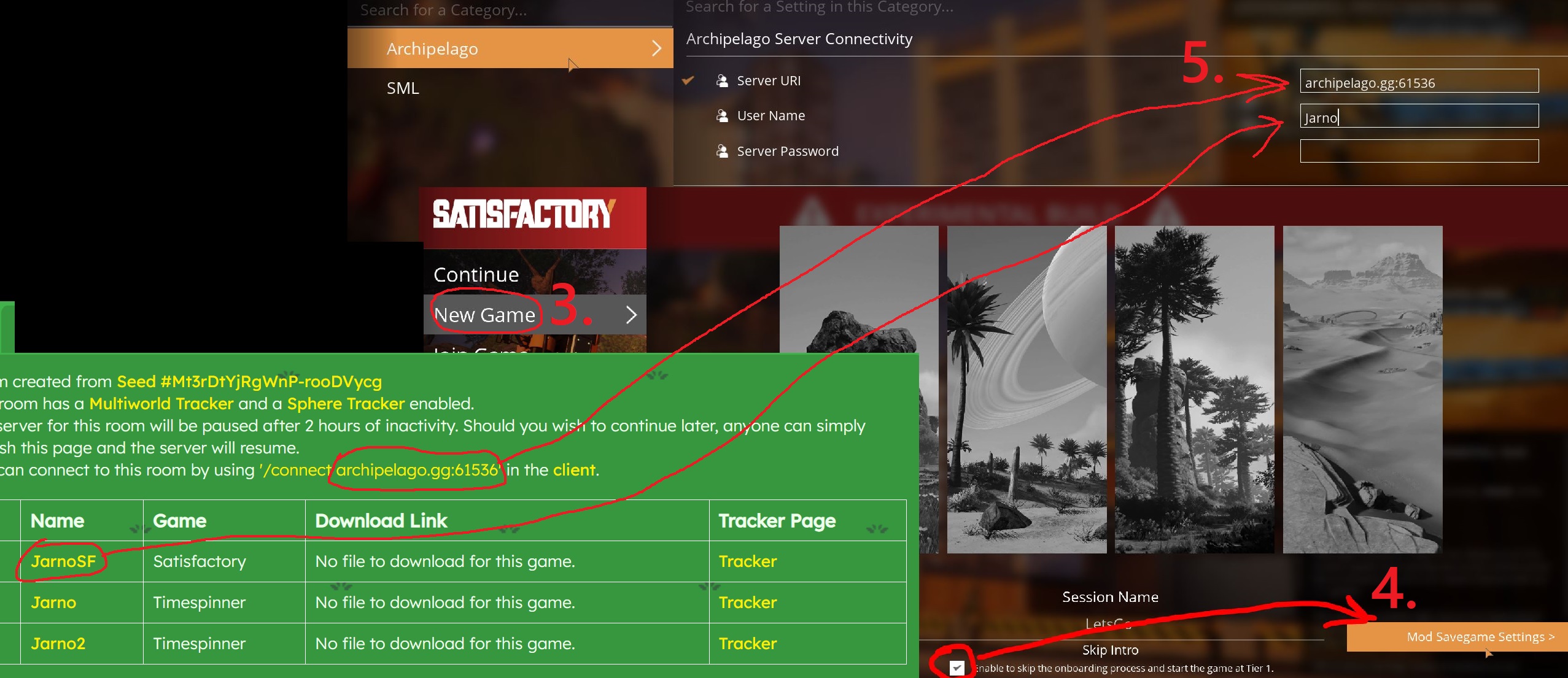
On the room page you will see connection details, for example, `/connect archipelago.gg:60282`.
Keep this room page open and bookmark the tab, otherwise you will lose access to your room.
Install this mod via the Mod Manager if you haven't already and fire up your game.
Create a New Game and click on `Mod Savegame Settings >`, select `Archipelago` and in the connection settings enter the following:
- For URI, enter the connection URI as seen on the room page without the /connect part, so for example just `archipelago.gg:60282`
- For Username, choose the `Player Name` you selected on the options-page or when creating your yaml file.
- Enter a password if you set one earlier.
[](https://raw.githubusercontent.com/Jarno458/SatisfactoryArchipelagoMod/main/Docs/Setup2.JPG)
Now start a new Satisfactory save as normal, but be sure to skip the intro tutorial.
Once you load into the game you should see chat messages indicating success or failure connecting to the server.
How to Continue a Save
Playing with this mod requires a connection to an Archipelago server.
This server will automatically shut down your room after 2h of inactivity, and the port your room was previously hosted on may be reassigned while you're away.
Upon loading into your save file you will see a chat message indicating connection failure if the room is asleep, its port changed, (or if the connection failed for some other reason).
In order to continue your save, you will first need to restart the room by re-opening or re-loading the `Room Page` url you held onto earlier, for example `https://archipelago.gg/room/dQw4w9WgXcQ`, this will spin your room back up on the server.
Back in the game, load your save file again and the connection should succeed.
If it doesn't, your room's port may have been reassigned.
Check the connection details on the room webpage. If the port has changed,
go to the [Mod Savegame Settings screen](https://docs.ficsit.app/satisfactory-modding/latest/ForUsers/ConfiguringMods.html#_mod_savegame_settings)
and update the Server URI field to use the new port.
To reload the save with the updated connection details, save the game,
then load the save you just created.
Support the Developers
- Jarno: _support me if you dare [completely mandatory tip jar](https://ko-fi.com/P5P718V0J4)_
- Robb: _If you enjoy my work, please consider donating to my [completely optional tip jar](https://ko-fi.com/robb4)._
Copyright Notice
- Archipelago Logo: © 2022 by Krista Corkos and Christopher Wilson is licensed under Attribution-NonCommercial 4.0 International. To view a copy of this license, visit <http://creativecommons.org/licenses/by-nc/4.0/>
- See LICENSE files in the [source repository](https://github.com/Jarno458/SatisfactoryArchipelagoMod) for more detailed license information.
Versions
How to Install Archipelago Randomizer on Your Server
Order Satisfactory Server
Order a Satisfactory server with at least 4 GB RAM (6 GB recommended). For multiplayer: per 4 players.
Install Mod
Open the mod manager in the dashboard and search for "Archipelago Randomizer". Installation dependencies are installed automatically.
Restart Server
Restart the server so the mod is loaded. Players need to have the mod installed locally as well.
Frequently Asked Questions
Archipelago Randomizer not working after update – what to do?
After a Satisfactory update, mods need to be updated. Check ficsit.app whether Archipelago Randomizer has been updated for the new game version. With Mado Hosting: open the mod manager and click "Update All". If the mod hasn't been updated yet, temporarily remove it so the server starts.
Archipelago Randomizer causing crashes in multiplayer – solution
Most common cause: all players must have exactly the same mod version installed. Check server logs for "ModMismatch" or "Version Conflict". Ensure all players use Archipelago Randomizer v2.4.6 and the same SML. With Mado Hosting, Satisfactory servers run with 6 GB RAM for stable multiplayer performance.
Is Archipelago Randomizer compatible with other Satisfactory mods?
Archipelago Randomizer uses the Satisfactory Mod Loader (SML). Generally, SML-based mods are cross-compatible, but mods modifying the same game systems can cause conflicts. Test new mod combinations on a backup save. The Mado dashboard automatically detects known conflicts and warns you.
Rent Archipelago Randomizer Server
Play Archipelago Randomizer on your own Satisfactory server with mod support.
Mod Information
- Author
- Jarno458, Robb
- Latest Version
- v2.4.6
- Created
- August 24, 2022
- Last Updated
- July 8, 2026
- Source Code
- GitHub →