
Digby Tool
Tool providing various enhancements
Description
A tool that will interact with some of my mods and have some standalone features. Available via a Tier 3 Milestone in the HUB, then crafted at the Equipment Workshop.
Standalone Modes:
Digby Mode
- Primary Fire: Ragdoll self
- Ctrl + Primary Fire: Ragdoll target player or creature
- Secondary Fire: Easter Egg emote
- Ctrl + Secondary Fire: Open the Sir Digby Chicken Caesar theme song on YouTube
Standby Mode
- Primary Fire: Turn on Machine
- Secondary Fire: Turn off Machine
Vehicle Path Mode
- Primary Fire: Select Node
- Secondary Fire: Deselect Node
- Arrow Keys & Page Up/Down: Nudge selected Node
- Shift/Ctrl: Large/Small nudge modifiers
- Alt + Left/Right: Rotate selected Node
<br><br>Optional Tool Modes:
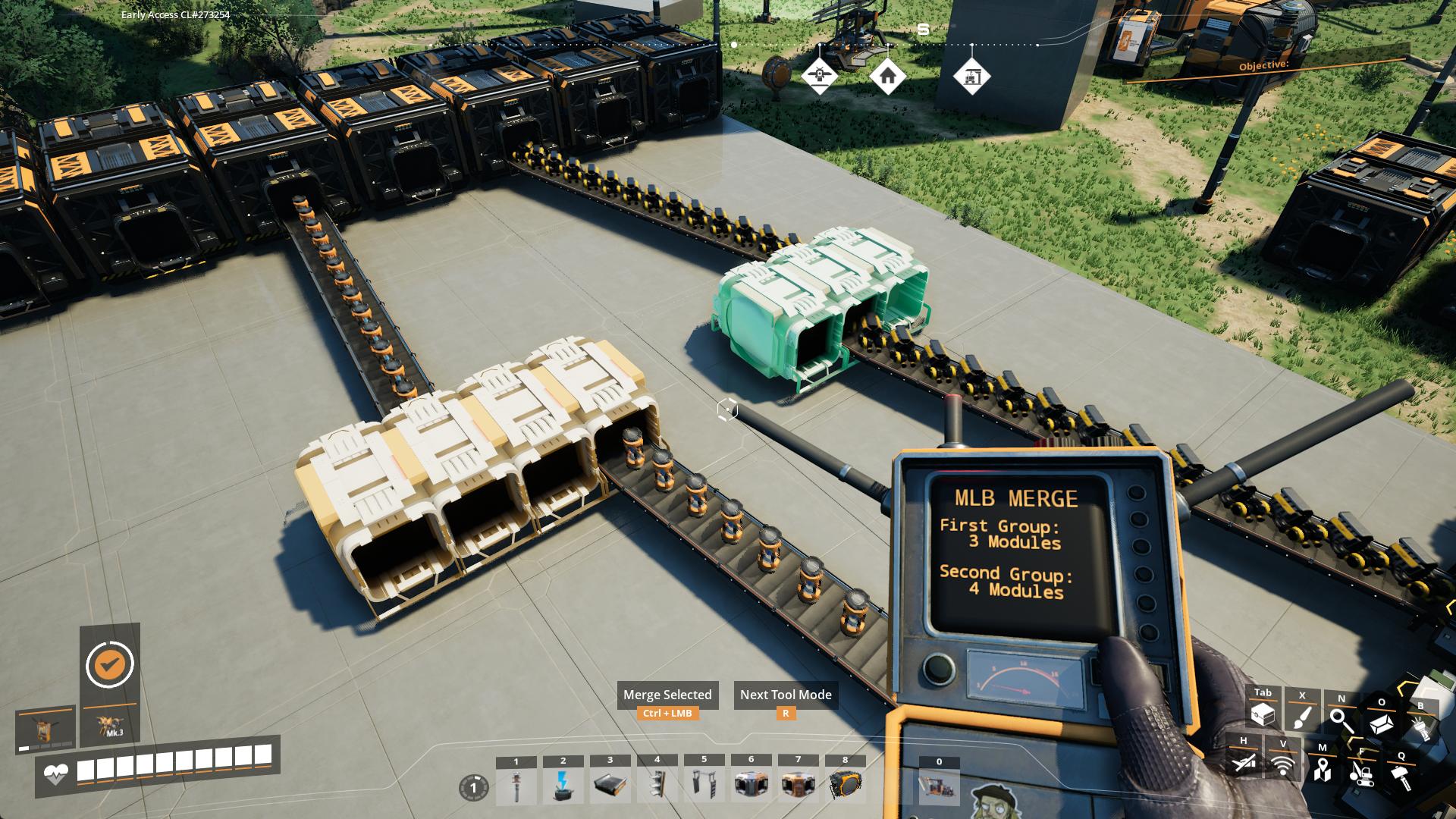
MLB Merge
- Select the first group with Left-Click
- Select the second group with Right-Click
- Ctrl-Click to merge the groups together
MLB Split
- Select all Modules you want in a new group by Left-Clicking each
- Ctrl-Click to combine them into a new group
<br><br><br>




<br><br>
---
<br><br>Please report any issues <a href="https://discord.gg/WM5KT7pVu8">on my Discord server</a><br><br>
<a href="https://ko-fi.com/sirdigbymodding">SirDigby's completely optional tip jar</a><br>
<br><a href="https://indifferentbroccoli.com/satisfactory-server-hosting?fpr=sirdigby"><img src="https://indifferentbroccoli.com/img/broccoli_shadow_square.png" width=80/></a>
Indifferent Broccoli provides the server I use to test Dedicated Server mod support, and I highly recommend them. If you're looking to <a href="https://indifferentbroccoli.com/satisfactory-server-hosting?fpr=sirdigby">host your own Satisfactory server</a> , try indifferent broccoli's 2-day free trial.
Versions
How to Install Digby Tool on Your Server
Order Satisfactory Server
Order a Satisfactory server with at least 4 GB RAM (6 GB recommended). For multiplayer: per 4 players.
Install Mod
Open the mod manager in the dashboard and search for "Digby Tool". Installation dependencies are installed automatically.
Restart Server
Restart the server so the mod is loaded. Players need to have the mod installed locally as well.
Frequently Asked Questions
Digby Tool not working after update – what to do?
After a Satisfactory update, mods need to be updated. Check ficsit.app whether Digby Tool has been updated for the new game version. With Mado Hosting: open the mod manager and click "Update All". If the mod hasn't been updated yet, temporarily remove it so the server starts.
Digby Tool causing crashes in multiplayer – solution
Most common cause: all players must have exactly the same mod version installed. Check server logs for "ModMismatch" or "Version Conflict". Ensure all players use Digby Tool v2.4.0 and the same SML. With Mado Hosting, Satisfactory servers run with 6 GB RAM for stable multiplayer performance.
Is Digby Tool compatible with other Satisfactory mods?
Digby Tool uses the Satisfactory Mod Loader (SML). Generally, SML-based mods are cross-compatible, but mods modifying the same game systems can cause conflicts. Test new mod combinations on a backup save. The Mado dashboard automatically detects known conflicts and warns you.
Rent Digby Tool Server
Play Digby Tool on your own Satisfactory server with mod support.
Mod Information
- Author
- SirDigby
- Latest Version
- v2.4.0
- Created
- May 10, 2024
- Last Updated
- July 8, 2026
- Source Code
- GitHub →