Craft Speed Booster
Stop waiting. Start crafting. The more you craft, the faster your workbench gets — up to x25 speed.
Description
Craft Speed Booster
Tired of holding the craft button forever? The longer you craft continuously, the faster your workbench runs — up to x25 speed after 5 minutes of uninterrupted crafting.
How it works
Hold the craft button and your speed multiplier climbs automatically:
- 10s → x2 | 45s → x8 | 120s → x16 | 300s → x25
Stop for more than 1.5 seconds and the streak resets. Simple.
HUD
A clean overlay shows your current multiplier, a progress bar toward the next tier, and a countdown:
Progressive Speed
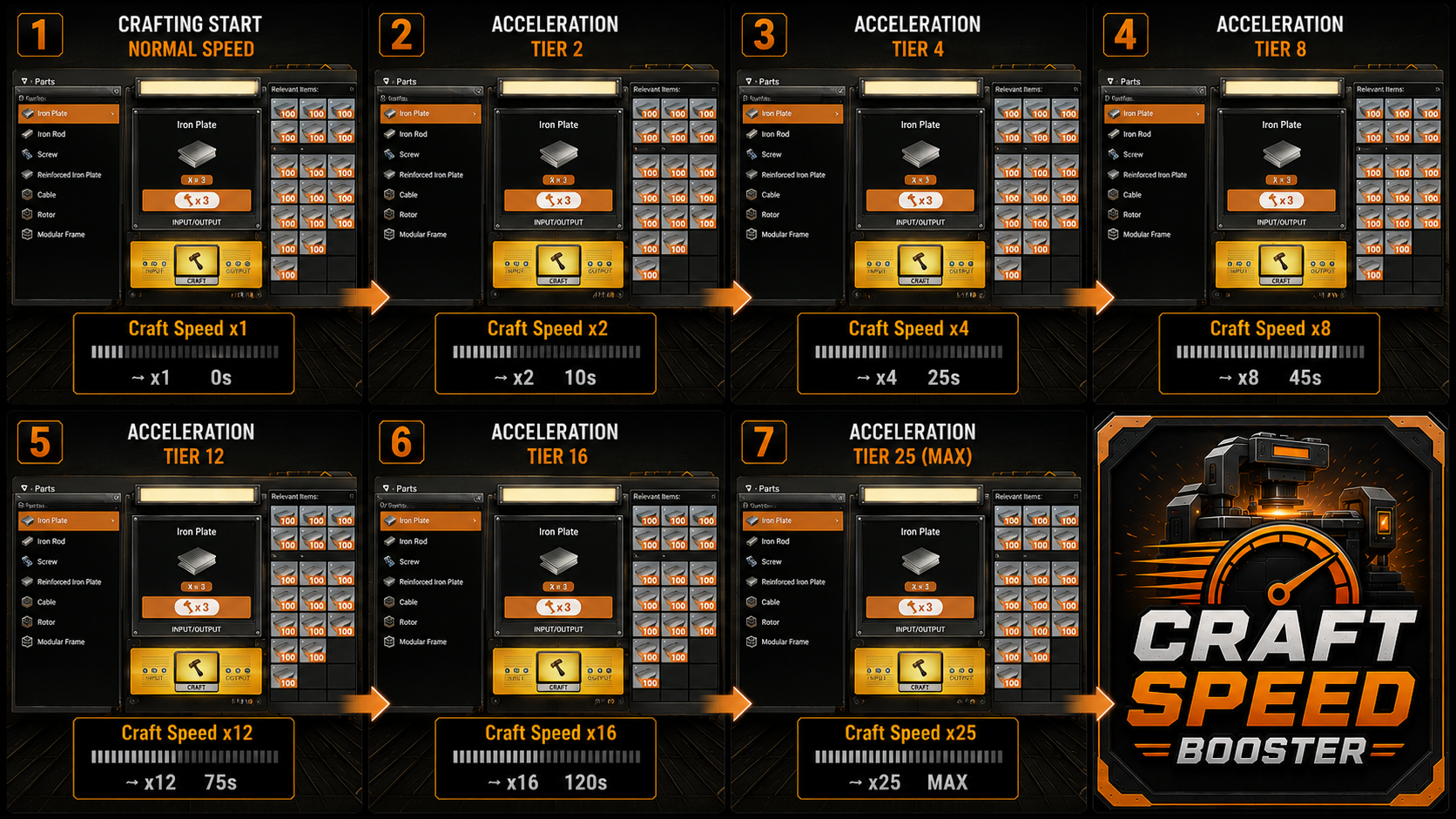
> The workbench progressively accelerates from x1 to x25 while preserving the vanilla gameplay experience.
Configurable
All tiers, multipliers, inactivity delay, and HUD size are editable in a `.ini` file — no recompile needed.
Multiplayer safe
Each workbench tracks its own streak. One player stopping does not affect others.
---
Inspired by FasterManualCraftingRedux by Robb — rebuilt from scratch for Satisfactory 1.2 with per-workbench coop support, configurable tiers, and a live HUD.
Source code available on GitHub — MIT license.
---
Support & Contact
- 🐛 Bug reports / suggestions : [GitHub Issues](https://github.com/Cfoxy/CraftSpeedBooster/issues)- 💬 Discord : Cfoxy on [Satisfactory Modding](https://discord.ficsit.app)
Versions
How to Install Craft Speed Booster on Your Server
Order Satisfactory Server
Order a Satisfactory server with at least 4 GB RAM (6 GB recommended). For multiplayer: per 4 players.
Install Mod
Open the mod manager in the dashboard and search for "Craft Speed Booster". Installation dependencies are installed automatically.
Restart Server
Restart the server so the mod is loaded. Players need to have the mod installed locally as well.
Frequently Asked Questions
Craft Speed Booster not working after update – what to do?
After a Satisfactory update, mods need to be updated. Check ficsit.app whether Craft Speed Booster has been updated for the new game version. With Mado Hosting: open the mod manager and click "Update All". If the mod hasn't been updated yet, temporarily remove it so the server starts.
Craft Speed Booster causing crashes in multiplayer – solution
Most common cause: all players must have exactly the same mod version installed. Check server logs for "ModMismatch" or "Version Conflict". Ensure all players use Craft Speed Booster v1.0.4 and the same SML. With Mado Hosting, Satisfactory servers run with 6 GB RAM for stable multiplayer performance.
Is Craft Speed Booster compatible with other Satisfactory mods?
Craft Speed Booster uses the Satisfactory Mod Loader (SML). Generally, SML-based mods are cross-compatible, but mods modifying the same game systems can cause conflicts. Test new mod combinations on a backup save. The Mado dashboard automatically detects known conflicts and warns you.
Rent Craft Speed Booster Server
Play Craft Speed Booster on your own Satisfactory server with mod support.
Mod Information
- Author
- Cfoxy
- Latest Version
- v1.0.4
- Created
- June 10, 2026
- Last Updated
- July 8, 2026
- Source Code
- GitHub →