
1:1 Beta
A 1:1 recreation of version b1.7.3 in modern Minecraft.
Screenshots
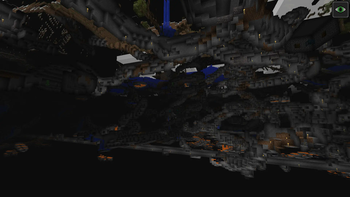
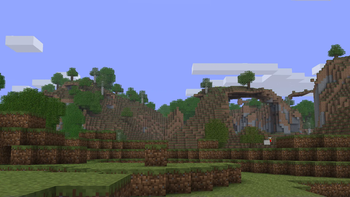
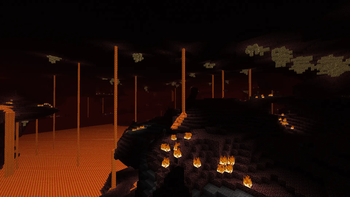
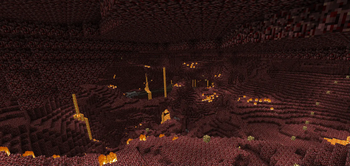
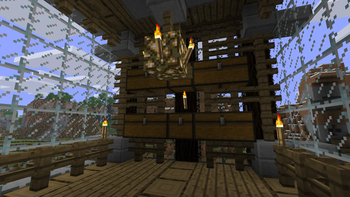
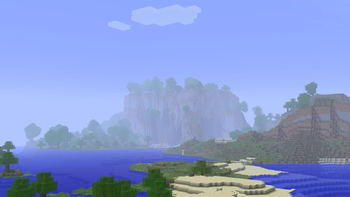
Über dieses Modpack
About:
1:1 Beta is a modpack aiming for near 100% parity between modern Minecraft versions and beta 1.7.3. It accomplishes this by utilizing a variety of mods, datapacks, and resourcepacks to revert Minecraft back to beta! This modpack will only be made available for newer versions of the game if supported mods are updated to those versions. 1:1 Beta was made with the intention of allowing an easy and seamless player experience back into beta minecraft, with the added customization that modern game versions provide. So feel free to add Vivecraft for VR support, a LAN extension mod for multiplayer, or to tweak the existing mods to your liking!
What Makes This Pack Special? Aren't There Already Modpacks That Do This?
Most modpacks that try to do this recreate most of the beta features (like world gen, visuals, etc.), but are either missing some things or intentionally incorporate newer features. As previously mentioned, this modpack is different in that it completely disables as many as are possible non-beta 1.7.3 features, with the exception of some objective annoyances and bugs from back then.
Notes:
How To Generate Beta Worlds:
- Singleplayer > Create New World
- World > World Type: Moderner Beta
- Customize > Chunk Provider Settings
- Generate Deepslate: OFF > Save Settings > Done
- More > Datapacks > add "moderner_beta/reduced_heights" to the right > Done
- Create New World
Resourcepacks:
The resource/texture pack load order should be enabled by default, however please double check on first load of the modpack that programmer art is loaded last.
Java:
This modpack requires the use of Java 17. If you don't have it, I recommend getting your OS' respective version from here and installing it.
Known Bugs:
Please report any not listed over here.
- Deepslate ores, stone variants, quartz in nether still generate
- Music plays on the title screen
- New game icon
- Modern reach value (is it a bug though?)
- Modern block placement positions (like upside down stairs/slabs/etc)
Credit:
Datapacks:
https://modrinth.com/datapack/achievements
https://github.com/JimmJam/BetaPacks
Resourcepacks:
https://modrinth.com/resourcepack/golden-days
Verfügbare Versionen
1:1 Beta Server einrichten
Server bestellen
Wähle mindestens 6 GB RAM (8 GB empfohlen für 1:1 Beta). Je nach Spieleranzahl: +1 GB pro 5 Spieler.
Modpack im Dashboard installieren
Öffne den Modpack-Browser im Dashboard, suche nach "1:1 Beta" und klicke "Installieren". Der fabric-Loader und Minecraft 1.21.1 werden automatisch konfiguriert.
Server starten & spielen
Starte den Server – alle Mods werden automatisch geladen. Teile die Server-IP mit Freunden und spielt zusammen!
Häufige Fragen
1:1 Beta Server crasht oder startet nicht – was tun?
Häufigste Ursachen: zu wenig RAM oder falscher fabric-Loader. Prüfe latest.log auf "OutOfMemoryError" → erhöhe RAM auf mindestens 8 GB. Bei "Mixin" oder "ClassNotFoundException": Modpack-Version und Loader stimmen nicht überein. Bei Mado Hosting werden Loader und Minecraft-Version beim Modpack-Install automatisch konfiguriert – das verhindert die meisten Startprobleme.
Wie viel RAM braucht ein 1:1 Beta Server wirklich?
Minimum 6 GB, empfohlen 8 GB für stabile Performance. +1 GB pro 5 Spieler. Wichtig: Minecraft-Modpacks brauchen mehr RAM als Vanilla – plane pro zusätzlichem Spieler extra ein. Bei Mado Hosting kannst du den RAM jederzeit live hochskalieren, ohne Datenverlust (ab €7.800000000000001/Monat).
Kann ich eigene Mods zu 1:1 Beta hinzufügen, ohne Konflikte?
Ja, aber achte auf die Kompatibilität: Nutze nur Mods für den gleichen Loader (fabric) und die gleiche Minecraft-Version (1.21.1). Häufige Probleme: ID-Konflikte bei Rezept-Mods und inkompatible Coremod-Versionen. Im Mado Dashboard zeigt der Mod-Browser nur kompatible Mods an und warnt bei bekannten Konflikten.
1:1 Beta Server laggt – Performance-Tipps
1) RAM auf 8 GB+ erhöhen. 2) Server-View-Distance auf 8 reduzieren (server.properties). 3) Pre-Generiere Chunks mit dem "Chunky" Plugin. 4) Prüfe mit /spark profiler welche Mods die meiste Tick-Time verbrauchen. Bei Mado Hosting laufen alle Server auf NVMe-SSDs mit dedizierten CPU-Kernen – das eliminiert Hardware als Engpass.
Ähnliche Modpacks
![Cobblemon Official Modpack [Fabric]](https://cdn.modrinth.com/data/5FFgwNNP/e7f9ee2e9d361623847853fe2ddce42f519ee64f.png)
![COBBLEVERSE - Pokemon Adventure [Cobblemon]](https://cdn.modrinth.com/data/Jkb29YJU/581ecf54530972afb18a04660afd820f2f24f6c7.png)
![Better MC [FABRIC] - BMC2](https://cdn.modrinth.com/data/shFhR8Vx/a19c2bcb51d38f32f138d3607e91cb2b7b8e387f_96.webp)


![Better MC [FORGE] - BMC4](https://cdn.modrinth.com/data/4BV47HRn/7f5ef7cc61b2593609aabef3ed07a866a4f11b73_96.webp)
1:1 Beta Server mieten
Starte deinen eigenen Server mit automatischer Modpack-Installation.
Unterstützte Versionen
Starte deinen 1:1 Beta Server jetzt
Ab €7.80/Monat; für die beste Performance werden 8 GB RAM empfohlen.
Server konfigurieren →