
aBTV Modpack
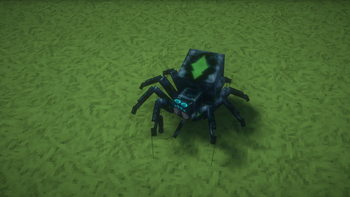
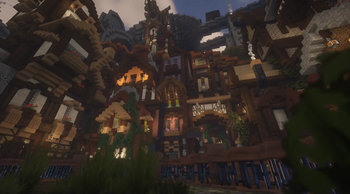
A medieval modpack, made for detailed medieval graphics.
Screenshots
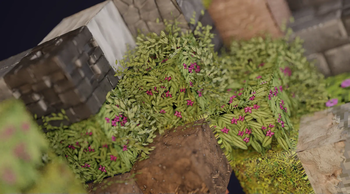
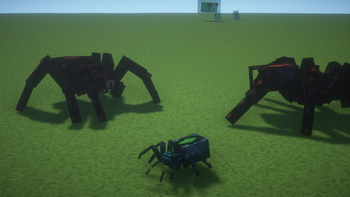
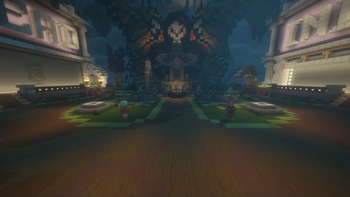
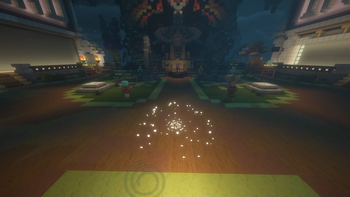
Über dieses Modpack
Improve your Minecraft gameplay with aBTV, a texture pack designed to bring a medieval theme to your world. aBTV combines detailed medieval textures with modern features like RTX ray tracing and Parallax Occlusion Mapping (POM) to create realistic gameplay. Whether you enjoy building castles or exploring villages, aBTV offers a simple way to add historical charm and visual quality to your game.
Features
Medieval Theme
aBTV provides textures inspired by history, recreating the look of the medieval period in Minecraft. This makes it perfect for players who want to build castles, villages, or other historical settings.
RTX Support
With RTX support, aBTV enhances your game’s lighting to make it look more natural. You’ll see effects like sunlight shining through leaves or torches casting lifelike shadows. These improvements add depth and make your Minecraft world feel more alive.
POM with Shaders
aBTV uses Parallax Occlusion Mapping (POM) to give textures a 3D appearance without slowing down your game. Surfaces like stone, wood, and cobblestone gain extra detail and realism. Using aBTV with shaders like BSL or Complementary Shaders creates a smooth and clean experience.
Easy Installation
aBTV comes as a Fabric modpack with shaders already set up, so you can start playing quickly. No extra steps are needed—just download and launch. This straightforward process lets you focus on enjoying the game.
Why Choose a Medieval Theme?
A medieval theme mixes historical detail with creative options, appealing to many Minecraft players. It’s great for building forts, acting out knightly adventures, or designing kingdoms. With aBTV, your projects look real and stand out, thanks to modern visual effects that highlight every detail.
User Testimonials
Here’s feedback from players:
- “The aBTV texture pack has greatly improved my Minecraft gameplay. The medieval textures are clear and immersive, and RTX makes everything more realistic.”
- “Installation was very easy, and the POM effect with shaders looks amazing.”
Comparison with Other Packs
Many medieval texture packs exist, but aBTV stands out with RTX support and POM. Unlike packs that only use detailed images, aBTV uses shader technology to create a realistic feel while keeping your game running smoothly. This balance of beauty and performance makes it a strong choice for players.
FAQ
Does aBTV work with other mods?
aBTV works with most Fabric mods, though results may differ based on the mod. Test it to check for texture issues.
Can I use aBTV without shaders?
Yes, but we suggest using the included shaders to get the full effect of POM and RTX.
Conclusion
Try aBTV to enjoy better visuals and a historical feel in Minecraft. With its medieval textures, modern features like RTX and POM, and easy setup, aBTV is perfect for players wanting to improve their game.
Verfügbare Versionen
aBTV Modpack Server einrichten
Server bestellen
Wähle mindestens 6 GB RAM (8 GB empfohlen für aBTV Modpack). Je nach Spieleranzahl: +1 GB pro 5 Spieler.
Modpack im Dashboard installieren
Öffne den Modpack-Browser im Dashboard, suche nach "aBTV Modpack" und klicke "Installieren". Der fabric-Loader und Minecraft 1.21.5 werden automatisch konfiguriert.
Server starten & spielen
Starte den Server – alle Mods werden automatisch geladen. Teile die Server-IP mit Freunden und spielt zusammen!
Häufige Fragen
aBTV Modpack Server crasht oder startet nicht – was tun?
Häufigste Ursachen: zu wenig RAM oder falscher fabric-Loader. Prüfe latest.log auf "OutOfMemoryError" → erhöhe RAM auf mindestens 8 GB. Bei "Mixin" oder "ClassNotFoundException": Modpack-Version und Loader stimmen nicht überein. Bei Mado Hosting werden Loader und Minecraft-Version beim Modpack-Install automatisch konfiguriert – das verhindert die meisten Startprobleme.
Wie viel RAM braucht ein aBTV Modpack Server wirklich?
Minimum 6 GB, empfohlen 8 GB für stabile Performance. +1 GB pro 5 Spieler. Wichtig: Minecraft-Modpacks brauchen mehr RAM als Vanilla – plane pro zusätzlichem Spieler extra ein. Bei Mado Hosting kannst du den RAM jederzeit live hochskalieren, ohne Datenverlust (ab €7.800000000000001/Monat).
Kann ich eigene Mods zu aBTV Modpack hinzufügen, ohne Konflikte?
Ja, aber achte auf die Kompatibilität: Nutze nur Mods für den gleichen Loader (fabric) und die gleiche Minecraft-Version (1.21.5). Häufige Probleme: ID-Konflikte bei Rezept-Mods und inkompatible Coremod-Versionen. Im Mado Dashboard zeigt der Mod-Browser nur kompatible Mods an und warnt bei bekannten Konflikten.
aBTV Modpack Server laggt – Performance-Tipps
1) RAM auf 8 GB+ erhöhen. 2) Server-View-Distance auf 8 reduzieren (server.properties). 3) Pre-Generiere Chunks mit dem "Chunky" Plugin. 4) Prüfe mit /spark profiler welche Mods die meiste Tick-Time verbrauchen. Bei Mado Hosting laufen alle Server auf NVMe-SSDs mit dedizierten CPU-Kernen – das eliminiert Hardware als Engpass.
Ähnliche Modpacks
![Cobblemon Official Modpack [Fabric]](https://cdn.modrinth.com/data/5FFgwNNP/e7f9ee2e9d361623847853fe2ddce42f519ee64f.png)
![COBBLEVERSE - Pokemon Adventure [Cobblemon]](https://cdn.modrinth.com/data/Jkb29YJU/581ecf54530972afb18a04660afd820f2f24f6c7.png)
![Better MC [FABRIC] - BMC2](https://cdn.modrinth.com/data/shFhR8Vx/a19c2bcb51d38f32f138d3607e91cb2b7b8e387f_96.webp)


![Better MC [FORGE] - BMC4](https://cdn.modrinth.com/data/4BV47HRn/7f5ef7cc61b2593609aabef3ed07a866a4f11b73_96.webp)
aBTV Modpack Server mieten
Starte deinen eigenen Server mit automatischer Modpack-Installation.
Details
- Lizenz
- LicenseRef-Terms-Of-Use
- Server-seitig
- Nicht unterstützt
- Client-seitig
- Erforderlich
Unterstützte Versionen
Starte deinen aBTV Modpack Server jetzt
Ab €7.80/Monat; für die beste Performance werden 8 GB RAM empfohlen.
Server konfigurieren →