
Act. & Better
🌍 A fully client-side modpack that tries to replicate the atmosphere as when playing with Actions & Stuff for Java Edition. The modpack combines excellent ⚡ performance, ✨ atmosphere and beauty.
Screenshots


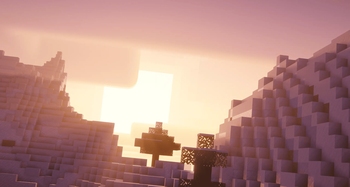
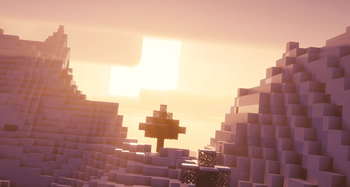
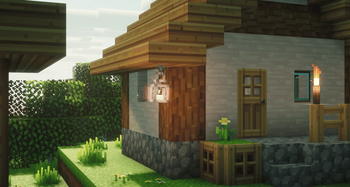
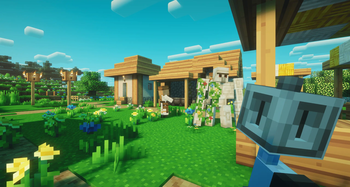
Über dieses Modpack



🔄️ 3.0 Update already here!
🟡 Actions & Better 🔵
- ✨ More than ~300 new particles, effects and animations in the world
- ⚡ Perfectly optimized and allows you to play without lags
- ⭐ Beautiful first-person animations
- 🔄️ Updates to the newest versions
- ➕ Completely client-side and not a single server-side mod
- 🌍 Beautiful atmospheric fog and built-in shaders (already with the necessary settings) (optional use)
- ✨ We try to replicate the atmosphere of Actions & Stuff as much as possible
- 🪓 Various 3D models for items, armor
📩 How to install?
🟢 Modrinth App
One of the easiest ways to install modpack
- Open the Launcher
- Search for this modpack (Action & Stuff ON JAVA)
- Click download
- Run and play
- ✅
🌍 MultiMC / Prism Launcher and etc.
In these launchers there are 2 ways to install modpack
1:
- Click in the launcher "Add build"
- Select "Modrinth" and search this modpack (Action & Stuff ON JAVA)
- Click download (or OK)
- Run and play
- ✅
2:
- Download the modpack file here
- Click "Add build" in the launcher
- Select "Import from file"
- Import modpack file to launcher
- Run and play
- ✅
2.1:
- Download the modpack file here
- Grab the file with your mouse and move it to the launcher (modpack starts installing)
- Run and play
- ✅
🟤 Official launcher or any other launcher
The hardest way
- Download the modpack file here
- Fabric Loader must be installed (you can find the tutorials on how to download it yourself)
- Convert the modpack from .mrpack to .zip on any website (search mrpack to zip converter)
- All files from .zip file should be moved to the folder with minecraft (.minecraft mostly)
- If you have done everything correctly modpack should start and work correctly
- Run and play
- ✅
🇷🇺 Description on russian / Описание на русском
🟡 Actions & Better 🔵
- ✨ Более ~300 новых партиклов, эффектов и анимаций в мире
- ⚡ Отлично оптимизировано и позволяет играть без лагов
- ⭐ Красивые анимации от первого лица
- 🔄️ Обновления на самые новые версии
- ➕ Полностью client-side и ни единого server-side мода
- 🌍 Красивый атмосферный туман и встроенные шейдеры (уже с нужными настройками) (использование по желанию)
- ✨ Стараемся максимально повторить атмосферу Actions & Stuff
- 🪓 Различные 3D модели для предметов, брони
📩 Как установить?
🟢 Modrinth App
Один из самых простых способов установки модпака
- Откройте лаунчер
- Найдите этот модпак (Action & Stuff ON JAVA)
- Нажмите
- Запустить и играть
- ✅
🌍 MultiMC / Prism Launcher
В этих лаунчерах есть 2 способа установить модпак
1:
- Нажмите в лаунчере "Добавить экземпляр (Add build)"
- Выберите "Modrinth" и найдите эту сборку (Action & Stuff ON JAVA)
- Нажмите скачать (или ОК)
- Запустить и играть
- ✅
2:
- Скачайте файл модпака здесь
- Нажмите в лаунчере "Добавить экземпляр (Add build)"
- Выберите "Импортировать из файла"
- Импортируйте файл модпака в лаунчер
- Запустить и играть
- ✅
2.1:
- Скачайте файл модпака здесь
- Захватите файл мышью и перенесите его в лаунчер (модпак начнет установливаться)
- Запускай и играй
- ✅
🟤 Официальный лаунчер или любой другой
Самый сложный способ
- Скачайте файл модпака здесь
- Fabric Loader должен быть установлен предварительно (вы можете найти руководство, как скачать его самостоятельно)
- Конвертируйте модпак из .mrpack в .zip на любом сайте (ищите mrpack to zip converter)
- Все файлы из .zip файла необходимо переместить в папку с майнкрафтом (.minecraft обычно)
- Если вы все сделали правильно, модпак должен запуститься и работать корректно
- Запускай и играй
- ✅
Verfügbare Versionen
Act. & Better Server einrichten
Server bestellen
Wähle mindestens 6 GB RAM (8 GB empfohlen für Act. & Better). Je nach Spieleranzahl: +1 GB pro 5 Spieler.
Modpack im Dashboard installieren
Öffne den Modpack-Browser im Dashboard, suche nach "Act. & Better" und klicke "Installieren". Der fabric-Loader und Minecraft 26.2 werden automatisch konfiguriert.
Server starten & spielen
Starte den Server – alle Mods werden automatisch geladen. Teile die Server-IP mit Freunden und spielt zusammen!
Häufige Fragen
Act. & Better Server crasht oder startet nicht – was tun?
Häufigste Ursachen: zu wenig RAM oder falscher fabric-Loader. Prüfe latest.log auf "OutOfMemoryError" → erhöhe RAM auf mindestens 8 GB. Bei "Mixin" oder "ClassNotFoundException": Modpack-Version und Loader stimmen nicht überein. Bei Mado Hosting werden Loader und Minecraft-Version beim Modpack-Install automatisch konfiguriert – das verhindert die meisten Startprobleme.
Wie viel RAM braucht ein Act. & Better Server wirklich?
Minimum 6 GB, empfohlen 8 GB für stabile Performance. +1 GB pro 5 Spieler. Wichtig: Minecraft-Modpacks brauchen mehr RAM als Vanilla – plane pro zusätzlichem Spieler extra ein. Bei Mado Hosting kannst du den RAM jederzeit live hochskalieren, ohne Datenverlust (ab €7.800000000000001/Monat).
Kann ich eigene Mods zu Act. & Better hinzufügen, ohne Konflikte?
Ja, aber achte auf die Kompatibilität: Nutze nur Mods für den gleichen Loader (fabric) und die gleiche Minecraft-Version (26.2). Häufige Probleme: ID-Konflikte bei Rezept-Mods und inkompatible Coremod-Versionen. Im Mado Dashboard zeigt der Mod-Browser nur kompatible Mods an und warnt bei bekannten Konflikten.
Act. & Better Server laggt – Performance-Tipps
1) RAM auf 8 GB+ erhöhen. 2) Server-View-Distance auf 8 reduzieren (server.properties). 3) Pre-Generiere Chunks mit dem "Chunky" Plugin. 4) Prüfe mit /spark profiler welche Mods die meiste Tick-Time verbrauchen. Bei Mado Hosting laufen alle Server auf NVMe-SSDs mit dedizierten CPU-Kernen – das eliminiert Hardware als Engpass.
Ähnliche Modpacks
![Cobblemon Official Modpack [Fabric]](https://cdn.modrinth.com/data/5FFgwNNP/e7f9ee2e9d361623847853fe2ddce42f519ee64f.png)
![COBBLEVERSE - Pokemon Adventure [Cobblemon]](https://cdn.modrinth.com/data/Jkb29YJU/581ecf54530972afb18a04660afd820f2f24f6c7.png)
![Better MC [FABRIC] - BMC2](https://cdn.modrinth.com/data/shFhR8Vx/a19c2bcb51d38f32f138d3607e91cb2b7b8e387f_96.webp)


![Better MC [FORGE] - BMC4](https://cdn.modrinth.com/data/4BV47HRn/7f5ef7cc61b2593609aabef3ed07a866a4f11b73_96.webp)
Act. & Better Server mieten
Starte deinen eigenen Server mit automatischer Modpack-Installation.
Details
- Lizenz
- Creative Commons Attribution Non Commercial Share Alike 4.0 International
- Server-seitig
- Nicht unterstützt
- Client-seitig
- Erforderlich
Unterstützte Versionen
Starte deinen Act. & Better Server jetzt
Ab €7.80/Monat; für die beste Performance werden 8 GB RAM empfohlen.
Server konfigurieren →