IE Aether & Create
Light-weight modpack based primarily on Aether and its addons, Create mod & expansions, Immersive Engineering and many other useful mods
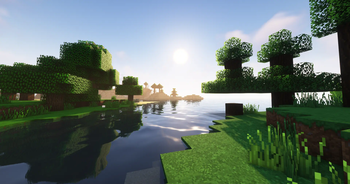
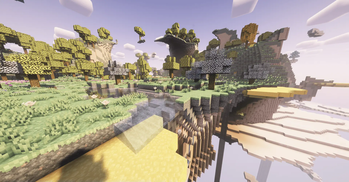
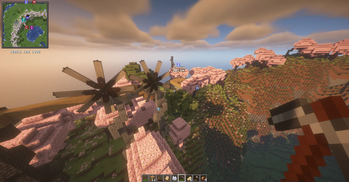
Screenshots
Über dieses Modpack
The Ultimate Minecraft Vanilla++ Technological experience, designed for players looking for a cohesive and expansive and incredibly beautiful yet non-bloated Minecraft modded experience.
Highly optimized for lower-end PCs and high-end PCs alike! and includes a server pack for users looking to play multiplayer right away with Friends.
Create + Immersive Engineering are balanced through scripts and compatability mods to be fair for the player and work seamlessly with each other (all changes listed below)
Highlight mods are
- Create + Addons
- Immersive Engineering
- Embers Rekindled
- Simple Tombstones
- Aether + it's addons
- Quark (modified config)
- Quark Oddities (Matrix Enchanting, item pipes, magnets)
- Wearable Backpacks
- Immersive Aircraft + Intergration with Create mod
- Farmer's Delight (CurseForge) + Aquaculture 2 (CurseForge) + Aquaculture Delight (CurseForge) + Ocean's Delight
YUNG's mods are included (excluding Better Dungeons but can be added by the user if desired) to enchance the Minecraft experience greatly.
Simple Gravestones mod is included for player deaths and to make the MC experience a little less frustrating.
Changes:
-IE's VBOs are disabled to ensure shaders work properly with machines
-IE's Crates are disabled for balance
-Ember's Ore Generation of silver/lead replaced with IE's ore gen
-Leather can be converted/crafted from IE's Erstaz leather
-Ore doubling via Immersive Engineering is back (for both Crusher and Arc Furnace)!
-Grit smelted in the furnace yields is changed to yield XP (by default IE's ore grits/dust don't yield XP)
-Each ore smelted in Arc Furnace yields 2 ingots per ore, along with Nuggets of Experience to ensure that the player does not miss out on XP that otherwise only be acquired by smelting ores or using Create's Crusher
-Chances of yielding a nugget of experience (3.0 XP each) in the Arc Furnace are based off the experience gained when smelting said ores in the Furnace and are as follows:
- Aluminum 10.00%
- Copper 23.33%
- Gold 33.33%
- Iron 23.33%
- Lead 23.33%
- Nickel 33.33%
- Silver 23.33%
- Uranium 33.33%
- Zinc 23.33%
-Enchanting system is highly enhanced with Matrix Enchanting from Quark Oddities
-Easy Anvil mod for more forgiving Anvils and decreased costs
-Visual Workbench mod allows beautiful and seamless crafting
-Create Jetpacks intergrated as Curios baubles
Please feel free to join to server to find a community to play with, make suggestions, or report bugs!
Additional notes:
Create Immersive Aircrafts
Aether Delight mod by nocubeyt recommended but is not included in modpack due to licensing issues.
Faithful 32x - Immersive Aircraft
Create Immersive Aircrafts resources packs all recommended for the best experience.
Verfügbare Versionen
IE Aether & Create Server einrichten
Server bestellen
Wähle mindestens 4 GB RAM (6 GB empfohlen für IE Aether & Create). Je nach Spieleranzahl: +1 GB pro 5 Spieler.
Modpack im Dashboard installieren
Öffne den Modpack-Browser im Dashboard, suche nach "IE Aether & Create" und klicke "Installieren". Der neoforge-Loader und Minecraft 1.20.1 werden automatisch konfiguriert.
Server starten & spielen
Starte den Server – alle Mods werden automatisch geladen. Teile die Server-IP mit Freunden und spielt zusammen!
Häufige Fragen
IE Aether & Create Server crasht oder startet nicht – was tun?
Häufigste Ursachen: zu wenig RAM oder falscher neoforge-Loader. Prüfe latest.log auf "OutOfMemoryError" → erhöhe RAM auf mindestens 6 GB. Bei "Mixin" oder "ClassNotFoundException": Modpack-Version und Loader stimmen nicht überein. Bei Mado Hosting werden Loader und Minecraft-Version beim Modpack-Install automatisch konfiguriert – das verhindert die meisten Startprobleme.
Wie viel RAM braucht ein IE Aether & Create Server wirklich?
Minimum 4 GB, empfohlen 6 GB für stabile Performance. +1 GB pro 5 Spieler. Wichtig: Minecraft-Modpacks brauchen mehr RAM als Vanilla – plane pro zusätzlichem Spieler extra ein. Bei Mado Hosting kannst du den RAM jederzeit live hochskalieren, ohne Datenverlust (ab €5.2/Monat).
Kann ich eigene Mods zu IE Aether & Create hinzufügen, ohne Konflikte?
Ja, aber achte auf die Kompatibilität: Nutze nur Mods für den gleichen Loader (neoforge) und die gleiche Minecraft-Version (1.20.1). Häufige Probleme: ID-Konflikte bei Rezept-Mods und inkompatible Coremod-Versionen. Im Mado Dashboard zeigt der Mod-Browser nur kompatible Mods an und warnt bei bekannten Konflikten.
IE Aether & Create Server laggt – Performance-Tipps
1) RAM auf 6 GB+ erhöhen. 2) Server-View-Distance auf 8 reduzieren (server.properties). 3) Pre-Generiere Chunks mit dem "Chunky" Plugin. 4) Prüfe mit /spark profiler welche Mods die meiste Tick-Time verbrauchen. Bei Mado Hosting laufen alle Server auf NVMe-SSDs mit dedizierten CPU-Kernen – das eliminiert Hardware als Engpass.
Ähnliche Modpacks

![COBBLEVERSE - Pokemon Adventure [Cobblemon]](https://cdn.modrinth.com/data/Jkb29YJU/581ecf54530972afb18a04660afd820f2f24f6c7.png)




IE Aether & Create Server mieten
Starte deinen eigenen Server mit automatischer Modpack-Installation.
Details
- Lizenz
- GNU Affero General Public License v3.0 only
- Server-seitig
- Optional
- Client-seitig
- Optional
Unterstützte Versionen
Starte deinen IE Aether & Create Server jetzt
Ab €5.20/Monat; für die beste Performance werden 6 GB RAM empfohlen.
Server konfigurieren →