
Affogato
Would you like your Minecraft with a shot of hot espresso? [A highly opinionated vanilla overhaul]
Screenshots
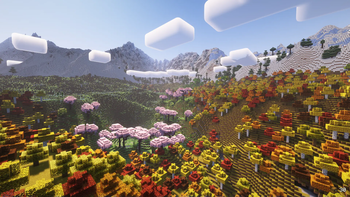
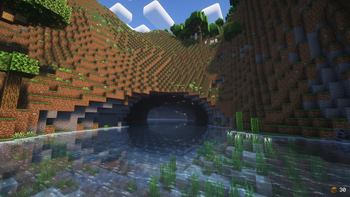
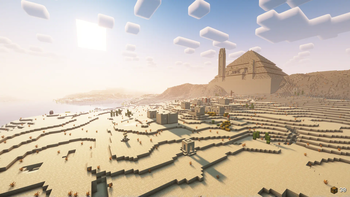

Über dieses Modpack
An affogato, more traditionally known as "affogato al caffè", is an Italian coffee-based dessert. It usually takes the form of a scoop of plain milk-flavored or vanilla gelato or ice cream topped or "drowned" with a shot of hot espresso.
About the modpack
Affogato is a modpack that represents my ideal version of Minecraft. It's a culmination of all the thoughts and ideas I had for the game over the years put into one neat, meticulously handcrafted package. It consists of all of my mods, a selection of quality mods from other authors, which help me in achieving my vision for this modpack, and Affogato Core, which adds features and tweaks I could not find in other mods, provides custom mod configs and data, and fixes mod incompatibilities and bugs.
The main goals of the modpack are the following:
- Change game progression to be more difficult, but feel more rewarding at the same time.
- Rework or improve underutilized and/or underwhelming game mechanics and incorporate them into the game's progression.
- Add new, meaningful content to the game that fits vanilla both functionally and aesthetically without compromising core gameplay.
- Put a way stronger emphasis on exploration and other core game mechanics.
- Add convenience features and mechanics, where it makes sense to do so.
Affogato targets the latest Minecraft version and will always try to update as soon as possible.
Installing the modpack
Install the modpack through the Modrinth app or your favorite launcher.
You can play with your friends by either using e4mc (included in the modpack) or setting up a dedicated server with the server installer, which uses mrpack4server.
Playing the modpack
Gameplay
Refer to in-game tutorials, advancements and the recipe book for progression guidance. There are no guide books, quest trees or anything like that.
Without going into specifics, the modpack is generally more difficult than vanilla Minecraft, especially early in the game. My advice is to stick to the surface until you get a food stash and at least full copper gear and a shield before throwing yourself into combat. Sneaking will make it harder for hostile mobs to detect you (moreso compared to vanilla) so try taking advantage of it to avoid getting into bad encounters.
Visuals
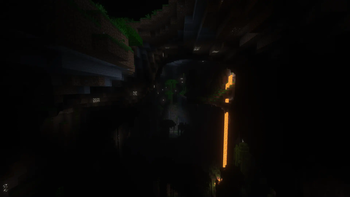
The modpack comes preconfigured with shader presets using Euphoria Patches. These presets are configured to achieve the intended look for the modpack. You can change the shader preset in the video settings under the Affogato page.
By default, no shaders are used, and the intended look for the modpack is achieved using Delight-map and dimension-specific brightness settings.
Recommendations
- For the intended visual experience, don't use shaders packs other than the ones provided in the modpack, and don't disable Delight-map or change the brightness settings.
- Keep the game difficulty on Hard for the intended gameplay experience.
- Change the maximum allocated memory to at least 4GB, but not more than 8GB.
Feedback
Either join the Discord server and use the #affogato channel, or open an issue on the GitHub repo of the modpack. Both are linked on the sidebar to the right.
Verfügbare Versionen
Affogato Server einrichten
Server bestellen
Wähle mindestens 4 GB RAM (6 GB empfohlen für Affogato). Je nach Spieleranzahl: +1 GB pro 8 Spieler.
Modpack im Dashboard installieren
Öffne den Modpack-Browser im Dashboard, suche nach "Affogato" und klicke "Installieren". Der fabric-Loader und Minecraft 26.1.2 werden automatisch konfiguriert.
Server starten & spielen
Starte den Server – alle Mods werden automatisch geladen. Teile die Server-IP mit Freunden und spielt zusammen!
Häufige Fragen
Affogato Server crasht oder startet nicht – was tun?
Häufigste Ursachen: zu wenig RAM oder falscher fabric-Loader. Prüfe latest.log auf "OutOfMemoryError" → erhöhe RAM auf mindestens 6 GB. Bei "Mixin" oder "ClassNotFoundException": Modpack-Version und Loader stimmen nicht überein. Bei Mado Hosting werden Loader und Minecraft-Version beim Modpack-Install automatisch konfiguriert – das verhindert die meisten Startprobleme.
Wie viel RAM braucht ein Affogato Server wirklich?
Minimum 4 GB, empfohlen 6 GB für stabile Performance. +1 GB pro 8 Spieler. Wichtig: Minecraft-Modpacks brauchen mehr RAM als Vanilla – plane pro zusätzlichem Spieler extra ein. Bei Mado Hosting kannst du den RAM jederzeit live hochskalieren, ohne Datenverlust (ab €5.2/Monat).
Kann ich eigene Mods zu Affogato hinzufügen, ohne Konflikte?
Ja, aber achte auf die Kompatibilität: Nutze nur Mods für den gleichen Loader (fabric) und die gleiche Minecraft-Version (26.1.2). Häufige Probleme: ID-Konflikte bei Rezept-Mods und inkompatible Coremod-Versionen. Im Mado Dashboard zeigt der Mod-Browser nur kompatible Mods an und warnt bei bekannten Konflikten.
Affogato Server laggt – Performance-Tipps
1) RAM auf 6 GB+ erhöhen. 2) Server-View-Distance auf 8 reduzieren (server.properties). 3) Pre-Generiere Chunks mit dem "Chunky" Plugin. 4) Prüfe mit /spark profiler welche Mods die meiste Tick-Time verbrauchen. Bei Mado Hosting laufen alle Server auf NVMe-SSDs mit dedizierten CPU-Kernen – das eliminiert Hardware als Engpass.
Ähnliche Modpacks

![COBBLEVERSE - Pokemon Adventure [Cobblemon]](https://cdn.modrinth.com/data/Jkb29YJU/581ecf54530972afb18a04660afd820f2f24f6c7.png)




Affogato Server mieten
Starte deinen eigenen Server mit automatischer Modpack-Installation.
Details
- Lizenz
- Creative Commons Attribution Share Alike 4.0 International
- Server-seitig
- Erforderlich
- Client-seitig
- Erforderlich
Unterstützte Versionen
Starte deinen Affogato Server jetzt
Ab €5.20/Monat; für die beste Performance werden 6 GB RAM empfohlen.
Server konfigurieren →