
Aged Light
A light version of the Aged Modpack for Fabric 1.20.1
Screenshots
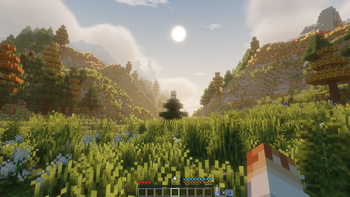
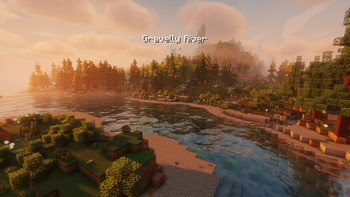
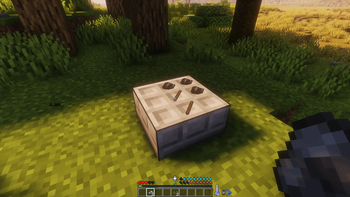
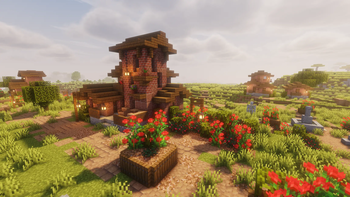
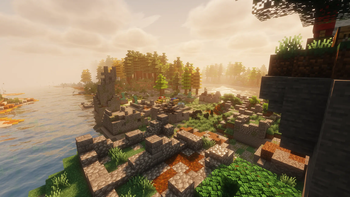
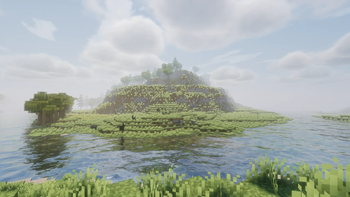
Über dieses Modpack

A light version of the original aged modpack.

You awaken in the Tales of Aged wilderness.
You quickly realize that you need to gather supplies & craft some flint tools.
Fresh water and body temperature become important pretty soon.
Your character is still weak, so you go an adventure to gather experience to increase your skills and attributes.
That's where your story begins.
- 💧 Hydration - boil water to receive purified water that you can safely consume
- 🍖 Nutrition - eat a balanced diet, but don't eat spoiled dishes
- ❄️ Temperature - keep yourself cozy in all areas
- 🌍 Seasons - prepare for winter & check your crops
- 🧮 Skills - gather xp to improve your characters aspects
- 🛠️ Jobs - assign up to 3 jobs to receive xp faster
- 🏡 Settle - explore & protect your goods against enemy forces
- 🪙 Trade - you'll stumple upon more wandering traders & other traders
- ⚔️ Fight - mobs get stronger the further you go. At the same time they offer more loot
- ♟️ Bosses - more than 6 unique boss fights to defeat
- 🎒 Backpacks - store goods in drawers or use portable backpacks
- 🔨 Upgrade Tools - smith gems onto tools while also increase the rarity
- 📦 Sieve - filter items trough sieves to get common to rare items
- 🪑 Furniture - decorate with [Let's Do] & Another Furniture
- 🦖 Archeology - reveal ancient fossils & powerful enchantments
- ✨ Decorate - various blocks from Chipped & Stoneworks
You're most likely asking yourself what the differences between Aged Lite & Aged are.
Aged Lite is a lightweight version of Aged with close to 0 aesthetic & visual mods.
Since Aged v 3.1.0 both modpacks are compatible with each other.
Take a look at the Aged Lite Changelog to know which Aged version its compatible with.


Q: Does Aged support multiplayer?
A: Yes and No, Aged is build for singleplayer since v3.0.0 but can be downloaded as server file via e.g. ATLauncher / mrpack-install / docker.
If you want to play with a friend we recommend to use e4mc to create a server for free.
// The Lavender Guide Book probably won't work on servers.
Q: Is there a wiki or documentation?
A: Ingame you'll find a guide book at first start. The command:
/get-lavender-book aged:aged_guide_book
Q: Where to ask for help / bug report?
A: For questions ask in
modpack-chaton our Discord. For bugs pls open a github issue.
Modded Logs can't be stripped
Try to strip them in a
Woodcutter
Flint and Steel does'nt show in EMI
Combine
flint&steel ingotin a crafting grid
Dungeon Compass on cartography table crash
Disable the mod
Fancy Menu-> link the compass -> reenable Fancy Menu
Enchanting Table crash
Could work since v 3.1.0, if not try several times.
// you could play with other mods like MC Dungeons Enchanting or Enchanting Infuser
Included Mods
- [EMF] Entity Model Features
- [ETF] Entity Texture Features
- [Let's Do Addon] EMI Compat
- [Let's Do] API
- [Let's Do] Bakery - Farm&Charm Compat
- [Let's Do] Brewery - Farm&Charm Compat
- [Let's Do] Candlelight - Farm&Charm Compat
- [Let's Do] Farm & Charm
- [Let's Do] HerbalBrews
- [Let's Do] Meadow
- [Let's Do] NetherVinery
- [Let's Do] Vinery
- AdditionZ
- AdventureZ
- Aged Addition
- Almanac
- Amarite
- Another Furniture
- Antique Atlas 4
- AppleSkin
- Architectury API
- ARRP
- Async Locator
- Athena
- AutoTag
- BackSlot
- BackSlotAddon
- BadOptimizations
- Balm
- Better Archeology
- Better Combat
- Better End Cities Vanilla
- Birds | Boids Addon
- Boids
- Building But Better
- Chalk
- Chalk: Colorful Addon
- Chipped
- Cloth Config API
- Combat Roll
- Connectible Chains [Fabric]
- Couplings
- Crawl
- Create The Server Datapack [Datapack]
- Creeper Overhaul
- Crop Growth Modifier
- Default Options
- Dehydration
- Desert Dungeon - DungeonZ Addon
- DEUF Refabricated
- Distant Horizons
- Dungeon Now Loading
- Dungeons and Taverns
- Dungeons and Taverns Ancient City Overhaul
- Dungeons and Taverns Pillager Outpost Rework
- Dungeons and Taverns Stronghold Rework
- Dungeons+
- DungeonZ
- EarlyStage
- EMI
- EMI Enchanting
- EMI Loot
- EMI Ores
- EMI Trades
- EMIffect
- End Remastered
- Enderman Overhaul
- Entity Culling
- EnvironmentZ
- Exposure
- Extended Drawers
- ExtendedDrawersAddon
- Fabric API
- Fabric Language Kotlin
- Fabric Seasons
- FerriteCore
- Fishing Real
- FleshZ
- Forge Config API Port
- Formations (Structure Library)
- Formations Nether
- Formations Overworld
- Fzzy Config
- Gardens of the Dead
- Geckolib
- Grass Overhaul
- Hearths
- HerdsPanic
- Hopo Better Mineshaft
- Hopo Better Underwater Ruins
- HT's TreeChop
- ImmediatelyFast
- Immersive Aircraft
- Immersive Armors
- Immersive Snow
- Indium
- Inmis
- InmisAddon
- Iris Shaders
- Iris/Oculus & GeckoLib Compat
- JobsAddon
- Kiwi Library
- Lavender
- Let Me Despawn
- LevelZ
- LibZ
- Lithium
- Load My F***ing Tags
- Load My Resources
- Log Begone
- Lootr
- Luki's Grand Capitals
- Medieval Buildings
- Medieval Weapons
- Memory Leak Fix
- MES - Moog's End Structures
- MNS - Moog's Nether Structures
- Mod Menu
- Model Gap Fix
- ModernFix
- Moonlight Lib
- More Culling
- Nameplate
- Naturalist
- Nature's Spirit
- Neruina - Ticking Entity Fixer
- NiftyCarts
- Noisium
- NutritionZ
- Overflowing Bars
- owo (owo-lib)
- PartyAddon
- Passable Foliage
- Paxi
- Phantom Loader
- playerAnimator
- Pockets
- Profundis: Seven New Quality Cave Biomes
- Puzzles Lib
- Raise Sound Limit Simplified
- RecipeRemover
- Resourceful Config
- Resourceful Lib
- Revive
- RpgDifficulty
- Scholar
- SeasonHUD-Fabric
- Ships
- Shut Up GL Error
- Small Ships
- Smarter Farmers (farmers replant)
- SmitherZ
- Sodium
- Sparse Structures
- Spawn Animations
- Spider Caves
- SpoiledZ
- Stoneworks
- Superb Steeds
- SuperMartijn642's Config Lib
- Surveyor Map Framework
- TerraBlender
- The Lost Castle
- TieredZ
- Time & Wind
- ToolTipFix
- TravelerZ
- Trinkets
- True Ending: Ender Dragon Overhaul
- Underground Jungle
- Unnamed Deserts
- VillagerTradeFix
- Villager Transportation
- Villages&Pillages
- VoidZ
- WelcomeScreen
- William Wythers' Overhauled Overworld [Datapack]
- YUNG's API
- YUNG's Better Desert Temples
- YUNG's Better End Island
- YUNG's Better Jungle Temples
- YUNG's Better Nether Fortresses
- YUNG's Better Ocean Monuments
Legacy Mods





Verfügbare Versionen
Aged Light Server einrichten
Server bestellen
Wähle mindestens 6 GB RAM (8 GB empfohlen für Aged Light). Je nach Spieleranzahl: +1 GB pro 5 Spieler.
Modpack im Dashboard installieren
Öffne den Modpack-Browser im Dashboard, suche nach "Aged Light" und klicke "Installieren". Der fabric-Loader und Minecraft 1.21.1 werden automatisch konfiguriert.
Server starten & spielen
Starte den Server – alle Mods werden automatisch geladen. Teile die Server-IP mit Freunden und spielt zusammen!
Häufige Fragen
Aged Light Server crasht oder startet nicht – was tun?
Häufigste Ursachen: zu wenig RAM oder falscher fabric-Loader. Prüfe latest.log auf "OutOfMemoryError" → erhöhe RAM auf mindestens 8 GB. Bei "Mixin" oder "ClassNotFoundException": Modpack-Version und Loader stimmen nicht überein. Bei Mado Hosting werden Loader und Minecraft-Version beim Modpack-Install automatisch konfiguriert – das verhindert die meisten Startprobleme.
Wie viel RAM braucht ein Aged Light Server wirklich?
Minimum 6 GB, empfohlen 8 GB für stabile Performance. +1 GB pro 5 Spieler. Wichtig: Minecraft-Modpacks brauchen mehr RAM als Vanilla – plane pro zusätzlichem Spieler extra ein. Bei Mado Hosting kannst du den RAM jederzeit live hochskalieren, ohne Datenverlust (ab €7.800000000000001/Monat).
Kann ich eigene Mods zu Aged Light hinzufügen, ohne Konflikte?
Ja, aber achte auf die Kompatibilität: Nutze nur Mods für den gleichen Loader (fabric) und die gleiche Minecraft-Version (1.21.1). Häufige Probleme: ID-Konflikte bei Rezept-Mods und inkompatible Coremod-Versionen. Im Mado Dashboard zeigt der Mod-Browser nur kompatible Mods an und warnt bei bekannten Konflikten.
Aged Light Server laggt – Performance-Tipps
1) RAM auf 8 GB+ erhöhen. 2) Server-View-Distance auf 8 reduzieren (server.properties). 3) Pre-Generiere Chunks mit dem "Chunky" Plugin. 4) Prüfe mit /spark profiler welche Mods die meiste Tick-Time verbrauchen. Bei Mado Hosting laufen alle Server auf NVMe-SSDs mit dedizierten CPU-Kernen – das eliminiert Hardware als Engpass.
Ähnliche Modpacks
![Cobblemon Official Modpack [Fabric]](https://cdn.modrinth.com/data/5FFgwNNP/e7f9ee2e9d361623847853fe2ddce42f519ee64f.png)
![COBBLEVERSE - Pokemon Adventure [Cobblemon]](https://cdn.modrinth.com/data/Jkb29YJU/581ecf54530972afb18a04660afd820f2f24f6c7.png)
![Better MC [FABRIC] - BMC2](https://cdn.modrinth.com/data/shFhR8Vx/a19c2bcb51d38f32f138d3607e91cb2b7b8e387f_96.webp)


![Better MC [FORGE] - BMC4](https://cdn.modrinth.com/data/4BV47HRn/7f5ef7cc61b2593609aabef3ed07a866a4f11b73_96.webp)
Aged Light Server mieten
Starte deinen eigenen Server mit automatischer Modpack-Installation.
Unterstützte Versionen
Starte deinen Aged Light Server jetzt
Ab €7.80/Monat; für die beste Performance werden 8 GB RAM empfohlen.
Server konfigurieren →