Altercraft
A Lightweight Modpack that turns Minecraft into a RPG!
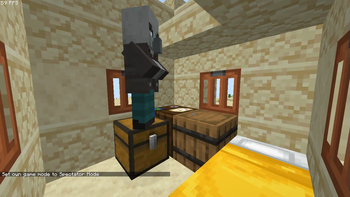
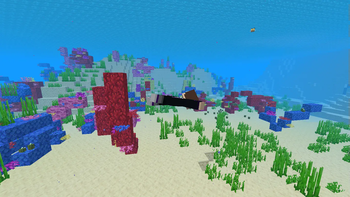
Screenshots
Über dieses Modpack

You wake up in the middle of an island, you try to swim, but your skin starts burning!
You remember that you are a descendant of the Endermans, Enderians, You can not swim.
There is nothing on the island, and yet so much in the world, You dig down to find a cave.
You explore it to find Zombies, Skeletons, Spiders, Endermans, Creepers and... What is th-
- Features
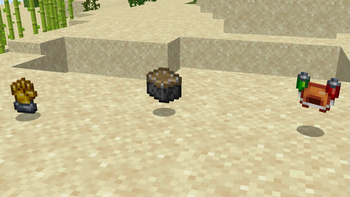
🎮 New Gameplay : Enhanced Combat with New Weapons & Armors with different playstyles, Artifacts enhancing even more your gameplay!
✈️ Species : Every Species has its unique Pros and Cons, Like Enderians, They reach further and teleport, but they are Hydrophobic.
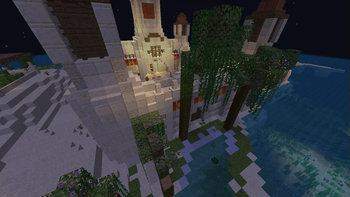
🗺️ World : In the Overworld there is several new biomes with seasons, in the Nether & End there are new biomes too, and new foes, so be prepared.
🩸 Hallucinations...? : You begin hallucinating overtime, seeing things like players and a urban legend called "Herobrine".
Altercraft aims to balance Features and Optimization, So give it a chance! why not?
- Others
Credits / Important Stuff
By downloading this Modpack, you agree that You will not redistribute the project. Security Measures only.
Also You can use the Modpack in videos or lives! Dont be shy, I know you probably wont\
Special Thanks to the Origins Developers! Origins basically holds this Modpack together!
This Modpack is Discontinued, Unless I really want to update Altercraft, there will not be any more updates now.
Verfügbare Versionen
Altercraft Server einrichten
Server bestellen
Wähle mindestens 6 GB RAM (8 GB empfohlen für Altercraft). Je nach Spieleranzahl: +1 GB pro 5 Spieler.
Modpack im Dashboard installieren
Öffne den Modpack-Browser im Dashboard, suche nach "Altercraft" und klicke "Installieren". Der fabric-Loader und Minecraft 1.20.1 werden automatisch konfiguriert.
Server starten & spielen
Starte den Server – alle Mods werden automatisch geladen. Teile die Server-IP mit Freunden und spielt zusammen!
Häufige Fragen
Altercraft Server crasht oder startet nicht – was tun?
Häufigste Ursachen: zu wenig RAM oder falscher fabric-Loader. Prüfe latest.log auf "OutOfMemoryError" → erhöhe RAM auf mindestens 8 GB. Bei "Mixin" oder "ClassNotFoundException": Modpack-Version und Loader stimmen nicht überein. Bei Mado Hosting werden Loader und Minecraft-Version beim Modpack-Install automatisch konfiguriert – das verhindert die meisten Startprobleme.
Wie viel RAM braucht ein Altercraft Server wirklich?
Minimum 6 GB, empfohlen 8 GB für stabile Performance. +1 GB pro 5 Spieler. Wichtig: Minecraft-Modpacks brauchen mehr RAM als Vanilla – plane pro zusätzlichem Spieler extra ein. Bei Mado Hosting kannst du den RAM jederzeit live hochskalieren, ohne Datenverlust (ab €7.800000000000001/Monat).
Kann ich eigene Mods zu Altercraft hinzufügen, ohne Konflikte?
Ja, aber achte auf die Kompatibilität: Nutze nur Mods für den gleichen Loader (fabric) und die gleiche Minecraft-Version (1.20.1). Häufige Probleme: ID-Konflikte bei Rezept-Mods und inkompatible Coremod-Versionen. Im Mado Dashboard zeigt der Mod-Browser nur kompatible Mods an und warnt bei bekannten Konflikten.
Altercraft Server laggt – Performance-Tipps
1) RAM auf 8 GB+ erhöhen. 2) Server-View-Distance auf 8 reduzieren (server.properties). 3) Pre-Generiere Chunks mit dem "Chunky" Plugin. 4) Prüfe mit /spark profiler welche Mods die meiste Tick-Time verbrauchen. Bei Mado Hosting laufen alle Server auf NVMe-SSDs mit dedizierten CPU-Kernen – das eliminiert Hardware als Engpass.
Ähnliche Modpacks
![Cobblemon Official Modpack [Fabric]](https://cdn.modrinth.com/data/5FFgwNNP/e7f9ee2e9d361623847853fe2ddce42f519ee64f.png)
![COBBLEVERSE - Pokemon Adventure [Cobblemon]](https://cdn.modrinth.com/data/Jkb29YJU/581ecf54530972afb18a04660afd820f2f24f6c7.png)
![Better MC [FABRIC] - BMC2](https://cdn.modrinth.com/data/shFhR8Vx/a19c2bcb51d38f32f138d3607e91cb2b7b8e387f_96.webp)


![Better MC [FORGE] - BMC4](https://cdn.modrinth.com/data/4BV47HRn/7f5ef7cc61b2593609aabef3ed07a866a4f11b73_96.webp)
Altercraft Server mieten
Starte deinen eigenen Server mit automatischer Modpack-Installation.
Details
- Lizenz
- LicenseRef-All-Rights-Reserved
- Server-seitig
- Erforderlich
- Client-seitig
- Erforderlich
Unterstützte Versionen
Starte deinen Altercraft Server jetzt
Ab €7.80/Monat; für die beste Performance werden 8 GB RAM empfohlen.
Server konfigurieren →