
ArdaCraft
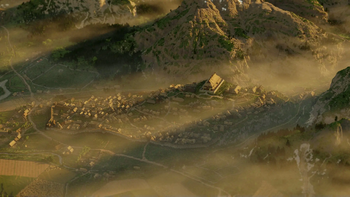
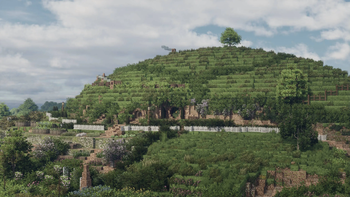
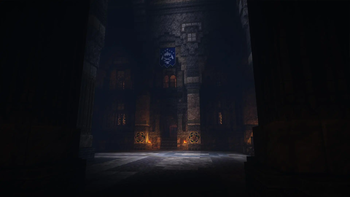
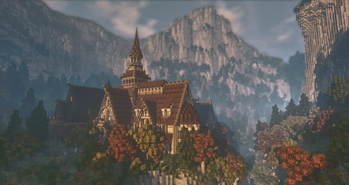
The modpack for the ArdaCraft server, a Lord of the Rings project re-creating J.R.R. Tolkien's Middle-earth in Minecraft.
Screenshots
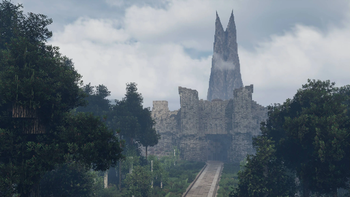
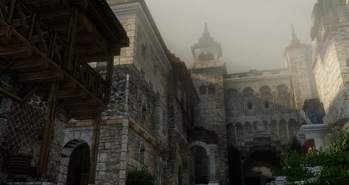
Über dieses Modpack

"In a hole in the ground, there lived a hobbit."
With these words scribbled on the back of a student's exam paper, the English writer and professor J.R.R. Tolkien began a series of books which have enthralled millions and contain within their pages the greatest fantasy universe ever created.
Now, a team of builders of all nationalities and ages, united by their love for Tolkien's works, have embarked on a singularly ambitious project - to recreate Tolkien's Middle-earth at a scale and level of detail never before seen in any video game.
We have combined our knowledge - not only of building, but of geology, botany, history and Tolkien's every word and letter to ensure that this project surpasses any other of its kind.
We have a friendly community of skilled builders, and are always looking for new members! Our community is made up of people from a range of backgrounds, nationalities and ages - united by a love for Tolkien's work.
Our modpack and server
If you need help installing this modpack, see our guide here.
This modpack is designed for players joining ArdaCraft. The two main content mods are Conquest Reforged and Create, alongside a suite of visual and performance-optimisation mods aimed to make players' experience as smooth as possible.
Although the server is aimed at re-creating Middle-earth, we also have a plots world where anyone can join and try their hand at building using the Conquest Reforged mod. You can also add your friends to your plot to build together!
When you join, you will be given an guidebook which gives you basic information about how to explore our world, claim a plot, and participate in the community. We highly recommend that you join our Discord for announcements, events, project discussions, discourse around Tolkien's work, screenshots of the server, tech support, discussion around film and TV, art, music and more!
Our Discord is also the place where you can apply to join our team, once you've built on our plot world. We look forward to seeing you online!
Permissions and credit
Resource Packs
The ArdaCraft Resource Pack is made by the ArdaCraft team.
Mods
ArdaPaths, ArdaRegions, ArdaMobs, ArdaGrass, Arda LODs Downloader, ArdaSettings, and Axiom Overrides were made by the ArdaCraft team.
Shader Packs
Xonks-Bliss-ArdaCraft-Settings is our own edit of the Bliss shader pack which changes saturation and shading, as well as providing compatibility with Conquest Reforged blocks. The developer, X0nk, gave us permission to redistribute this here.
Verfügbare Versionen
ArdaCraft Server einrichten
Server bestellen
Wähle mindestens 4 GB RAM (6 GB empfohlen für ArdaCraft). Je nach Spieleranzahl: +1 GB pro 8 Spieler.
Modpack im Dashboard installieren
Öffne den Modpack-Browser im Dashboard, suche nach "ArdaCraft" und klicke "Installieren". Der fabric-Loader und Minecraft 1.20.1 werden automatisch konfiguriert.
Server starten & spielen
Starte den Server – alle Mods werden automatisch geladen. Teile die Server-IP mit Freunden und spielt zusammen!
Häufige Fragen
ArdaCraft Server crasht oder startet nicht – was tun?
Häufigste Ursachen: zu wenig RAM oder falscher fabric-Loader. Prüfe latest.log auf "OutOfMemoryError" → erhöhe RAM auf mindestens 6 GB. Bei "Mixin" oder "ClassNotFoundException": Modpack-Version und Loader stimmen nicht überein. Bei Mado Hosting werden Loader und Minecraft-Version beim Modpack-Install automatisch konfiguriert – das verhindert die meisten Startprobleme.
Wie viel RAM braucht ein ArdaCraft Server wirklich?
Minimum 4 GB, empfohlen 6 GB für stabile Performance. +1 GB pro 8 Spieler. Wichtig: Minecraft-Modpacks brauchen mehr RAM als Vanilla – plane pro zusätzlichem Spieler extra ein. Bei Mado Hosting kannst du den RAM jederzeit live hochskalieren, ohne Datenverlust (ab €5.2/Monat).
Kann ich eigene Mods zu ArdaCraft hinzufügen, ohne Konflikte?
Ja, aber achte auf die Kompatibilität: Nutze nur Mods für den gleichen Loader (fabric) und die gleiche Minecraft-Version (1.20.1). Häufige Probleme: ID-Konflikte bei Rezept-Mods und inkompatible Coremod-Versionen. Im Mado Dashboard zeigt der Mod-Browser nur kompatible Mods an und warnt bei bekannten Konflikten.
ArdaCraft Server laggt – Performance-Tipps
1) RAM auf 6 GB+ erhöhen. 2) Server-View-Distance auf 8 reduzieren (server.properties). 3) Pre-Generiere Chunks mit dem "Chunky" Plugin. 4) Prüfe mit /spark profiler welche Mods die meiste Tick-Time verbrauchen. Bei Mado Hosting laufen alle Server auf NVMe-SSDs mit dedizierten CPU-Kernen – das eliminiert Hardware als Engpass.
Ähnliche Modpacks


![Cobblemon Official Modpack [Fabric]](https://cdn.modrinth.com/data/5FFgwNNP/e7f9ee2e9d361623847853fe2ddce42f519ee64f.png)
![COBBLEVERSE - Pokemon Adventure [Cobblemon]](https://cdn.modrinth.com/data/Jkb29YJU/581ecf54530972afb18a04660afd820f2f24f6c7.png)

![Better MC [FABRIC] - BMC2](https://cdn.modrinth.com/data/shFhR8Vx/a19c2bcb51d38f32f138d3607e91cb2b7b8e387f_96.webp)

ArdaCraft Server mieten
Starte deinen eigenen Server mit automatischer Modpack-Installation.
Unterstützte Versionen
Starte deinen ArdaCraft Server jetzt
Ab €5.20/Monat; für die beste Performance werden 6 GB RAM empfohlen.
Server konfigurieren →