
Asai Integrated Modpack
A free license modpack that optimizes game performance and adds a few improvements to the game's mechanics.
Screenshots
Über dieses Modpack
📢 Introduce
Asai Integrated Modpack is a free license modpack that optimizes game performance and adds a few improvements to the game's mechanics.
This is a modpack that you can use freely, you can use to make things like a server client, or a new modpack, and you can build your ideas on top of this modpack without the authorization of the modpack author.
🔧 What functions does have?
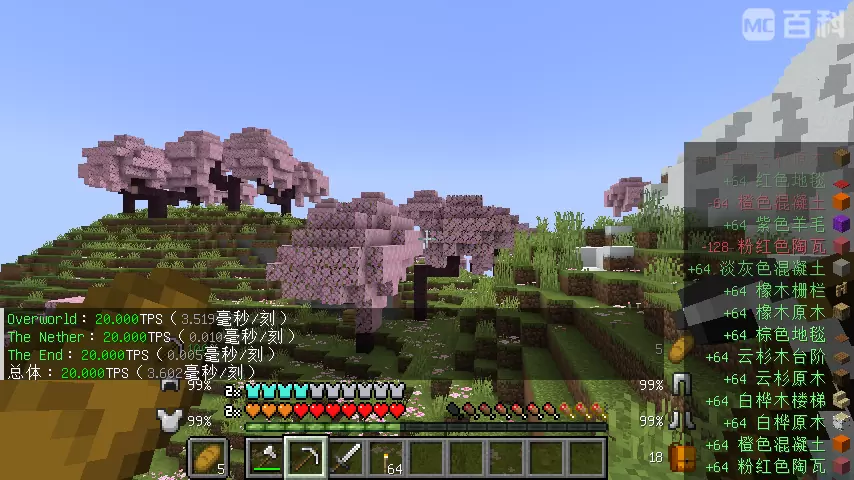
- Avoid unnecessary UI displays, provide a clean and simple layout.
- While providing performance optimizations, it also offers some gameplay improvements.
- Added Packet Fixer to fix issues where NBT tags and oversized packets prevent gameplay.
- Optimize the performance of item drops through Stxck, improve game performance, and slightly reduce the annoyance caused to players by scattered items.
※Notes on Stxck: If you are playing with Create, this mod may break the Create machines that implement the "distribution" feature. Please avoid letting items become physical entities during processing. Also, when drops exceeding the normal stack size enter Create's crusher wheels, only the normal stack quantity will be output (the excess will be lost). If you find this troublesome, you may uninstall the Stxck mod. - Adding NERB removes the recipe book, greatly improving the performance of CrT/KJS or other mods in reading player data, and speeding up data synchronization between the server and client as well as the time it takes for players to enter the saved world.
Game Mechanics Improvement Section
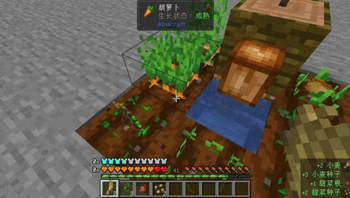
- Added Actually Harvest, just right-click on crops to harvest them. New plants will be left automatically, compatible with most MOD crops;
- Added Inventory Spam, allowing you to see which items you picked up or dropped in the bottom right corner of the screen, and it can be configured manually.
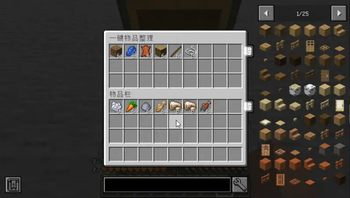
- Added Inventory Tweaks-Refoxed, a one-click organization port, with additional features;
- Added Silence Mobs, suitable for scenarios that require many creatures but where their sounds should not be too loud.
- Added Clean swing through grass, it allows you to attack creatures directly through blocks like grass and rails.
※This mod has a friendly-fire issue, but it is a client-side only mod. If you think the trouble it brings outweighs its convenience, you can delete it. - Added In-game NBTEdit and WorldEdit(1.21.1) provides convenience for advanced players, such as creators;
- Added Pro Placer, completely revamped the block placement logic, making it a whole lot easier and faster to use.
🖐 Precautions
- This modpack does not include any minimap-type mods. If needed, you can add your preferred minimap mods yourself.
- This modpack does not include shader loader mod, you can add Iris(1.21.1) or Oculus(1.20.1) yourself.
- You can join our discord server to discuss this modpack, or chat with other players: [Invite]
📝 Java arguments
This modpack have dedicated arguments, used to further optimize game performance:
1.20.1 for Client:
-XX:+UnlockExperimentalVMOptions -XX:+UseG1GC -XX:MaxGCPauseMillis=37 -XX:+UseCompressedOops -XX:+UseCompressedClassPointers -XX:+PerfDisableSharedMem -XX:+ExplicitGCInvokesConcurrent -XX:-UseAdaptiveSizePolicy -XX:+OmitStackTraceInFastThrow -XX:+UseFastUnorderedTimeStamps -XX:-DontCompileHugeMethods -XX:+OptimizeStringConcat -XX:+UseStringDeduplication -XX:G1HeapRegionSize=16M -XX:G1NewSizePercent=23 -XX:G1ReservePercent=20 -XX:SurvivorRatio=32 -XX:G1MixedGCCountTarget=3 -XX:G1HeapWastePercent=20 -XX:InitiatingHeapOccupancyPercent=10 -XX:G1RSetUpdatingPauseTimePercent=0 -XX:MaxTenuringThreshold=1 -XX:G1SATBBufferEnqueueingThresholdPercent=30 -XX:G1ConcMarkStepDurationMillis=5.0 -XX:G1ConcRSHotCardLimit=16 -XX:G1ConcRefinementServiceIntervalMillis=150 -XX:GCTimeRatio=99 -Dfml.ignoreInvalidMinecraftCertificates=true -Dfml.ignorePatchDiscrepancies=true -Dlog4j2.formatMsgNoLookups=true -Dfile.encoding=UTF-8 -Dconsole.encoding=UTF-8 -Djdk.lang.Process.allowAmbiguousCommands=true
For server, when use Java 17 booted:
-XX:+UseG1GC -XX:MaxGCPauseMillis=130 -XX:+UnlockExperimentalVMOptions -XX:+AlwaysActAsServerClassMachine -XX:+AlwaysPreTouch -XX:+ExplicitGCInvokesConcurrent -XX:+OptimizeStringConcat -XX:+UseCompressedOops -XX:+UseCompressedClassPointers -XX:+UseStringDeduplication -XX:-DontCompileHugeMethods -XX:-UseAdaptiveSizePolicy -XX:+UseVectorCmov -XX:+PerfDisableSharedMem -XX:+UseFastUnorderedTimeStamps -XX:+OmitStackTraceInFastThrow -XX:+UseNUMA -XX:G1NewSizePercent=28 -XX:G1HeapRegionSize=16M -XX:G1ReservePercent=20 -XX:G1MixedGCCountTarget=3 -XX:InitiatingHeapOccupancyPercent=10 -XX:G1MixedGCLiveThresholdPercent=90 -XX:G1RSetUpdatingPauseTimePercent=0 -XX:SurvivorRatio=32 -XX:MaxTenuringThreshold=1 -XX:G1SATBBufferEnqueueingThresholdPercent=30 -XX:G1ConcMarkStepDurationMillis=5 -XX:G1ConcRSHotCardLimit=16 -XX:G1ConcRefinementServiceIntervalMillis=150 -Dfile.encoding=UTF-8 -Dconsole.encoding=UTF-8 -Djdk.lang.Process.allowAmbiguousCommands=true -Dlog4j2.formatMsgNoLookups=true -Dfml.ignorePatchDiscrepancies=true -Dfml.ignoreInvalidMinecraftCertificates=true -Xlog:async -Djava.security.egd=file:/dev/urandom --add-modules jdk.incubator.vector
1.21.1 for Client:
-XX:+UnlockExperimentalVMOptions -XX:+UseG1GC -XX:MaxGCPauseMillis=37 -XX:+UseCompressedOops -XX:+UseCompressedClassPointers -XX:+PerfDisableSharedMem -XX:+ExplicitGCInvokesConcurrent -XX:-UseAdaptiveSizePolicy -XX:+OmitStackTraceInFastThrow -XX:+UseFastUnorderedTimeStamps -XX:-DontCompileHugeMethods -XX:+OptimizeStringConcat -XX:+UseStringDeduplication -XX:G1HeapRegionSize=16M -XX:G1NewSizePercent=23 -XX:G1ReservePercent=20 -XX:SurvivorRatio=32 -XX:G1MixedGCCountTarget=3 -XX:G1HeapWastePercent=20 -XX:InitiatingHeapOccupancyPercent=10 -XX:G1RSetUpdatingPauseTimePercent=0 -XX:MaxTenuringThreshold=1 -XX:G1SATBBufferEnqueueingThresholdPercent=30 -XX:G1ConcMarkStepDurationMillis=5.0 -XX:GCTimeRatio=99 -Dlog4j2.formatMsgNoLookups=true -Djdk.lang.Process.allowAmbiguousCommands=true
For server, when use Java 21 booted:
-XX:+UseG1GC -XX:MaxGCPauseMillis=130 -XX:+UnlockExperimentalVMOptions -XX:+AlwaysActAsServerClassMachine -XX:+AlwaysPreTouch -XX:+ExplicitGCInvokesConcurrent -XX:+OptimizeStringConcat -XX:+UseCompressedOops -XX:+UseCompressedClassPointers -XX:+UseStringDeduplication -XX:-DontCompileHugeMethods -XX:-UseAdaptiveSizePolicy -XX:+UseVectorCmov -XX:+PerfDisableSharedMem -XX:+UseFastUnorderedTimeStamps -XX:+OmitStackTraceInFastThrow -XX:+UseNUMA -XX:G1NewSizePercent=28 -XX:G1HeapRegionSize=16M -XX:G1ReservePercent=20 -XX:G1MixedGCCountTarget=3 -XX:InitiatingHeapOccupancyPercent=10 -XX:G1MixedGCLiveThresholdPercent=90 -XX:G1RSetUpdatingPauseTimePercent=0 -XX:SurvivorRatio=32 -XX:MaxTenuringThreshold=1 -XX:G1SATBBufferEnqueueingThresholdPercent=30 -XX:G1ConcMarkStepDurationMillis=5 -Djdk.lang.Process.allowAmbiguousCommands=true -Dlog4j2.formatMsgNoLookups=true -Dfml.ignorePatchDiscrepancies=true -Dfml.ignoreInvalidMinecraftCertificates=true -Xlog:async -Djava.security.egd=file:/dev/urandom --add-modules jdk.incubator.vector
Verfügbare Versionen
Asai Integrated Modpack Server einrichten
Server bestellen
Wähle mindestens 4 GB RAM (6 GB empfohlen für Asai Integrated Modpack). Je nach Spieleranzahl: +1 GB pro 5 Spieler.
Modpack im Dashboard installieren
Öffne den Modpack-Browser im Dashboard, suche nach "Asai Integrated Modpack" und klicke "Installieren". Der forge-Loader und Minecraft 1.21.1 werden automatisch konfiguriert.
Server starten & spielen
Starte den Server – alle Mods werden automatisch geladen. Teile die Server-IP mit Freunden und spielt zusammen!
Häufige Fragen
Asai Integrated Modpack Server crasht oder startet nicht – was tun?
Häufigste Ursachen: zu wenig RAM oder falscher forge-Loader. Prüfe latest.log auf "OutOfMemoryError" → erhöhe RAM auf mindestens 6 GB. Bei "Mixin" oder "ClassNotFoundException": Modpack-Version und Loader stimmen nicht überein. Bei Mado Hosting werden Loader und Minecraft-Version beim Modpack-Install automatisch konfiguriert – das verhindert die meisten Startprobleme.
Wie viel RAM braucht ein Asai Integrated Modpack Server wirklich?
Minimum 4 GB, empfohlen 6 GB für stabile Performance. +1 GB pro 5 Spieler. Wichtig: Minecraft-Modpacks brauchen mehr RAM als Vanilla – plane pro zusätzlichem Spieler extra ein. Bei Mado Hosting kannst du den RAM jederzeit live hochskalieren, ohne Datenverlust (ab €5.2/Monat).
Kann ich eigene Mods zu Asai Integrated Modpack hinzufügen, ohne Konflikte?
Ja, aber achte auf die Kompatibilität: Nutze nur Mods für den gleichen Loader (forge) und die gleiche Minecraft-Version (1.21.1). Häufige Probleme: ID-Konflikte bei Rezept-Mods und inkompatible Coremod-Versionen. Im Mado Dashboard zeigt der Mod-Browser nur kompatible Mods an und warnt bei bekannten Konflikten.
Asai Integrated Modpack Server laggt – Performance-Tipps
1) RAM auf 6 GB+ erhöhen. 2) Server-View-Distance auf 8 reduzieren (server.properties). 3) Pre-Generiere Chunks mit dem "Chunky" Plugin. 4) Prüfe mit /spark profiler welche Mods die meiste Tick-Time verbrauchen. Bei Mado Hosting laufen alle Server auf NVMe-SSDs mit dedizierten CPU-Kernen – das eliminiert Hardware als Engpass.
Ähnliche Modpacks

![Cobblemon Official Modpack [Fabric]](https://cdn.modrinth.com/data/5FFgwNNP/e7f9ee2e9d361623847853fe2ddce42f519ee64f.png)
![COBBLEVERSE - Pokemon Adventure [Cobblemon]](https://cdn.modrinth.com/data/Jkb29YJU/581ecf54530972afb18a04660afd820f2f24f6c7.png)
![Better MC [FABRIC] - BMC2](https://cdn.modrinth.com/data/shFhR8Vx/a19c2bcb51d38f32f138d3607e91cb2b7b8e387f_96.webp)


Asai Integrated Modpack Server mieten
Starte deinen eigenen Server mit automatischer Modpack-Installation.
Details
- Lizenz
- BSD 3-Clause "New" or "Revised" License
- Server-seitig
- Erforderlich
- Client-seitig
- Erforderlich
Unterstützte Versionen
Starte deinen Asai Integrated Modpack Server jetzt
Ab €5.20/Monat; für die beste Performance werden 6 GB RAM empfohlen.
Server konfigurieren →