
asphyxia mods
heavy and unoptimized but cute opinionated modpack for techy players
Screenshots
Über dieses Modpack
its higly advised to only use versions released in july 2026, or later, as previous versions migh contain litematica with rce vulnerability unpatched, or at least make sure to remove/update litematica to the latest version manually. list of the versions with fix included:
- 1.1.0 - 1.21.1 - old, most of the features
- 3.2.1 - 1.21.4 - lts, most of the features
- 7.2.2 - 1.21.8 - many features but not all
- 9.1.1 - 1.21.11 - latest changes
- 10.0.2 - 26.1.2 - many features
- 11.0.1 - 26.2 - wip, many features, latest changes
- 12.0.3-mini - 26.3 - wip, many features but not all, latest changes
this modrinth page (modrinth[dot]com/modpack/asphyxia-mods) are the only officially maintained place to download
heavy and unoptimized but cute techy qol modpack based on fabulously-optimized
for current releases java 25+ is required
while this is almost fully client-side (except for a few mods like syncmatica), please make sure that the use of these mods is allowed on the server you want to play on. you can check the full list of included mods under the "dependencies" section of the specific version page for example.
also, keep in mind that the autototem mod changes the client brand to autototem, which server's filters, anti-cheats and admins can see.
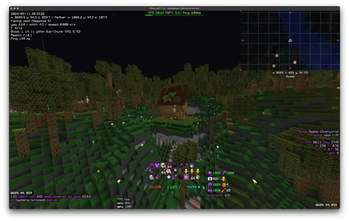
key feature is to provide tons of nerdy info and other modifications like:
f3-like onscreen lines
- real time and date
- your xyz coordinates and calculated nether variant (or vice versa)
- your facing
- yaw, pitch, and speed
- entity count
- coordinates of the block you're looking at
- blockstate
- in-chunk coordinates and sub-chunk info
- name of the region file
- your ping
- mc version, modloader name, mods count, and java version
- server brand
- fps, cpu, and gpu usage
- biome and world name
- in-game time and day counter
- local difficulty and clamped local difficulty
- entities rendered and particles
- block light level
- saturation %
- distance to the block you're looking at
inventory
- inventory, armor, held items, free slot counter, and arrow counter
- shulker box tooltip
- bees in a bee nest
- marker locations on maps and compasses
- suspicious stew effects
- and more
- shortcuts to move items easier in inventory screens
- keeps your inventory sorted
- replaces your semi-broken tool
- dumps everything into chests with one click
- moves items that are already in the chest
- locks item slots so sorting ignores them
- keeps locked slots empty
- lets you press R+C to set your shortcuts
- works purely client-side, so it runs everywhere
- lets you walk around while in inventories
- swap to other in-world screens (blocks, entities, etc.) via tabs
- edit any NBT tags in-game with a GUI
- makes tooltips look better
- armor model viewer
- shows item rarity
- displays tooltip paging
- displays food item effects
- enhances inventory management with mouse functions
- adds the 1.20.5 menu background blur to inventories like chests, player inventory, etc.
- alternative to just enough items/jei
- smooth scrolling for any screen using scrollbars
visuals and shaders
continuity
- makes connected textures work
polytone
- add more customizations via resourcepacks
fabrishot
- allows super high-res screenshots
optigui
- blazing fast custom gui textures
fabricSkyboxes
- custom skybox textures
iris shaders
- shader mod for better visuals
model gap fix
- fixes small gaps in block models
cubes without borders
- allows you to play in a borderless fullscreen window
animatica
- A mod implementing the OptiFine/MCPatcher animated texture format
no more purple
- allowing you to choose your enchantment glint color
performance
sodium
- boosts fps, overall performance
lithium
- speeds up game logic
more culling
- cuts down rendering of hidden stuff
immediatelyfast
- speed up immediate mode rendering
entity culling
- stops rendering entities you can’t see
enhanced block entities
- makes block entities load faster
ferritecore
- lowers memory usage
fastquit
- speeds up quitting time
modernfix
- improves performance, reduces memory usage, and fixes many bugs in modern minecraft versions
remove reloading screen
- gets rid of the reloading screen
hud and ui
capes
- lets you see optifine and other capes
reese’s sodium options
- gives more sodium settings
better mount hud
- improves the HUD while mounted
better statistics screen
- makes stats screen more useful
journeymap
- adds an in-game map and minimap
main menu credits
- custom credits screen
controls and keybinds
macro keybinds
- allows macros on keybinds
controlify
- controller support
invmovecompats
- adds compatibility for invmove
zoomify
- adds smooth zoom functionality
freelook
- lets you look around
utility
autototem
- automatically equips totems
client side data get
- gets client-side data easily
nbtedit reborn
- edit NBT data in-game
spark
- performance monitoring and profiling
indium
- adds compatibility for sodium and other mods
simple discord rpc
- displays in-game status on discord
resourcify
- custom resource pack management
client time
- lets you set a custom client-side time
say
- client side command to say commands in chat as raw text
automatic infinite elytra
- makes you elytra fly using pitch 40 technic
tweakeroo
- lets you tweak a bunch of small settings
client commands
- useful client-side commands
gamma utils
- fullbright feature, no darkness
replaced versions, wont receive any updates:
abandoned versions, likely wont receive updates:
- 0.x.x - 1.21 - old, most of the features
- 1.x.x - 1.21.1 - old, most of the features
- 25w14craftmine.x.x - 25w14craftmine - likely one time snapshot thing, many features tho
- 4.x.x - 1.21.5 - died in wip state
- 7.x.x - 1.21.8 - many features but not all
- 8.x.x - 1.21.10 - many features but not all
if you want me to remove your mod, report bugs, complain about low fps, or even help me with this, please contact me on discord
Verfügbare Versionen
asphyxia mods Server einrichten
Server bestellen
Wähle mindestens 6 GB RAM (8 GB empfohlen für asphyxia mods). Je nach Spieleranzahl: +1 GB pro 5 Spieler.
Modpack im Dashboard installieren
Öffne den Modpack-Browser im Dashboard, suche nach "asphyxia mods" und klicke "Installieren". Der fabric-Loader und Minecraft 26.3 werden automatisch konfiguriert.
Server starten & spielen
Starte den Server – alle Mods werden automatisch geladen. Teile die Server-IP mit Freunden und spielt zusammen!
Häufige Fragen
asphyxia mods Server crasht oder startet nicht – was tun?
Häufigste Ursachen: zu wenig RAM oder falscher fabric-Loader. Prüfe latest.log auf "OutOfMemoryError" → erhöhe RAM auf mindestens 8 GB. Bei "Mixin" oder "ClassNotFoundException": Modpack-Version und Loader stimmen nicht überein. Bei Mado Hosting werden Loader und Minecraft-Version beim Modpack-Install automatisch konfiguriert – das verhindert die meisten Startprobleme.
Wie viel RAM braucht ein asphyxia mods Server wirklich?
Minimum 6 GB, empfohlen 8 GB für stabile Performance. +1 GB pro 5 Spieler. Wichtig: Minecraft-Modpacks brauchen mehr RAM als Vanilla – plane pro zusätzlichem Spieler extra ein. Bei Mado Hosting kannst du den RAM jederzeit live hochskalieren, ohne Datenverlust (ab €7.800000000000001/Monat).
Kann ich eigene Mods zu asphyxia mods hinzufügen, ohne Konflikte?
Ja, aber achte auf die Kompatibilität: Nutze nur Mods für den gleichen Loader (fabric) und die gleiche Minecraft-Version (26.3). Häufige Probleme: ID-Konflikte bei Rezept-Mods und inkompatible Coremod-Versionen. Im Mado Dashboard zeigt der Mod-Browser nur kompatible Mods an und warnt bei bekannten Konflikten.
asphyxia mods Server laggt – Performance-Tipps
1) RAM auf 8 GB+ erhöhen. 2) Server-View-Distance auf 8 reduzieren (server.properties). 3) Pre-Generiere Chunks mit dem "Chunky" Plugin. 4) Prüfe mit /spark profiler welche Mods die meiste Tick-Time verbrauchen. Bei Mado Hosting laufen alle Server auf NVMe-SSDs mit dedizierten CPU-Kernen – das eliminiert Hardware als Engpass.
Ähnliche Modpacks


![Cobblemon Official Modpack [Fabric]](https://cdn.modrinth.com/data/5FFgwNNP/e7f9ee2e9d361623847853fe2ddce42f519ee64f.png)
![COBBLEVERSE - Pokemon Adventure [Cobblemon]](https://cdn.modrinth.com/data/Jkb29YJU/581ecf54530972afb18a04660afd820f2f24f6c7.png)

![Better MC [FABRIC] - BMC2](https://cdn.modrinth.com/data/shFhR8Vx/a19c2bcb51d38f32f138d3607e91cb2b7b8e387f_96.webp)
asphyxia mods Server mieten
Starte deinen eigenen Server mit automatischer Modpack-Installation.
Details
- Lizenz
- BSD 3-Clause "New" or "Revised" License
- Server-seitig
- Nicht unterstützt
- Client-seitig
- Erforderlich
Unterstützte Versionen
Starte deinen asphyxia mods Server jetzt
Ab €7.80/Monat; für die beste Performance werden 8 GB RAM empfohlen.
Server konfigurieren →