
Bedwars Optimized
A lightweight modpack for maximum FPS and smooth gameplay in Bedwars and PvP without any bloat
Screenshots
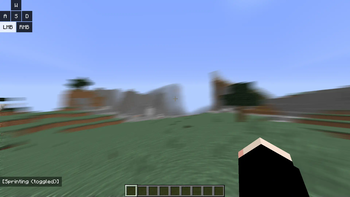
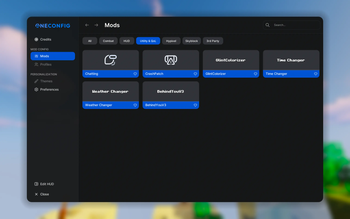
Über dieses Modpack
What does this modpack do?
Bedwars Optimized is a lightweight, high-performance Forge 1.8.9 client modpack built for maximum FPS, smooth combat, and a clean PvP experience. Designed specifically for Bedwars, duels, and competitive gameplay on servers like Hypixel without adding any bloat.
📝 Notes:
This modpack requires OptiFine to function properly and to achieve maximum FPS.
Due to legal reasons, OptiFine cannot be bundled directly with the modpack. You will need to download and install it manually.Made for Forge 1.8.9
Multiplayer-safe (Hypixel friendly)
No gameplay-changing mods or cheats
Light on RAM and perfect for low-end systems
📦 Full Modlist
PolySprint – by Polyfrost
Toggle sprint and sneak mod for Minecraft 1.8.9 and 1.12.2No Hurt Cam – by ilofizisinsane
Removes that pesky hurt cameraAutoGG Reimagined – by QWERTZexe
Automatically says “gg” at the end of games in hypixel.PolyCrosshair – by Polyfrost
An extremely customizable crosshair modOverflow Particles – by Polyfrost
Advanced particles mod for 1.8.9Canelex Keystrokes Revamp – by Polyfrost
Displays WASD/mouse input on screenEvergreenHUD – by Polyfrost
Improves your heads up display.Velox Caelo – by nea89o
OptiFine CIT performance optimizer for 1.8.9PolyBlur – by Polyfrost
Apply motion blur in-game in way.Wavey Capes – by tr7zw
Makes capes wave and animate realistically.Raw Input – by Chromatic
Fixes mouse jittering and increases smoothnessOverflow Animations – by PolyFrost
1.7 and modern animations in 1.8PolyPatcher – by Polyfrost
A Forge mod full of Vanilla bug fixes, Quality of Life improvements, and performance enhancements.Behind You v3 - by Polyfrost
Allows looking behind you without pressing F5 twice.
📜 License:
This modpack is licensed under CC BY-NC 4.0.
✅ You are free to play, edit, and share the pack with credit.
❌ Do not reupload or sell this modpack.
Verfügbare Versionen
Bedwars Optimized Server einrichten
Server bestellen
Wähle mindestens 4 GB RAM (6 GB empfohlen für Bedwars Optimized). Je nach Spieleranzahl: +1 GB pro 5 Spieler.
Modpack im Dashboard installieren
Öffne den Modpack-Browser im Dashboard, suche nach "Bedwars Optimized" und klicke "Installieren". Der forge-Loader und Minecraft 1.8.9 werden automatisch konfiguriert.
Server starten & spielen
Starte den Server – alle Mods werden automatisch geladen. Teile die Server-IP mit Freunden und spielt zusammen!
Häufige Fragen
Bedwars Optimized Server crasht oder startet nicht – was tun?
Häufigste Ursachen: zu wenig RAM oder falscher forge-Loader. Prüfe latest.log auf "OutOfMemoryError" → erhöhe RAM auf mindestens 6 GB. Bei "Mixin" oder "ClassNotFoundException": Modpack-Version und Loader stimmen nicht überein. Bei Mado Hosting werden Loader und Minecraft-Version beim Modpack-Install automatisch konfiguriert – das verhindert die meisten Startprobleme.
Wie viel RAM braucht ein Bedwars Optimized Server wirklich?
Minimum 4 GB, empfohlen 6 GB für stabile Performance. +1 GB pro 5 Spieler. Wichtig: Minecraft-Modpacks brauchen mehr RAM als Vanilla – plane pro zusätzlichem Spieler extra ein. Bei Mado Hosting kannst du den RAM jederzeit live hochskalieren, ohne Datenverlust (ab €5.2/Monat).
Kann ich eigene Mods zu Bedwars Optimized hinzufügen, ohne Konflikte?
Ja, aber achte auf die Kompatibilität: Nutze nur Mods für den gleichen Loader (forge) und die gleiche Minecraft-Version (1.8.9). Häufige Probleme: ID-Konflikte bei Rezept-Mods und inkompatible Coremod-Versionen. Im Mado Dashboard zeigt der Mod-Browser nur kompatible Mods an und warnt bei bekannten Konflikten.
Bedwars Optimized Server laggt – Performance-Tipps
1) RAM auf 6 GB+ erhöhen. 2) Server-View-Distance auf 8 reduzieren (server.properties). 3) Pre-Generiere Chunks mit dem "Chunky" Plugin. 4) Prüfe mit /spark profiler welche Mods die meiste Tick-Time verbrauchen. Bei Mado Hosting laufen alle Server auf NVMe-SSDs mit dedizierten CPU-Kernen – das eliminiert Hardware als Engpass.
Ähnliche Modpacks

![Cobblemon Official Modpack [Fabric]](https://cdn.modrinth.com/data/5FFgwNNP/e7f9ee2e9d361623847853fe2ddce42f519ee64f.png)
![COBBLEVERSE - Pokemon Adventure [Cobblemon]](https://cdn.modrinth.com/data/Jkb29YJU/581ecf54530972afb18a04660afd820f2f24f6c7.png)
![Better MC [FABRIC] - BMC2](https://cdn.modrinth.com/data/shFhR8Vx/a19c2bcb51d38f32f138d3607e91cb2b7b8e387f_96.webp)


Bedwars Optimized Server mieten
Starte deinen eigenen Server mit automatischer Modpack-Installation.
Details
- Lizenz
- Creative Commons Attribution Non Commercial 4.0 International
- Server-seitig
- Nicht unterstützt
- Client-seitig
- Erforderlich
Unterstützte Versionen
Starte deinen Bedwars Optimized Server jetzt
Ab €5.20/Monat; für die beste Performance werden 6 GB RAM empfohlen.
Server konfigurieren →